
Lieferung heute & morgen

Qualitätsgarantie

Willkommens-Angebote freischalten: KOSTENLOSE Lieferung | Bis zu 80 % RABATT | Kostenlose 30-Tage-JoyPlus-Testphase
App herunterladen
The search for a new mechanical gaming keyboard can quickly become overwhelming. The market is flooded with technical jargon, countless models, and marketing promises that often obscure more than they clarify. Many users invest in a device only to find out after a few months that it doesn't meet their needs or has quality defects.
This guide will help you identify the crucial features and avoid common purchasing pitfalls. We focus on the objective criteria essential for a durable and high-performance product, ensuring your investment pays off in the long run.
To make an informed decision, you should carefully examine three technical aspects. These fundamentally determine the typing experience, ergonomics, and longevity of your new keyboard.
Mechanical switches define the typing feel and response speed. Choosing the right type is a matter of personal preference and primary use case.
The size of the keyboard affects not only the desk space it requires but also the available keys.
Modern keyboards offer more than just a USB port. The right additional features can significantly increase longevity and flexibility.
Here are some models tailored to specific user profiles that meet the quality criteria mentioned above.

Why This Fits Their Persona: This model is built for speed. The low-profile speed switches have a shortened actuation distance for extremely fast reactions. The compact 65% layout creates maximum space for sweeping mouse movements, which is crucial in FPS and MOBA games.
Performance is the priority here. Instead of just focusing on RGB effects, this keyboard offers a low-latency 2.4 GHz connection and switches optimised for speed—both are critical performance features for competitive gaming.
The combination of CHERRY MX Low Profile Speed Switches and flexible tri-mode connectivity makes it a high-performance and versatile tool for demanding players.
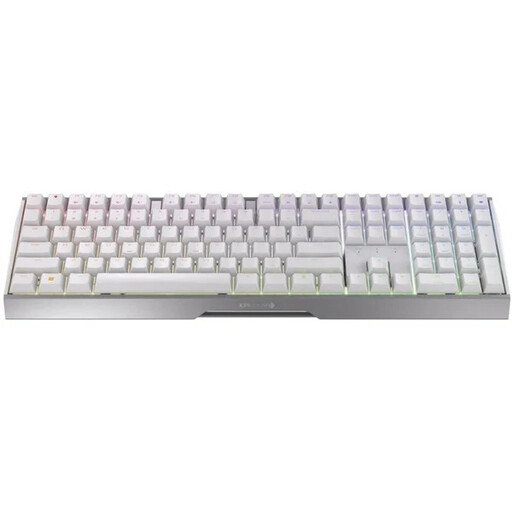
Why This Fits Their Persona: As an all-rounder, this keyboard combines gaming performance with office suitability. The full German QWERTZ layout is ideal for productive work, while the gaming mode with sub-1ms latency and the proven linear switches (MX2A Red) are ready for demanding gaming sessions.
This model bypasses the layout trap by offering a full German layout. The triple-mode connectivity is a practical feature for multi-device setups, not just a marketing gimmick.
The robust aluminium frame ensures high durability and stability, while the flexible connectivity allows for a seamless switch between a gaming PC, work laptop, and other devices.

Why This Fits Their Persona: This model is ideal for users who want to customise their keyboard down to the last detail. The hot-swap capability allows for easy replacement of switches to change the typing feel. Additionally, details like pre-lubed stabilisers and dual-layer sound dampening ensure a premium user experience.
This model offers true, unrestricted hot-swap functionality for both 3-pin and 5-pin switches. It avoids the trap of proprietary systems that severely limit the choice of compatible switches and only feign customisability.
Full hot-swap capability combined with a high-quality construction designed for an optimised sound and feel provides maximum freedom and a first-class foundation for modifications.
We have compiled a complete, real-time list of products that fully satisfy these strict selection criteria and UK safety regulations.
1. What is the difference between linear, tactile, and clicky switches? Linear switches provide a smooth keystroke with no tactile feedback, ideal for fast-paced gaming. Tactile switches have a noticeable "bump" on actuation that provides feedback without being loud. Clicky switches combine this bump with an audible click for maximum feedback.
2. Is a wireless mechanical keyboard worthwhile for gaming? Yes, modern wireless keyboards with 2.4 GHz radio technology offer latency of under one millisecond, comparable to wired models. They are perfectly suitable for competitive gaming. Bluetooth connections typically have higher latency and are better suited for everyday tasks or slower-paced games.
3. How do I properly maintain a mechanical keyboard? Disconnect the keyboard from the computer. Use a keycap puller to gently remove the keycaps. Clean the keycaps with lukewarm soapy water. The case and the spaces between switches can be cleaned of dust and debris with a soft brush, a microfibre cloth, or compressed air. Ensure that no liquid gets inside the keyboard.