
Lieferung heute & morgen

Qualitätsgarantie

Willkommens-Angebote freischalten: KOSTENLOSE Lieferung | Bis zu 80 % RABATT | Kostenlose 30-Tage-JoyPlus-Testphase
App herunterladen
The search for the right mechanical gaming keyboard can quickly become overwhelming. The market is flooded with technical jargon, marketing promises, and a huge selection of models. Many users invest in expensive devices only to find they don't meet their needs or lack essential features. As your Joybuy Product Recommendation Officer, I'll help you understand the key features and avoid common purchasing pitfalls.
This guide focuses on the objective criteria that separate a good keyboard from an unsuitable one. We'll break down the technical details that truly make a difference and show you what to look for to make an informed decision.
Before we dive into the technical details, it's important to be aware of two common marketing traps that often lead to disappointment.
To make an informed choice, you should focus on three core areas. These define the performance, feel, and longevity of your future keyboard.
The switches determine the typing feel and responsiveness. Alongside the classic types (linear, tactile, clicky), new technologies are emerging that are particularly relevant for gamers.
Latency is a critical factor in competitive gaming. At the same time, the size of the keyboard affects the ergonomics of your entire setup.
Features that enhance comfort and longevity are a worthwhile investment.
Here are some models tailored to specific user profiles that meet the criteria mentioned above.
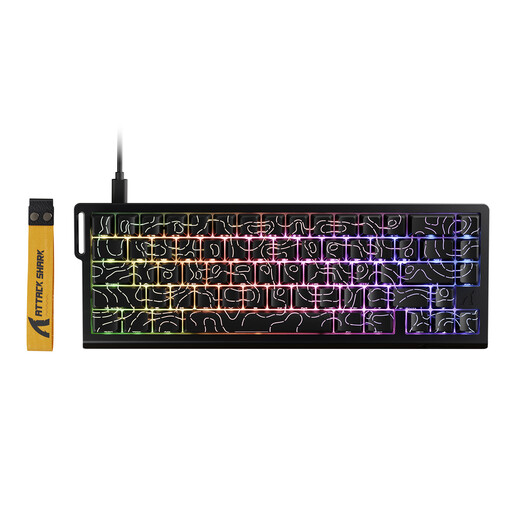
Why This Fits Their Persona: This model is designed for gamers where every millisecond counts. The combination of Rapid Trigger and an 8000Hz polling rate offers extremely low latency, which can provide a tangible advantage in fast-paced shooters.
It delivers real, measurable gaming performance through Hall Effect switches and a high polling rate, rather than just relying on RGB lighting.
Adjustable actuation point (0.1–3.4 mm) for individual customisation; hot-swappable for magnetic switches.
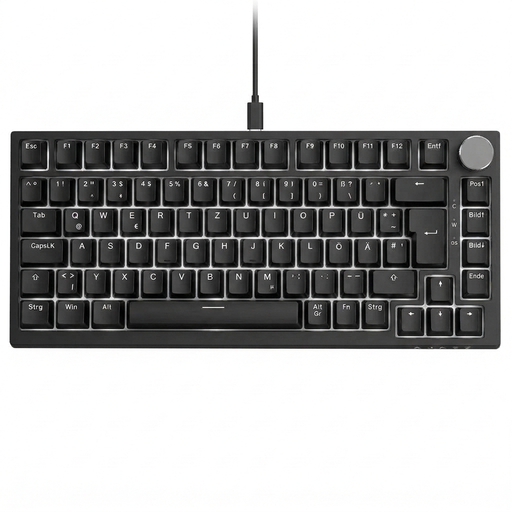
Why This Fits Their Persona: Ideal for users who want a compact gaming keyboard but don't want to sacrifice a standard QWERTY layout and practical features. The volume knob and 75% format make it a versatile tool for both gaming and productivity.
It focuses on practical usability with its QWERTY layout and control knob, rather than just an eye-catching design.
Gasket-mount structure for a softer typing feel; hot-swappable for 3-pin switches; QWERTY layout.

Why This Fits Their Persona: This TKL keyboard is designed for users who love to customise their gear. The hot-swap sockets are compatible with both 3-pin and 5-pin switches, offering maximum freedom in switch selection. The standard layout is an added bonus.
The focus is on modifiability and longevity through hot-swap sockets, creating long-term value instead of being a closed system.
Gasket-mount structure for a dampened typing sound; hot-swap support for 3-pin and 5-pin switches; standard QWERTY layout.
We have compiled a complete, up-to-date list of products that fully meet these strict selection criteria.
A hot-swap keyboard has sockets on the PCB that allow you to easily pull out the mechanical switches and replace them with new ones without any soldering. This offers two main advantages: you can change the typing feel of your keyboard by installing different switch types, and you can inexpensively replace individual faulty switches yourself, extending the life of the device.
Not necessarily. An 8000Hz polling rate reduces input latency to a minimum and can make a difference for professional or highly competitive players in fast-paced FPS or rhythm games. However, for most casual gamers and for everyday tasks, a standard 1000Hz polling rate is perfectly sufficient. The benefit of an 8000Hz rate largely depends on individual playstyle and perceptual ability.
For regular cleaning, disconnect the keyboard from the computer. Use a keycap puller to remove the keycaps. The keycaps can be cleaned in lukewarm soapy water (make sure they are completely dry before reattaching them). You can clear dust and crumbs from the case and the plate between the switches with compressed air and then wipe it down with a slightly damp microfibre cloth or cotton swabs. Avoid getting any liquid directly into the switches.