
Lieferung heute & morgen

Qualitätsgarantie

Willkommens-Angebote freischalten: KOSTENLOSE Lieferung | Bis zu 80 % RABATT | Kostenlose 30-Tage-JoyPlus-Testphase
App herunterladen
Finding the right mechanical keyboard can be a daunting task. Gamers need fast response times and precision, while heavy typists value a comfortable typing feel and durability. A mechanical gaming keyboard can meet both demands, but the sheer number of options, switch types, and layouts often makes the decision overwhelming.
This guide is designed to bring clarity. We'll introduce the key features you should consider when making your choice and present a selection of models that stand out with specific features for different use cases. Our goal is to provide you with objective information so you can make an informed decision.
To make the right choice, it's helpful to understand the fundamental differences between models. Three main factors significantly determine the functionality and user experience.
Mechanical switches are responsible for the tactile and acoustic feedback. They come in different types, each suited for different purposes.
The size of the keyboard not only affects the amount of desk space it occupies but also the number of available keys.
The connection type is another important aspect that depends on your personal preferences and where you'll use it.
Based on the criteria above, we have compiled a selection of keyboards that cater to different needs.
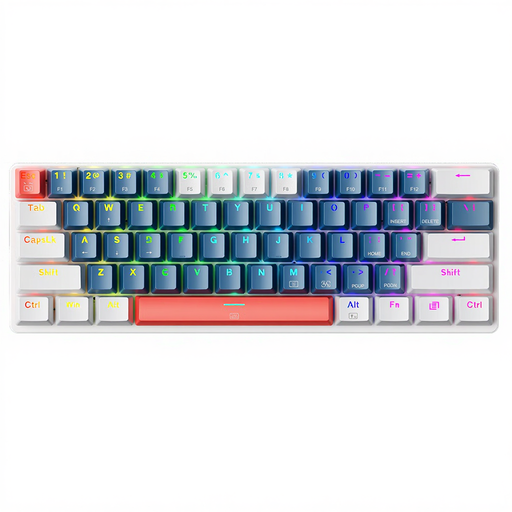
Why it stands out: The Machenike K500-B61 is a compact gaming keyboard with a 60% layout, designed from the ground up for space-saving and performance. Its wired keyboard connection via USB-C ensures stable, low-latency input, while the Blue switches deliver precise, clicky feedback.
Pros:
Who it's for: Gamers and users with limited desk space who are looking for a responsive, wired keyboard with a distinct typing feel and customisable lighting.
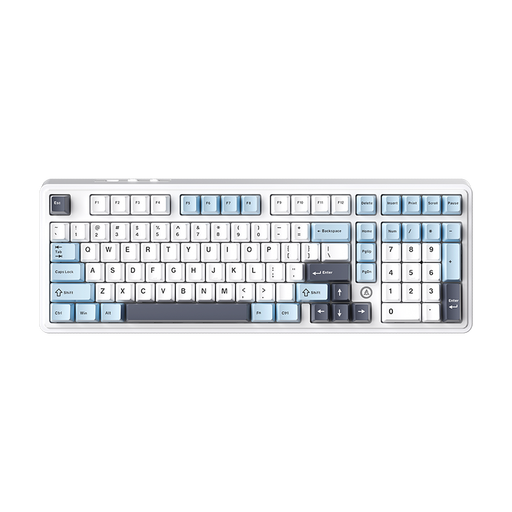
Why it stands out: The AJAZZ AK980 V2 is a versatile wireless keyboard that shines with its triple-mode connectivity (Bluetooth, 2.4 GHz, wired) and hot-swap keyboard functionality. The 98% layout is an excellent compromise, integrating a number pad into a compact frame.
Pros:
Who it's for: Keyboard enthusiasts and power users who value customisation, flexible connectivity, and a premium typing experience for both gaming and productivity.
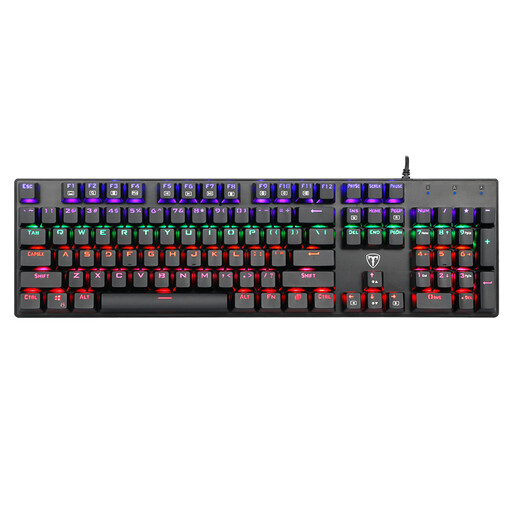
Why it stands out: This model is a straightforward wired keyboard in a 100% full-size layout. With 104 keys, including a number pad, and responsive Blue switches, it's a reliable tool for gaming and office work. The splash-proof construction and durable ABS keycaps round out the package.
Pros:
Who it's for: Users looking for a full-featured, reliable, and budget-friendly mechanical keyboard for a mix of gaming, typing, and everyday tasks.
The models presented cover a broad spectrum. However, if you are specifically looking for keyboards with particular lighting options or simply want to compare more alternatives, you can find a larger selection in our category.
? Discover more keyboards with blue backlighting and other designs
Compared to common rubber dome keyboards, mechanical keyboards offer several advantages. Each key has its own mechanical switch, resulting in higher precision, better tactile feedback, and a significantly longer lifespan. The lifespan is often measured in millions of keystrokes (e.g., 50 million), making them a durable investment.
There is no one-size-fits-all answer, as the choice depends on personal preference. Linear switches (e.g., Red) are popular with many FPS gamers due to their fast and resistance-free actuation. Tactile switches (e.g., Brown) provide a noticeable actuation point that can be helpful in strategy games or MOBAs. Clicky switches (e.g., Blue) give clear acoustic and tactile feedback, which some gamers also appreciate, although they are louder.