
Lieferung heute & morgen

Qualitätsgarantie

Willkommens-Angebote freischalten: KOSTENLOSE Lieferung | Bis zu 80 % RABATT | Kostenlose 30-Tage-JoyPlus-Testphase
App herunterladen
The search for the right mechanical gaming keyboard can quickly become overwhelming. The market is flooded with technical jargon, marketing promises, and a bewildering array of models. Many gamers invest in expensive keyboards only to find after a few months that they don't meet their needs or exhibit quality defects. As your Joybuy Product Recommendation Officer, I'll help you identify the crucial features and avoid common purchasing pitfalls.
Before we dive into the important technical details, let's clarify the most common misconceptions that often lead to a bad purchase.
To make an informed decision, focus on three fundamental aspects: the switches, the form factor, and the connectivity options.
The switch under each key determines the typing feel and response speed. The most common types are:
A more recent development is Rapid Trigger Keyboard technology, often based on Hall Effect magnetic switches. Here, the actuation and reset point of the key can be set dynamically and with extreme precision (often to within 0.1 mm). This enables a near-instantaneous response in-game, as the key doesn't need to return fully to its starting position to be triggered again—a clear advantage in competitive games.
The size of the keyboard has a direct impact on ergonomics and the available space for your mouse.
Regardless of the form factor, choosing the correct regional QWERTY layout (e.g., US or UK) is essential for users in English-speaking countries to ensure seamless operation.
Here are some recommendations tailored to specific user profiles that avoid the pitfalls mentioned above.
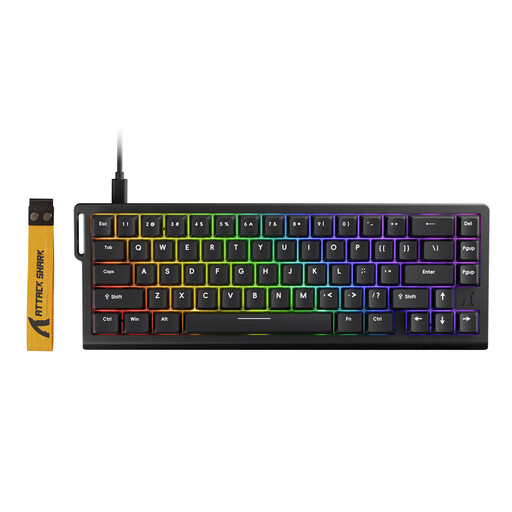
Why This Fits Their Persona: Engineered for maximum speed. The combination of Rapid Trigger technology and an 8000 Hz polling rate aims to reduce input lag to an absolute minimum, which can be decisive in fast-paced games.
Instead of relying on pure marketing figures, this keyboard delivers a technologically-backed performance boost with its Rapid Trigger function, which can be the difference between victory and defeat.
Adjustable actuation point (0.1-3.4 mm) and an 8000 Hz polling rate for extremely responsive control.
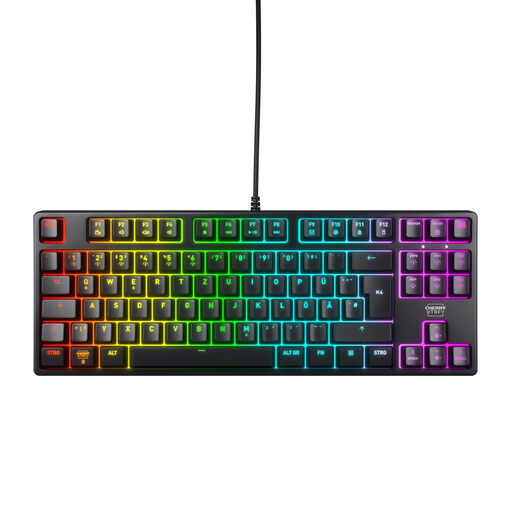
Why This Fits Their Persona: A reliable workhorse for gamers who also type a lot. The TKL format saves space without sacrificing essential keys, and the German QWERTZ layout ensures intuitive daily use (Note: ensure you select your correct regional layout).
This keyboard bypasses the "switch lottery" by using proven CHERRY MX2A RED switches. According to the manufacturer, these are rated for over 100 million actuations and offer a consistently precise, linear feel.
Robust construction with a metal plate, reliable CHERRY MX2A switches, and a space-saving TKL format with a German QWERTZ layout.
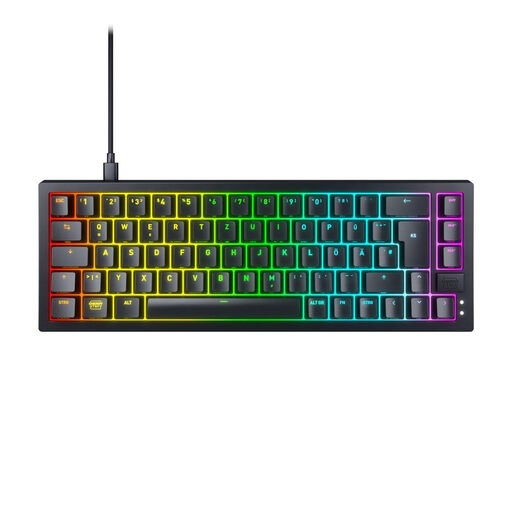
Why This Fits Their Persona: For users who want to customise their keyboard down to the last detail. The ultra-compact 65% format with a QWERTZ layout is the perfect foundation for a personalised setup that offers maximum control over the typing experience.
This hot-swappable keyboard makes you independent of the original switch choice. You are not tied to the factory-installed switches and can install linear, tactile, or clicky switches at any time without having to buy a new keyboard.
Hot-swap sockets for easy, solder-free switch replacement. Combined with high-quality sound dampening and pre-lubed stabilizers for a solid sound profile.
We have compiled a complete, up-to-date list of products that fully meet these strict selection criteria and German safety regulations.
That depends on your personal preference.
Yes, modern wireless keyboards that use a 2.4 GHz wireless connection offer latencies that are virtually indistinguishable from their wired counterparts. They are absolutely suitable for competitive gaming. Bluetooth connections can have higher latency and are better recommended for casual gaming or office work.
QWERTY is the standard keyboard layout in the US and UK, named for the first six keys on the top letter row. Other regions use different layouts, such as QWERTZ in Germany (where the Z and Y keys are swapped) or AZERTY in France. These layouts also feature different positions for special characters and dedicated keys for regional characters (e.g., ?, ?, ? on a QWERTZ board). Buying a keyboard with the correct regional QWERTY layout for your language and operating system is crucial for a smooth typing experience.