
Lieferung heute & morgen

Qualitätsgarantie

Willkommens-Angebote freischalten: KOSTENLOSE Lieferung | Bis zu 80 % RABATT | Kostenlose 30-Tage-JoyPlus-Testphase
App herunterladen
Finding the right mechanical gaming keyboard can quickly become overwhelming. The market is flooded with technical jargon, a vast array of designs, and features that don't always live up to their promises. As your Joybuy Product Recommendation Officer, I'll help you identify the crucial features and avoid common purchasing pitfalls so you can make an informed decision.
Before we dive into the important specifications, let's look at the three most common issues that lead to post-purchase disappointment.
To avoid these pitfalls, focus on the following three core aspects. These are the primary determinants of your new keyboard's functionality and longevity.
The layout is the foundation of any keyboard. Explicitly look for the "QWERTZ" or "ISO-DE" specification to ensure the keyboard is designed for the German market. Beyond that, the form factor is crucial for your use case:
The switches define the typing feel and acoustics. The most common types are:
A hot-swap keyboard gives you the freedom to change these switches later and tailor the typing feel to your preferences. A customizable RGB keyboard also allows for personalized lighting effects.
The connection to your PC/Mac is a critical factor.
Extra features like a keyboard with a volume knob significantly enhance everyday convenience, allowing for quick media adjustments without having to fiddle with software.
Here are a few models that represent a smart choice for different user profiles, based on the criteria mentioned above.
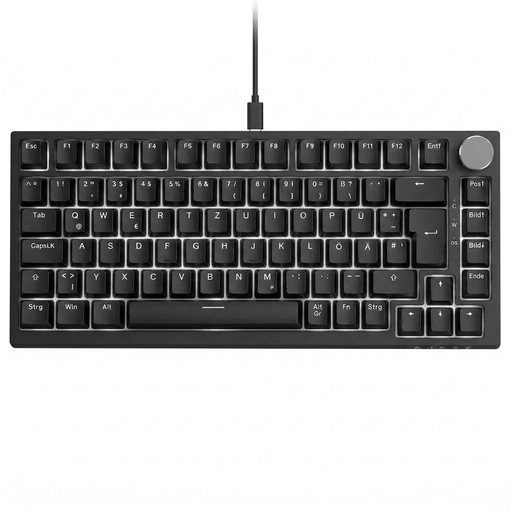
Why This Fits Their Persona: This model offers a budget-friendly entry point into the world of mechanical keyboards without compromising on the essential requirements for German users. The compact 75% layout is space-saving yet functional.
With its explicit German QWERTZ layout, it sidesteps the most common source of frustration. The stable wired connection eliminates any concerns about latency or battery life.
Features a volume knob and hot-swap capability, both of which are features not typically found in this price range and allow for future customization.
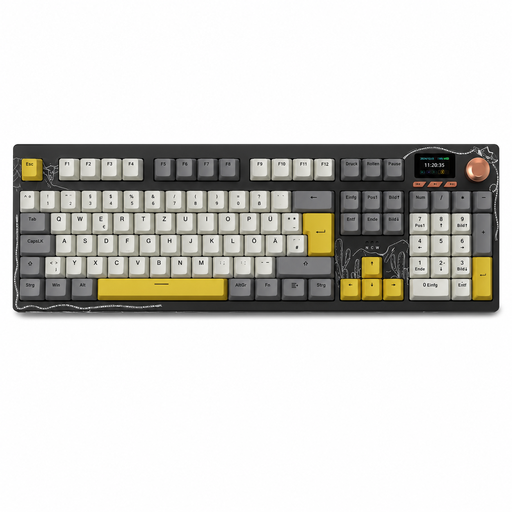
Why This Fits Their Persona: For users who want a single keyboard for both gaming and productivity. The full-size layout with a number pad and flexible connection options make it a true jack-of-all-trades.
The tri-mode connectivity (Bluetooth, 2.4GHz, USB-C) provides the right option for every use case—low-latency for gaming, flexible for the workplace. The German QWERTZ layout is standard here.
Combines a full-size layout with modern features like a TFT color screen, a control knob, and hot-swap capability, ensuring high functionality and customizability.
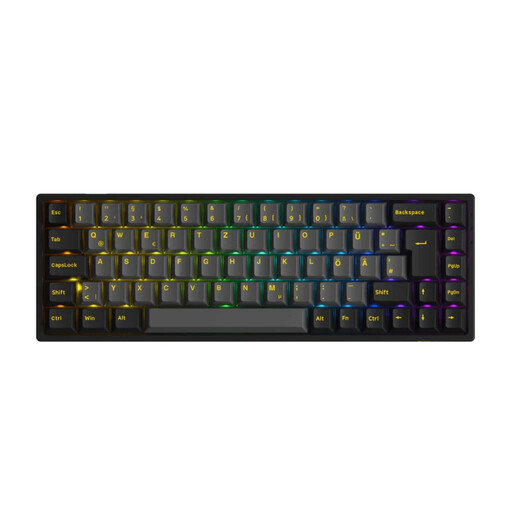
Why This Fits Their Persona: Perfect for users who value a clean, wireless desk setup and maximum customizability. The 65% layout is extremely space-saving but retains the crucial arrow keys for navigation.
Offers a correct ISO-DE (QWERTZ) layout in a rare compact form factor. The hot-swap capability for both 3-pin and 5-pin switches prevents you from being locked into a single switch type.
The factory-lubed Akko V3 Cream Yellow Pro switches and high-quality PBT keycaps provide a premium typing experience and excellent durability right out of the box.
We have compiled a complete, up-to-date list of products that fully meet these strict selection criteria and German safety regulations.
Linear switches have a smooth, continuous keystroke with no tactile feedback. Tactile switches have a small "bump" in the key travel that marks the actuation point but are relatively quiet. Clicky switches also have this bump but add an audible click sound. The choice depends on personal preference for acoustics and typing feel.
Yes, a hot-swap keyboard can be very worthwhile for beginners. It allows you to change the typing feel by swapping out the switches without having to buy a completely new keyboard. This lets you experiment with different switch types to find out what you like best. It also makes repairs easier if a single switch fails.
For regular maintenance, simply disconnect the keyboard and remove dust and crumbs with compressed air or a soft brush. On most models, the keycaps can be removed with a keycap puller and cleaned separately with lukewarm water and mild soap. Make sure the caps are completely dry before reattaching them. In general, liquids should be kept away from the keyboard.