
Lieferung heute & morgen

Qualitätsgarantie

Willkommens-Angebote freischalten: KOSTENLOSE Lieferung | Bis zu 80 % RABATT | Kostenlose 30-Tage-JoyPlus-Testphase
App herunterladen
The search for a new mechanical gaming keyboard can quickly become overwhelming. The market is flooded with marketing jargon and features whose practical benefits are often unclear. Many users invest in a model that looks impressive on paper, only to be disappointed by loud keystrokes, an unsuitable layout, or poor responsiveness in daily use. As your Joybuy Product Recommendation Officer, I'm here to help you avoid these pitfalls and make an informed decision.
Two common mistakes lead to buyer's remorse:
To find a keyboard that truly fits your needs, you should examine three core aspects. These determine the typing feel, ergonomics, and functionality for both daily use and gaming.
Mechanical switches are the heart of every keyboard. They define how each keystroke feels and sounds. The three main types are:
For users in English-speaking regions, a QWERTY gaming keyboard is essential for easy access to standard characters. When making your selection, explicitly look for the layout that matches your region. Furthermore, the form factor affects the amount of space on your desk:
Modern keyboards offer additional flexibility that enhances their longevity and versatility:
Instead of making a one-size-fits-all recommendation, we have selected models tailored to specific user profiles.
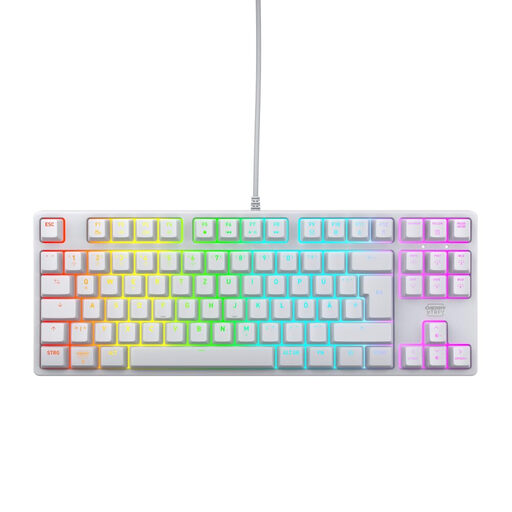
Why This Fits Their Persona: Focuses on the essentials—fast, linear switches, a compact TKL format for more mouse room, and a robust build for competitive reliability. Ideal for gamers who value proven performance.
This model avoids the "gaming" trap by focusing on core features like a 1000 Hz polling rate, full N-key rollover, and a low-latency wired connection, rather than superfluous gimmicks.
Durable CHERRY MX2A RED linear switches (rated for over 100M actuations) and a German QWERTZ layout in a space-saving TKL format.

Why This Fits Their Persona: Offers maximum flexibility with hot-swap sockets and a gasket-mount structure for a customised typing feel. Ideal for users who want to tweak and optimise their keyboard without buying a new one.
Solves the "switch dilemma" by allowing the user to easily swap out switches. This lets you alternate between linear, tactile, or other switch types depending on your preference and use case.
Hot-swap keyboard for 3-pin switches, gasket-mount structure for a cushioned typing feel, and a convenient volume knob. The German QWERTZ layout is also included.
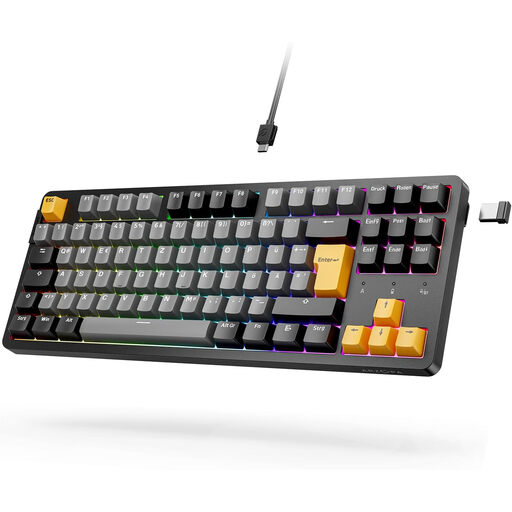
Why This Fits Their Persona: Combines gaming features with everyday flexibility. The tri-mode connectivity (wireless via Bluetooth/2.4G or wired) and compact TKL format adapt to any situation, from the gaming setup to the home office.
Offers a reliable wireless option without locking the user into one connection type. The hot-swap feature future-proofs the investment in case switch preferences change.
Tri-mode connectivity (Bluetooth, 2.4G, USB-C), German QWERTZ layout, and hot-swap capability for 3- and 5-pin switches. A versatile solution for various devices and use cases.
We've compiled a complete, up-to-date list of products that fully meet these strict selection criteria and local regulations.
The main difference lies in the technology beneath the keys. Mechanical keyboards use an individual physical switch for each key. This results in a more precise, consistent typing feel and significantly higher durability. Membrane keyboards use a single rubber sheet under the keys, which is cheaper to manufacture but often leads to a "mushy" feel and wears out faster.
N-Key Rollover means the keyboard can correctly register an unlimited number of simultaneous keystrokes. For most everyday applications, this isn't crucial. However, in fast-paced games (e.g., MOBAs, FPS, or rhythm games) where complex key combinations must be executed in milliseconds, NKRO prevents inputs from being lost ("ghosting"). A keyboard with at least 6-Key Rollover is recommended for gaming, while full NKRO offers maximum assurance.
For a basic cleaning, disconnect the keyboard from your computer. Turn it upside down and gently shake out any loose debris. You can use a can of compressed air to remove dust from between the keys. The key surfaces can be wiped with a slightly damp microfiber cloth. On many mechanical keyboards, the keycaps can be removed with a special tool (keycap puller) to allow for a more thorough cleaning of the plate underneath. Never use harsh cleaning agents.