
Lieferung heute & morgen

Qualitätsgarantie

Willkommens-Angebote freischalten: KOSTENLOSE Lieferung | Bis zu 80 % RABATT | Kostenlose 30-Tage-JoyPlus-Testphase
App herunterladen
The search for the right mechanical gaming keyboard can quickly become overwhelming. The market is flooded with technical jargon, marketing promises, and an enormous selection of products. As a Joybuy Product Recommendation Officer, I see daily which pitfalls lead users to make a purchase decision they later regret. Before you invest, you should know the most common sources of error to find a keyboard that truly fits your needs.
The 3 Most Common Keyboard-Buying Traps:
To make an informed decision, you should focus on a few, but crucial, technical features. These define the typing feel, response time, and longevity of your future PC gaming keyboard.
Mechanical switches determine how every keystroke feels and sounds. The three basic types are:
A more recent development is the Rapid Trigger keyboard. These models, often equipped with magnetic switches, allow for dynamic adjustment of the actuation and reset points. This means a key is immediately re-activated as soon as it moves upward even slightly. This can provide an advantage in fast-paced games like Valorant or CS2 for quick directional changes (counter-strafing).
The size of the keyboard has a direct impact on ergonomics and the space available for your mouse.
A hot-swap keyboard allows you to change the mechanical switches without soldering. This offers enormous flexibility: you can try out different switch types, easily replace defective switches, or customise your keyboard individually. For enthusiasts, this is a must-have, but it can also increase the long-term value of the keyboard for beginners.
Practical additional features like a keyboard with a volume control in the form of a knob or slider significantly enhance everyday convenience, as the volume can be adjusted without leaving the game or application.
Here are some models that represent a considered choice for specific user groups based on objective features.

Why This Fits Their Persona: This model is aimed at players for whom every millisecond counts. The combination of magnetic switches, Rapid Trigger, and an 8000 Hz polling rate is designed for maximum response speed in competitive FPS games.
It bypasses the "gaming" sticker trap by offering concrete, performance-oriented technologies like Rapid Trigger and an 8000 Hz polling rate, rather than relying solely on aesthetics. However, note the US (QWERTY) layout.
The actuation point is adjustable via software from 0.2 mm to 4.0 mm. The compact 65% format creates plenty of space for the mouse.
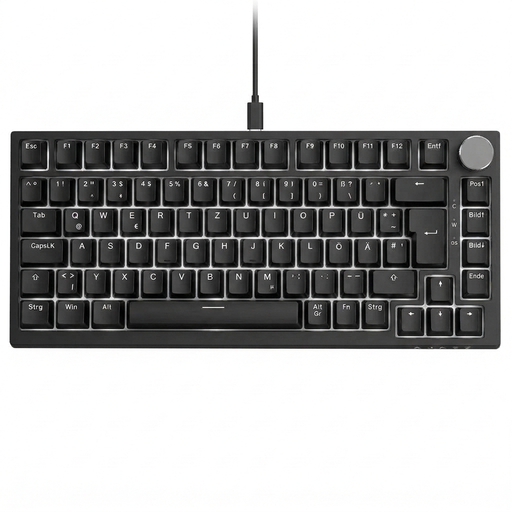
Why This Fits Their Persona: For users looking for a single keyboard for gaming, work, and daily use, this model is a balanced choice. The 75% format is compact but retains essential keys, and the volume knob is very practical in everyday use.
It consistently solves the layout problem with a German QWERTZ layout. Furthermore, it offers tangible features like the volume knob and hot-swap capability instead of pure aesthetics.
The combination of a QWERTZ layout, hot-swap sockets, and a dedicated volume knob in a compact form factor is a strong overall package in this price range.

Why This Fits Their Persona: Ideal for users who are new to the world of mechanical keyboards and want to keep the option for future customisation open. The TKL format is a proven standard for gaming and productive work.
This keyboard combines a German QWERTZ layout with a hot-swap feature. This avoids the trap of buying a keyboard with permanently installed switches that may not match one's preferences or cannot be repaired.
The hot-swap capability for 3- and 5-pin switches offers maximum freedom to personalise the typing feel. The compact TKL layout is space-saving yet fully functional.
We have compiled a complete, up-to-date list of products that fully meet these strict selection criteria and applicable safety regulations.
The choice depends on your personal preference and primary use case.
"Hot-swap" means you can easily pull out the keyboard's mechanical switches and replace them with others without soldering. It's not essential for beginners, but it is a very useful feature. It allows you to change the typing feel of your keyboard later, try out different switches, or inexpensively replace a faulty switch yourself.
A polling rate of 8000 Hz means the keyboard reports its inputs to the computer 8000 times per second, compared to 1000 Hz for standard gaming keyboards. This reduces latency from 1 ms to 0.125 ms. Whether this difference is noticeable depends heavily on individual perception and the game being played. For most gamers, a rate of 1000 Hz is perfectly sufficient. However, for professional esports players in extremely fast-paced games, a higher rate can offer a measurable, albeit small, advantage.