
Lieferung heute & morgen

Qualitätsgarantie

Willkommens-Angebote freischalten: KOSTENLOSE Lieferung | Bis zu 80 % RABATT | Kostenlose 30-Tage-JoyPlus-Testphase
App herunterladen
For many PC gamers, a mechanical gaming keyboard is a core component of their setup. It promises precision, speed, and a long lifespan. But the market is saturated with marketing buzzwords and a seemingly endless array of options, making the choice difficult. Often, overlooked details lead to a bad purchase—a keyboard that fails to respond at a critical moment or loses its quality after just a few months.
This guide focuses on the critical factors that truly matter. We'll highlight common pitfalls and explain which technical specifications are essential for a reliable gaming experience.
Before you start looking at models, it's important to understand the common marketing traps that often lead to disappointment.
To avoid a bad purchase, you should focus on three objective criteria. These determine the performance and longevity of your future keyboard.
The mechanical switches define the typing feel and response speed. For gamers, linear switches are particularly relevant.
The size of the keyboard affects not only the space on your desk but also your ergonomics during gameplay.
Important Note on Regional Layouts: Always pay attention to the keyboard layout, such as QWERTZ or QWERTY. Many models sold online come with the international QWERTY layout, which can cause issues if you're used to a different regional standard with specific characters or symbols.
These two terms are critical for PC gamers. Anti-Ghosting prevents incorrect inputs ("ghost keys") from being registered when multiple keys are pressed simultaneously. N-Key Rollover (NKRO) is the logical evolution: it guarantees that every keystroke is correctly transmitted to the computer, regardless of how many keys you press at once. For competitive gaming, full NKRO (often advertised as "Full N-Key Rollover") is a must-have.
Here are some models that represent a considered choice for different user profiles, based on objective criteria.
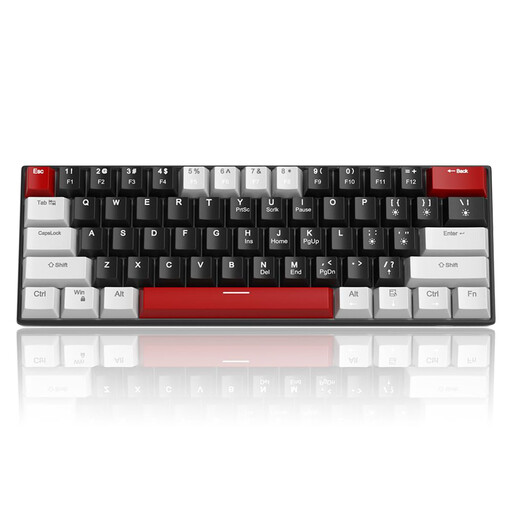
Why This Fits Their Persona: Offers the core features of a mechanical keyboard—fast switches and anti-ghosting—at an accessible price point. Ideal for entering the world of PC gaming without breaking the bank. The compact form factor also saves valuable desk space.
It provides N-Key Rollover for all 61 keys, avoiding the pitfall of limited anti-ghosting often found in budget models. The focus is on function rather than overloaded features.
Compact 60% design for maximum mouse freedom; linear red switches for fast responses. Note: This model has a QWERTY layout.
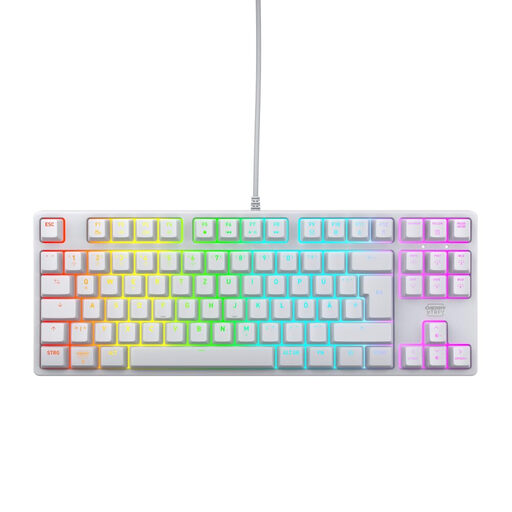
Why This Fits Their Persona: Perfect for users seeking a durable, precise keyboard for both gaming and daily typing. The German QWERTZ layout and high-quality materials make it a reliable choice for long-term use.
Relies on proven CHERRY MX2A Red switches and a robust metal plate construction instead of flashy but short-lived gimmicks. Quality is clearly prioritised over pure aesthetics.
Original CHERRY MX2A Red switches with a lifespan of over 100 million keystrokes (per manufacturer specs); German QWERTZ layout and Full N-Key Rollover.
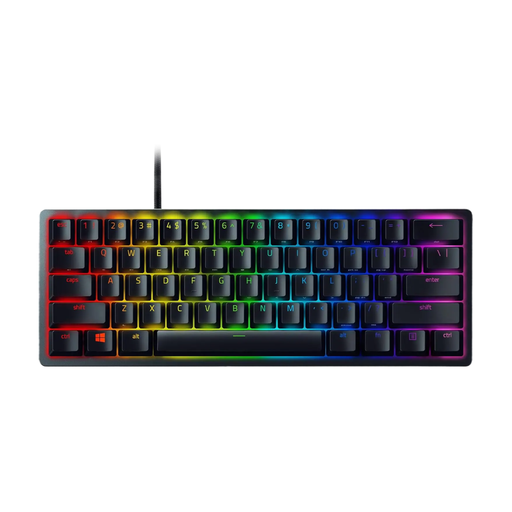
Why This Fits Their Persona: Engineered for maximum speed and a minimal footprint. The 60% form factor creates more room for the mouse, which is critical in fast-paced FPS games. The optical switches provide near-instant actuation.
Focuses on the pure performance metric of actuation speed via optical switches, bypassing the compromise where feel comes at the expense of response time. The build quality is designed for competitive durability.
Razer Linear Optical Switches for extremely fast actuation; very compact 60% format for maximum mouse movement. Note: This model has a QWERTY layout.
We have compiled a complete, up-to-date list of products that fully meet these strict selection criteria and quality standards.
The QWERTZ layout is the standard in Germany and Austria. The Z and Y keys are swapped compared to the international QWERTY layout. Additionally, QWERTZ provides dedicated keys for umlauts (?, ?, ?) and other special characters. Buying a keyboard with the wrong layout can significantly hinder everyday typing.
The lifespan is primarily determined by the switches used. Most mechanical switches are rated for 50 to 100 million keystrokes per key (check the manufacturer's specifications). Under normal use, this translates to a lifespan of many years, far exceeding that of conventional rubber-dome keyboards.
Not necessarily. Red switches are very popular for gaming due to their linear characteristics and fast actuation. However, some players prefer the tactile feedback of brown switches to feel the activation of an ability more deliberately. The choice of switch ultimately remains a matter of personal preference. There is no objectively "better" choice for all gamers.