
Lieferung heute & morgen

Qualitätsgarantie

Willkommens-Angebote freischalten: KOSTENLOSE Lieferung | Bis zu 80 % RABATT | Kostenlose 30-Tage-JoyPlus-Testphase
App herunterladen
The search for the right mechanical gaming keyboard can quickly become overwhelming. The market is filled with jargon, technical specs, and marketing promises that often create more confusion than clarity. Many users invest in a model that looks impressive on paper but turns out to be a poor choice in practice. Before you make a decision, it's crucial to understand the most common pitfalls.
As your Joybuy Product Recommendation Officer, I'll help you navigate these hurdles. We will focus on the objective features that truly matter and debunk three common marketing traps that often lead to disappointment.
Custom Keyboard. Furthermore, low-quality hot-swap sockets can be damaged after just a few switch changes.RGB Keyboard is not automatically a high-performance one. Often, the quality of the lighting is prioritised over functionality. Issues like buggy software, uneven illumination, or north-facing LEDs that interfere with certain keycap profiles (e.g., Cherry profile) are not uncommon.Wireless Gaming Keyboard promises a clutter-free desk, but not every wireless connection is suitable for demanding games. An unstable 2.4 GHz connection or high latency in Bluetooth mode can cause delays at critical in-game moments. The reliability of the connection is more important than the mere presence of the feature.To avoid buyer's remorse, you should focus on a few critical technical features. These define the performance, feel, and longevity of your keyboard.
The mechanical switches determine the typing feel and response time. There are three main types:
Pay attention to the specifications for Actuation Force (in grams, g) and Pre-travel (in millimeters, mm). A lower actuation force and shorter pre-travel result in faster key activation.
The size and arrangement of the keys are crucial for ergonomics and functionality. For users in Germany, a QWERTZ mechanical keyboard with a German layout is essential to use umlauts and special characters directly.
Common form factors include:
The choice between a wired and a wireless keyboard depends on your priorities.
Wireless Gaming Keyboard with a 2.4 GHz radio connection provides a low-latency alternative to a cable. Bluetooth is convenient for connecting to multiple devices but typically has higher latency.Here are some models tailored to specific user needs that cleverly avoid the pitfalls mentioned earlier.
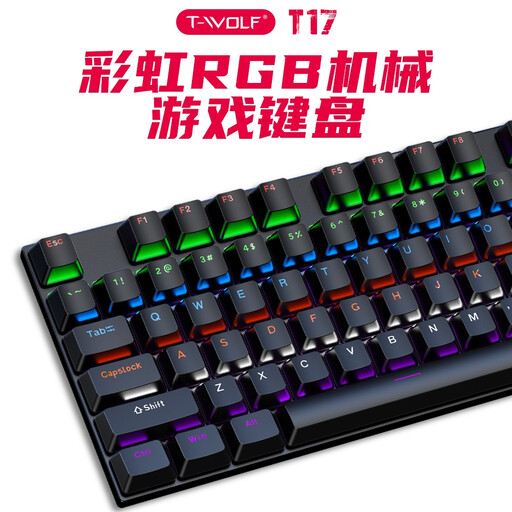
Why it's a great fit: Ideal for anyone looking for a straightforward and functional mechanical keyboard to get started. The full-size layout with a number pad is practical for both gaming and everyday tasks.
This model focuses on the essentials: a stable, wired USB connection for reliable input and anti-ghosting. It forgoes complex, potentially faulty features like wireless or hot-swap.
Plug-and-play functionality and a full key layout make it a solid foundation without any complicated setup.
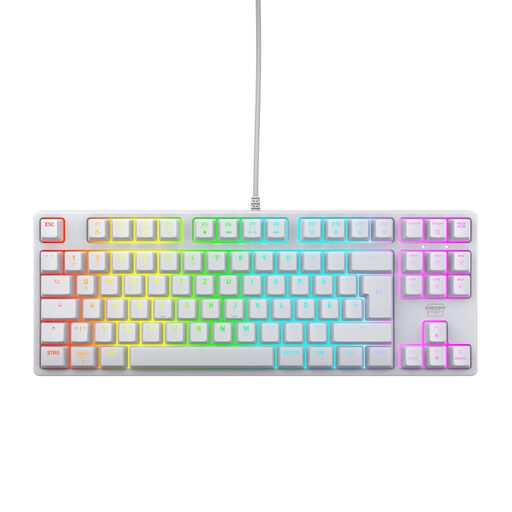
Why it's a great fit: Engineered for high performance in esports. The compact TKL format creates more space for the mouse, while the high-quality CHERRY switches stand for precision and durability.
Prioritises a latency-free, wired connection and switch quality over unnecessary extra features. The RGB lighting is functional and controllable without bloated software.
Equipped with CHERRY MX2A Red, proven linear switches with a lifespan of over 100 million actuations. The German QWERTZ layout is optimised for local users.

Why it's a great fit: Offers maximum flexibility for keyboard modders. With tri-mode connectivity, a gasket-mount structure, and a German layout, it's an excellent foundation for a custom setup.
Directly addresses the "hot-swap" trap by supporting both 3-pin and 5-pin switches. The wireless connection is also reliable for gaming, thanks to the 2.4 GHz option.
A true hot-swap keyboard with a German layout. The gasket-mount construction provides a dampened and pleasant typing feel, highly valued by enthusiasts.
We have compiled a complete, up-to-date list of products that fully meet these strict selection criteria and German safety regulations.
1. How long does a mechanical keyboard last? The lifespan of a mechanical keyboard is primarily determined by its switches. Most manufacturers rate their switches for 50 to 100 million keystrokes each. With normal use, a well-maintained mechanical keyboard can function reliably for many years, often significantly longer than conventional rubber dome keyboards.
2. What exactly does "hot-swap" mean on a keyboard? "Hot-swap" means you can replace the keyboard's mechanical switches without needing to solder. Using a special tool (a switch puller), you can simply pull out the existing switches and insert new ones. This allows you to change the typing feel (e.g., from linear to tactile), replace faulty switches, or combine different switch types for different keys.
3. Is a wireless mechanical keyboard suitable for gaming? Yes, but it depends on the technology. A Wireless Gaming Keyboard with a 2.4 GHz radio connection (usually via a USB dongle) offers very low latency, comparable to a wired connection, making it suitable for competitive gaming. Bluetooth connections tend to have higher latency and are better suited for slower-paced games, typing, or use with mobile devices. Many models offer both options for maximum flexibility.