
Lieferung heute & morgen

Qualitätsgarantie

Willkommens-Angebote freischalten: KOSTENLOSE Lieferung | Bis zu 80 % RABATT | Kostenlose 30-Tage-JoyPlus-Testphase
App herunterladen
The market for mechanical keyboards can be overwhelming. Countless models advertise impressive features, but not all of them live up to their promises. As a Joybuy Product Recommendation Officer, my job is to provide you with objective information so you can make an informed decision and not fall for overhyped marketing. Before you invest, you should know the most common pitfalls.
Pitfall 1: The Overpriced "Gaming" Label Many keyboards are marketed as "gaming" products and given a high price tag without possessing the necessary technical features. Aggressive aesthetics or an RGB keyboard alone don't justify a premium price if critical performance features like low latency or N-key rollover (the ability to register multiple keys at once) are missing.
Pitfall 2: The "Custom" Illusion The term "customisable" is often used misleadingly. Some manufacturers advertise their keyboards as a "Custom Keyboard" when, in fact, only the keycaps can be replaced. True customisation, however, means that the switches can be changed without soldering—a feature known as hot-swap, which significantly increases a keyboard's longevity and versatility.
To find a mechanical gaming keyboard that meets your needs, you should focus on verifiable technical specifications.
The switches determine the typing feel and response time. There are three main types:
A hot-swap keyboard allows you to easily exchange these switches. This is a crucial advantage: you can try out different switch types to find the perfect feel for you, or replace a faulty switch without having to dispose of the entire keyboard.
The way the circuit board (PCB) is mounted in the case has a significant impact on the typing sound and feel. A gasket-mount keyboard uses silicone or Poron gaskets to isolate the PCB from the case. The result is a more muted, softer, and often perceived as more premium typing experience. Hollowness and metallic pinging are minimised. Cheaper models often use a "tray mount" construction, where the PCB is screwed directly to the case, which can lead to a stiffer and louder typing experience.
The keyboard layout should suit your workspace and usage habits. While a full-size keyboard offers a number pad, more compact layouts save valuable desk space for wide mouse movements. A 75% keyboard is a popular compromise: it is significantly more compact than a standard keyboard but retains the arrow and function keys.
A wireless mechanical keyboard offers maximum flexibility. Pay attention to the connection technology: a 2.4 GHz connection generally offers lower latency than Bluetooth and is the more reliable choice for demanding gaming. Many models also offer a wired mode for maximum performance and for charging. Also, note that many models in the German custom keyboard market come with a US (QWERTY) layout. Before purchasing, check if a German layout (QWERTZ) mechanical keyboard is necessary for you.
Here are some recommendations tailored to specific user profiles.
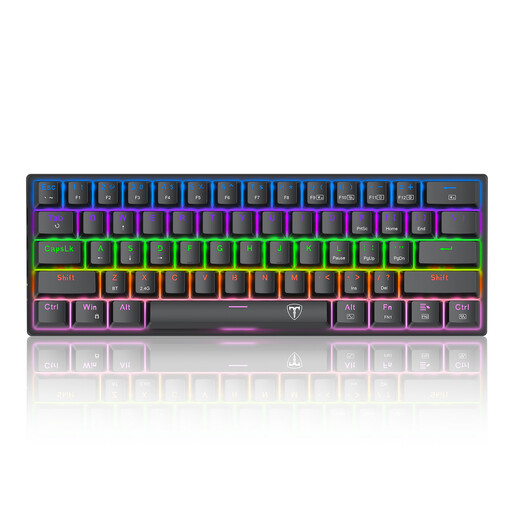
Why it's a good fit: Ideal for entering the world of mechanical keyboards without a large budget. The compact 60% layout creates plenty of space for the mouse and is perfect for gaming setups with limited desk space. The wired connection ensures stable, latency-free input.
This model avoids the overpriced "gaming" label trap by offering genuine mechanical switches with tactile and audible feedback at an accessible price point, rather than just focusing on flashy aesthetics.
Delivers a distinct, mechanical typing feel with its blue switches and an extremely space-saving design that is optimised for FPS games.
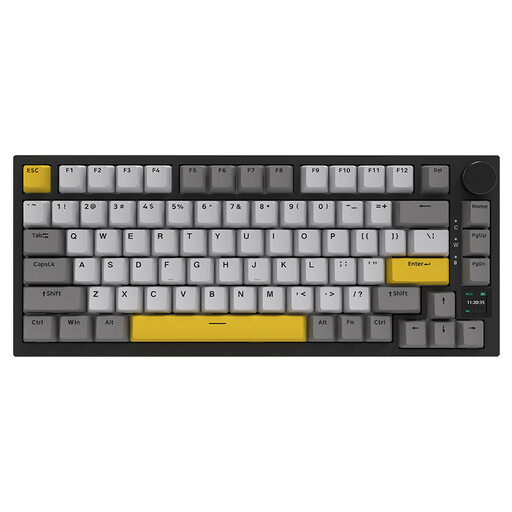
Why it's a good fit: This user is looking for modern features and the freedom to customise their keyboard. The tri-mode connectivity (Bluetooth, 2.4G, Wired), gasket-mount structure, and hot-swap capability offer maximum flexibility for work and gaming.
This model fully delivers on the promise of customisation. It offers true hot-swap sockets and a high-quality gasket-mount construction—features often missing from keyboards falsely advertised as "custom."
Combines a soft, muted typing feel from the gasket mount with the flexibility of tri-mode connectivity and hot-swap switches. The TFT display is a useful bonus for showing system information.
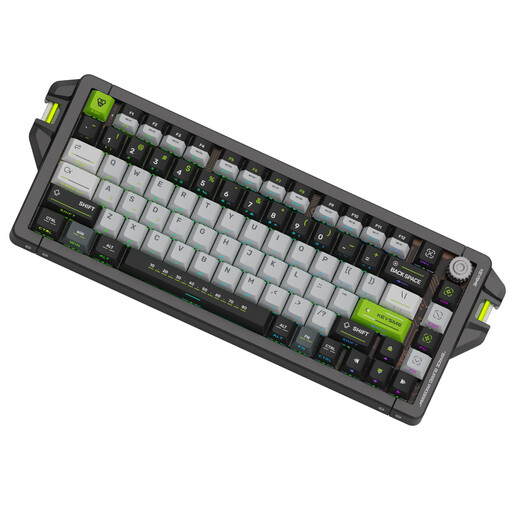
Why it's a good fit: For this user, every millisecond counts. The extremely high 8 kHz polling rate, adjustable actuation point, and Rapid Trigger technology provide a measurable performance advantage in competitive games where reaction speed is critical.
This model cuts through vague marketing about "fast switches" by providing quantifiable performance metrics. An 8 kHz polling rate and an actuation point adjustable down to 0.1 mm are concrete specifications that make a real difference in esports.
Offers extremely low latency and maximum control over key activation thanks to magnetic switches with an adjustable travel distance and Rapid Trigger functionality.
We have compiled a complete, up-to-date list of products that fully meet these strict selection criteria and safety standards.
The most obvious difference is the arrangement of the letters: the German layout is QWERTZ, while the American one is QWERTY. Additionally, the positions of special characters like @, Z, Y, and the umlauts (?, ?, ?) are different. If you primarily write in German, a German layout mechanical keyboard is more comfortable. However, many gamers and programmers prefer the US layout as it is more common in the custom keyboard scene.
Modern wireless keyboards that use a 2.4 GHz wireless connection offer latency that is nearly indistinguishable from a wired connection. They are therefore perfectly suitable for demanding gaming. Bluetooth connections tend to have slightly higher latency and are better suited for typing or casual gaming. The main advantage is a clean, cable-free desk setup.
Regular cleaning extends the life of your keyboard. Carefully remove the keycaps with a keycap puller and clean them with lukewarm soapy water. While the caps are drying, you can remove dust and debris from between the switches with a soft brush or compressed air. Make sure all parts are completely dry before reassembling the keyboard.