
Lieferung heute & morgen

Qualitätsgarantie

Willkommens-Angebote freischalten: KOSTENLOSE Lieferung | Bis zu 80 % RABATT | Kostenlose 30-Tage-JoyPlus-Testphase
App herunterladen
Finding the right mechanical gaming keyboard can be a complex task. Gamers and esports enthusiasts need a tool that is not only precise and fast but can also be customised to individual preferences. Factors like response time, key feel, and layout are crucial for in-game performance and everyday comfort.
This article serves as a comprehensive guide. It explains the key technological features of modern keyboards and presents a selection of models tailored to the specific needs of gamers and demanding users.
The selection process becomes easier once you understand the core features that define a keyboard's performance. Here are three key aspects to consider when making your decision.
For competitive gaming, especially in FPS titles like Valorant or CS2, minimal input delay is critical. This is where technologies like Rapid Trigger and a high Polling Rate come into play.
A keyboard should adapt to the user, not the other way around. The ability to personalise your experience is therefore a key criterion.
A keyboard's internal construction has a major impact on its typing feel and sound. A Gasket Mount is a hallmark of premium models. In this design, the plate and PCB assembly is sandwiched between silicone or Poron gaskets instead of being screwed directly into the case. This isolates vibrations, dampens sound, and provides a softer, more flexible, and often quieter typing experience.
Based on the criteria above, we have curated a selection of keyboards that focus on different priorities—from all-round performance to a specialised competitive edge.
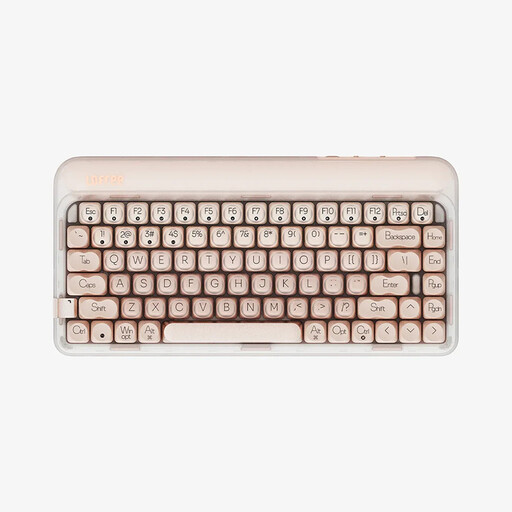
Lofree OE914 75% Mechanical Tri-Mode Keyboard, QWERTY US layout, Warm Pink
Why It Stands Out: The Lofree OE914 combines an appealing design with superior typing comfort. Its Gasket-Mount structure and multi-layer sound-dampening materials deliver a soft and quiet typing sound. Its flexibility, thanks to Tri-Mode connectivity, makes it a versatile companion for both work and play.
Pros:
Who It's For: Users looking for an aesthetically pleasing, quiet, and comfortable mechanical keyboard for daily use and casual gaming. Ideal for those who want to switch seamlessly between multiple devices.
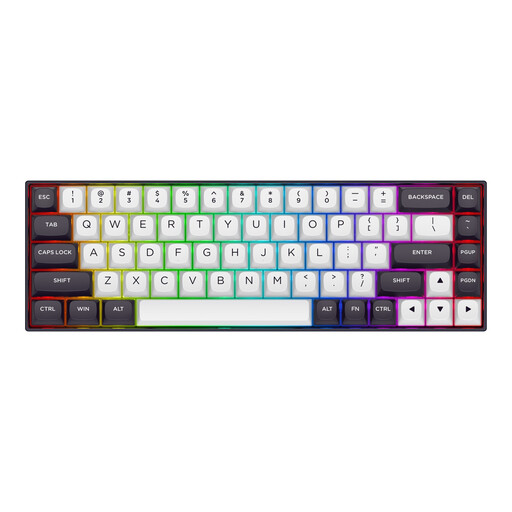
Why It Stands Out: The Redragon M68 is engineered purely for esports performance. With magnetic switches, Rapid Trigger, and an 8000Hz Polling Rate, it offers extremely low latency that can provide the decisive edge in competitive games.
Pros:
Who It's For: Competitive FPS players and esports athletes for whom every millisecond counts. Anyone seeking a keyboard with maximum response speed and precision for titles like Valorant, CS2, or Apex Legends will find a specialised tool here.
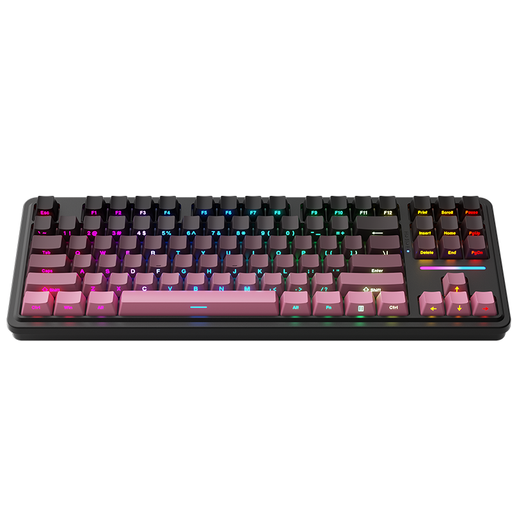
Machenike KG87 80% Mechanical Tri-Mode Keyboard, Gasket Mount, Latte Switch-Pink, QWERTY US layout
Why It Stands Out: The Machenike KG87 is a well-balanced TKL keyboard that combines functionality with modern comfort. The 80% layout retains the essential function and arrow keys, while the Gasket-Mount construction and Hot-Swap capability offer a high degree of customisation and a pleasant typing experience.
Pros:
Who It's For: Users looking for a versatile keyboard for both gaming and productivity. The TKL format is ideal for those who need more mouse space but don't want to sacrifice the function row.
Choosing a keyboard is a highly personal decision that depends on individual preferences for sound, feel, and design. If none of the featured models are the right fit for you, there are plenty of other options to explore.
Browse a wider range of designs and features in our Cute PC Keyboards category to find the model that perfectly matches your setup.
A hot-swap keyboard allows you to easily change the mechanical switches without any soldering. This gives users the freedom to completely personalise the typing feel, sound, and response characteristics of their keyboard by using different types of switches (e.g., linear, tactile, clicky).
Rapid Trigger is a feature typically found on keyboards with magnetic switches. It allows a key to reset the moment it starts to travel upwards, rather than needing to return to its original reset point. This enables significantly faster repeated keystrokes, which is particularly advantageous for movement control (like counter-strafing) in fast-paced games.
The ideal layout depends on your personal needs. A TKL (80%) layout removes the number pad, creating more space for the mouse, which is popular with many gamers. A 65% layout is even more compact, omitting the F-keys as well but retaining the arrow keys. It's ideal for FPS players who need maximum desk space. Full-size keyboards offer all the keys but also take up the most space.