
Lieferung heute & morgen

Qualitätsgarantie

Willkommens-Angebote freischalten: KOSTENLOSE Lieferung | Bis zu 80 % RABATT | Kostenlose 30-Tage-JoyPlus-Testphase
App herunterladen
As a Joybuy Product Recommendation Officer, I see the vast number of options available in the mechanical gaming keyboard market every day. However, this variety can quickly become overwhelming, leading to purchase decisions you might later regret. Before you invest, it's crucial to understand the common pitfalls often hidden behind flashy marketing.
This guide is designed to help you find objective criteria for your decision and select a keyboard that truly fits your needs.
Many users are disappointed post-purchase when a product fails to live up to its marketing promises. Pay special attention to these three points:
To avoid these traps, focus on the following objective features. These determine the performance, feel, and longevity of your keyboard.
Switches define the typing feel and responsiveness. The most well-known are Cherry MX switches, but other manufacturers also offer high-quality alternatives. There are three main types:
For a quiet mechanical keyboard, linear or tactile switches combined with internal dampening elements (e.g., made of silicone or foam) are an excellent choice.
The size of the keyboard affects ergonomics and the available space on your desk. For the English-speaking market, a QWERTY mechanical keyboard layout is essential for standard typing.
Modern keyboards offer more than just a wired connection.
Here are a few models that represent a smart choice for specific user profiles, based on objective features.

Why This Fits Their Persona: Ideal for gamers who depend on fast reactions and maximum mouse space. The compact 65% layout, ultra-fast low-profile speed switches, and low-latency 2.4 GHz connection are engineered for performance.
Delivers genuine, measurable gaming performance (low latency, fast switches) instead of just a "gaming" label. Its specifications are geared for competition.
Tri-mode connectivity provides maximum flexibility between a gaming PC, laptop, and other devices. Features a German QWERTZ layout in a compact form factor.
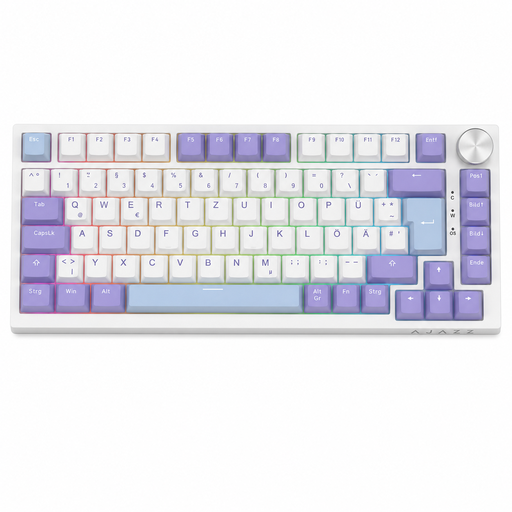
Why This Fits Their Persona: Appeals to users who love to personalise their keyboard. It offers hot-swap capability, a convenient rotary knob, and a gasket-mount structure, which is prized in the modding community for its softer typing feel.
The hot-swap sockets are clearly specified for 3-pin switches. This sets realistic expectations for customisation and prevents compatibility issues.
Combines a compact 75% layout with QWERTZ, a rotary knob, and solid sound dampening. It offers many enthusiast features in an accessible package.
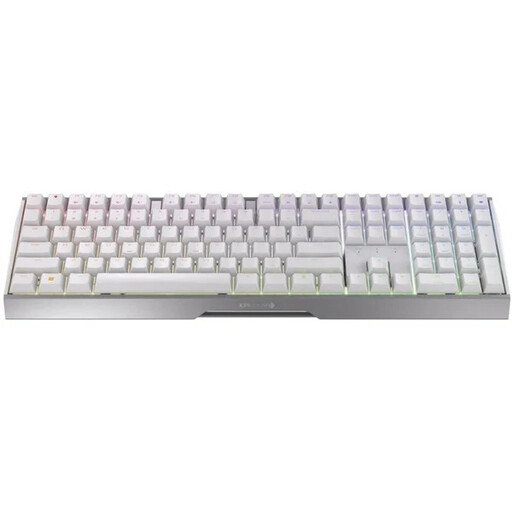
Why This Fits Their Persona: Perfect for users who want a single, high-quality keyboard for both intense gaming and productive work. The solid aluminium frame, proven MX2A Red switches, and flexible tri-mode connectivity provide a reliable foundation for any use case.
Focuses on durable, high-quality core components (aluminium frame, MX2A switches rated for over 100 million actuations) instead of short-lived gimmicks.
Premium build quality and reliable wireless performance in the German QWERTZ layout. The screwless design ensures a clean aesthetic.
Customisable lighting is a key factor for many setups. We've compiled a list of products that meet these selection criteria and feature high-quality RGB lighting.
3-pin switches are held on the PCB only by the three metal contacts (two for the circuit, one for mounting). 5-pin switches have two additional plastic pins that provide better alignment and stability on the PCB. A 5-pin hot-swap PCB is more versatile as it can accommodate both 3-pin and 5-pin switches. A 3-pin PCB can only accept 3-pin switches, unless you modify 5-pin switches by clipping off the plastic pins.
Look for models with linear or tactile switches that are advertised as "Silent" (e.g., Cherry MX Silent Red). Additionally, check for information on internal dampening. Terms like "gasket mount," "silicone dampener," or "multi-layer foam inserts" indicate that the manufacturer has taken steps to reduce noise.
Not always. Many keyboards allow you to control basic RGB effects and colours directly via key combinations (on-board controls). However, dedicated software usually offers more advanced customisation options, such as syncing lighting with games, creating your own effects, or programming individual keys. Check the product description to see if software is required or optional.