
Lieferung heute & morgen

Qualitätsgarantie

Willkommens-Angebote freischalten: KOSTENLOSE Lieferung | Bis zu 80 % RABATT | Kostenlose 30-Tage-JoyPlus-Testphase
App herunterladen
The search for a suitable mechanical gaming keyboard can quickly become overwhelming. The market is saturated with technical jargon, marketing promises, and a vast array of models. Many users invest in a device only to discover after a short time that it doesn't meet their needs or has quality defects. This guide will help you identify the crucial features and avoid common purchasing pitfalls.
Before we dive into recommendations, it's important to understand the typical issues that can lead to a bad purchase. Knowing these will enable you to make more informed decisions.
To find the right mechanical keyboard, you should focus on a few critical technical features. These define the typing feel, functionality, and longevity of the device.
The size of the keyboard directly impacts ergonomics and the available space on your desk. While a full-size keyboard offers a number pad, more compact formats save valuable space for mouse movement.
The way the circuit board (PCB) is mounted in the case significantly influences the typing sound and feel.
Modern keyboards often offer useful extra features that enhance user convenience.
Here are some models that, based on the objective criteria mentioned above, are suitable for different user profiles.
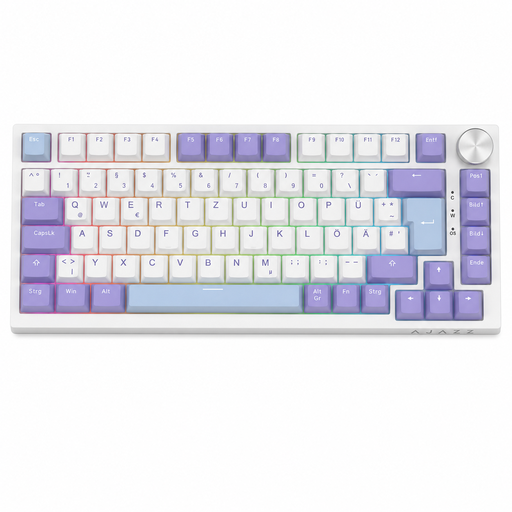
Why This Fits Their Persona: Suitable for users seeking a reliable keyboard for both gaming and productive work. The compact 75% layout with a German QWERTZ scheme saves space without sacrificing important keys like the F-row or arrow keys.
This model offers concrete technical features like a gasket mount and hot-swap sockets for 3-pin switches, which go beyond a mere "gaming" label. The standardised layout avoids compatibility issues.
The combination of a Gasket Mount, a practical rotary knob for volume control, and the compact 75% format provides a cohesive overall package.

Why This Fits Their Persona: Ideal for users who need a fully-equipped command centre. The full QWERTZ layout with a numpad, tri-mode connectivity, and TFT screen are suited for multi-device setups and demanding tasks.
The features are practical, not just gimmicks. The TFT screen displays useful status information, and the hot-swap capability allows for long-term customisation, increasing its value beyond mere marketing terms.
The integrated 1.14-inch TFT colour screen for status display and the flexible tri-mode connectivity (Bluetooth/2.4G/USB-C) set this model apart from others.

Why This Fits Their Persona: For users who value a high-quality typing feel, a clean sound profile, and maximum customisability. The 80% (TKL) layout with a German QWERTZ scheme is ideal for a clean setup.
The focus is on build quality and genuine customisation options. The hot-swap sockets are compatible with both 3-pin and 5-pin switches according to the manufacturer, providing true freedom in switch choice and avoiding a marketing dead-end.
The Gasket Mount structure with multi-layer sound dampening ensures a soft and acoustically pleasing typing experience. The comprehensive Hot-Swap compatibility is a clear advantage for enthusiasts.
We have compiled a complete, real-time updated list of products that fully meet these strict selection criteria and local regulations.
Mechanical switches have either 3 or 5 pins. 3-pin switches have two metal contacts and a central mounting pin. 5-pin switches have two additional plastic side pins that provide more stability on the PCB. A keyboard with 5-pin hot-swap sockets is more versatile as it can accommodate both 3-pin and 5-pin switches. A 3-pin-only keyboard cannot accept 5-pin switches without modification (clipping off the plastic pins).
Regular cleaning is crucial. Use a soft brush or compressed air to remove dust and crumbs from between the keys. The keycaps can be removed and cleaned in lukewarm soapy water (ensure they are completely dry before reattaching them). Avoid spilling liquids, as this can damage the electronics.
For professional or competitive gamers, a wired keyboard is often the preferred choice as it offers the lowest possible input delay (latency). However, modern wireless keyboards with 2.4 GHz technology have nearly closed this gap, and the difference is no longer noticeable for most users in everyday or casual gaming. Bluetooth connections tend to have slightly higher latency and are better suited for typing and general use.