
Lieferung heute & morgen

Qualitätsgarantie

Willkommens-Angebote freischalten: KOSTENLOSE Lieferung | Bis zu 80 % RABATT | Kostenlose 30-Tage-JoyPlus-Testphase
App herunterladen
The search for the right mechanical gaming keyboard can quickly become overwhelming. The market is filled with jargon and marketing promises that often obscure more than they clarify. Many users invest in a model that looks great at first glance, only to find after a few months that the typing feel is disappointing, it lacks customisation, or the wireless connection fails at a critical moment.
As your Joybuy Product Recommendation Officer, I'm here to help you identify these pitfalls. Instead of falling for exaggerated advertising, we'll focus on the technical features that truly matter. Here are the most common problems and how to make an informed decision.
To avoid the problems mentioned above, you should check three technical specifications before making a purchase decision.
The mounting style describes how the circuit board (PCB) and the plate where the switches are mounted are secured in the case. While the traditional tray mount construction screws the PCB directly to the case, transferring vibrations and noise, the gasket mount structure uses gaskets made of silicone or Poron. These gaskets decouple the typing assembly from the case.
A hot-swap keyboard allows you to change the mechanical switches at any time without tools or a soldering iron. This offers two crucial advantages:
Check whether the keyboard supports both 3-pin and 5-pin switches to ensure maximum compatibility with the switches available on the market.
For gamers and power users who switch between different devices, versatile connectivity is essential. A keyboard with tri-mode functionality offers the full spectrum:
Here are some models that represent a compelling solution for different user profiles based on objective technical features.
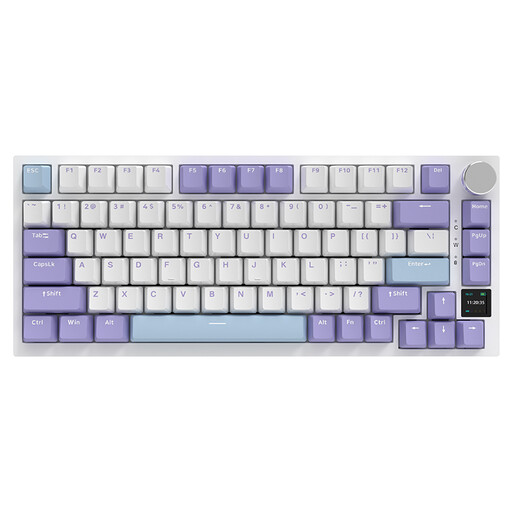
Why This Fits Their Persona: Ideal for users seeking cutting-edge features and a premium typing feel. The compact 75% keyboard layout, TFT screen, and sophisticated internal structure appeal to enthusiasts aiming for a Hi-Fi sound experience.
The gasket mount structure with multi-layer dampening completely eliminates hollow sounds. True hot-swap capability for 3/5-pin switches offers maximum freedom for a custom keyboard.
The interactive TFT color screen for displaying battery status, connection mode, and custom GIFs is a clear unique selling proposition in this class.
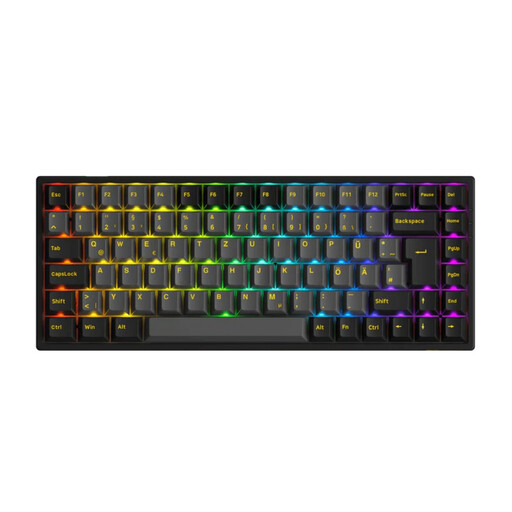
Why This Fits Their Persona: Perfect for users who need a compact yet fully functional keyboard for a clean setup. The seamless compatibility with Windows and macOS, along with tri-mode connectivity, makes it the ideal companion for multi-device workflows.
Offers true tri-mode connectivity, including a low-latency 2.4 GHz mode for casual gaming. The 5-pin hot-swap capability future-proofs the investment and avoids the false "custom" promise.
This model is equipped with a German ISO-DE layout, which is a decisive advantage for users in Germany who don't want to give up umlauts and the familiar key arrangement.
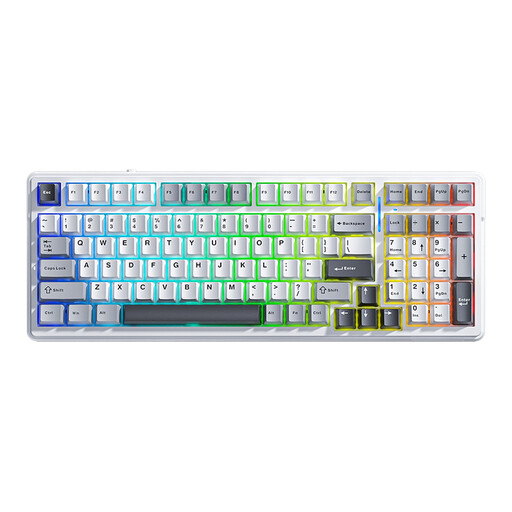
Why This Fits Their Persona: An excellent choice for users who need the numpad for productivity tasks but still prefer a more compact form factor than a full-size keyboard. The large battery supports long wireless workdays.
The gasket mount structure provides a deep, dampened typing sound, avoiding the rattling feel of cheaper keyboards. The reliable tri-mode connection and hot-swap capability make it future-proof.
The 99-key (96%) layout is an excellent compromise that retains the numpad while saving valuable desk space. The 8000 mAh battery offers above-average runtime.
We have compiled a complete, real-time updated list of products that fully meet these strict selection criteria and German safety regulations.
In a tray mount keyboard, the PCB is screwed directly into the bottom case shell. This is a simple and cost-effective design, but it transfers vibrations and noise directly to the case, often resulting in a hollow sound. In a gasket mount keyboard, the PCB is "sandwiched" between gaskets made of soft material (e.g., silicone), which isolates it from the case. This leads to a softer typing feel and a more muted, deeper sound.
Battery life varies greatly depending on the model, battery capacity, usage, and especially the RGB gaming keyboard's backlighting. Models with large batteries (e.g., 4000 mAh to 8000 mAh) can last for several weeks with the backlighting off. With RGB lighting activated, the runtime typically reduces to a few days to a week, depending on the brightness and selected effect.
Most modern hot-swap keyboards are compatible with the most common switch types. The most important factor is the number of pins. Many PCBs support both 3-pin and 5-pin switches. 5-pin switches have two extra plastic feet for stability, which would need to be clipped for a 3-pin-only PCB. A keyboard that is natively 5-pin compatible offers the greatest flexibility in your choice of switches.