
Lieferung heute & morgen

Qualitätsgarantie

Willkommens-Angebote freischalten: KOSTENLOSE Lieferung | Bis zu 80 % RABATT | Kostenlose 30-Tage-JoyPlus-Testphase
App herunterladen
The search for the right mechanical gaming keyboard can quickly become overwhelming. The market is flooded with technical jargon, marketing promises, and a vast selection of models. Many gamers and prolific typists invest in a device, only to realize after a few months that it doesn't meet their needs or lacks crucial features. As your Joybuy Product Recommendation Officer, I'm here to help you identify the typical pitfalls and make an informed decision.
Before we dive into the technical details, let's look at the most common sources of error that often lead to disappointment and unnecessary expense.
To avoid these traps, focus on three objective parameters that determine your keyboard's performance and longevity.
The heart of any mechanical keyboard is the switches beneath the keys. They define the typing feel and response time. The most common types are:
The size of the keyboard affects not only the space on your desk but also its functionality.
These two terms are critical for gaming performance. Anti-ghosting prevents incorrect or missed inputs when multiple keys are pressed simultaneously. While basic anti-ghosting only covers a few keys, a keyboard with N-Key Rollover (NKRO) allows for the simultaneous and correct detection of all keys. For competitive gaming, an anti-ghosting keyboard with full NKRO is a clear recommendation. Make sure the manufacturer explicitly states this feature.
Based on these criteria, we have identified a few models that represent a smart choice for specific user profiles.
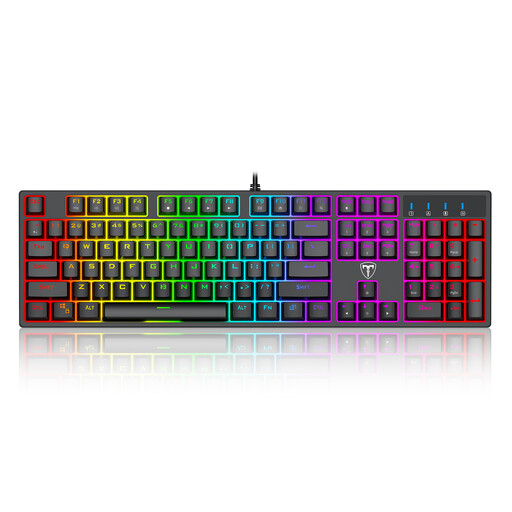
Why This Fits Their Persona: This model is ideal for beginners looking for a full-featured mechanical keyboard without a large budget. It offers a full key layout for both gaming and productivity, plus customizable RGB effects.
It combines full N-Key Rollover with tactile Blue switches, thus avoiding the trap of sacrificing performance for pure aesthetics.
Full anti-ghosting for flawless gaming; spill-resistant design for enhanced durability.
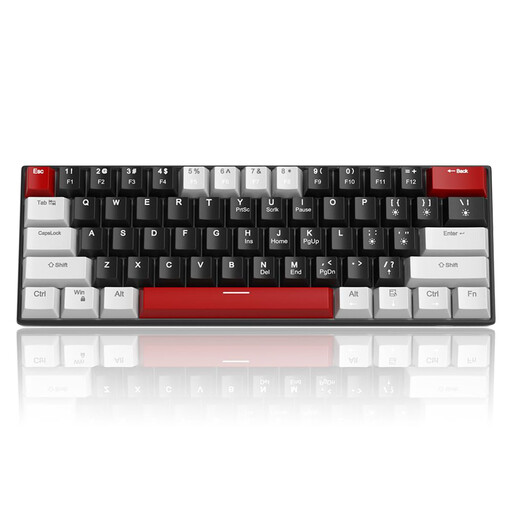
Why This Fits Their Persona: For gamers who need every inch of desk space for their mouse. The compact 60% format maximizes room for movement, providing an advantage in fast-paced FPS games.
This model focuses on the essentials: a compact layout and reliable switches. It deliberately omits a number pad, which is superfluous for many gamers anyway.
Extremely space-saving 60% design; detachable USB-C cable for easy transport and replacement.
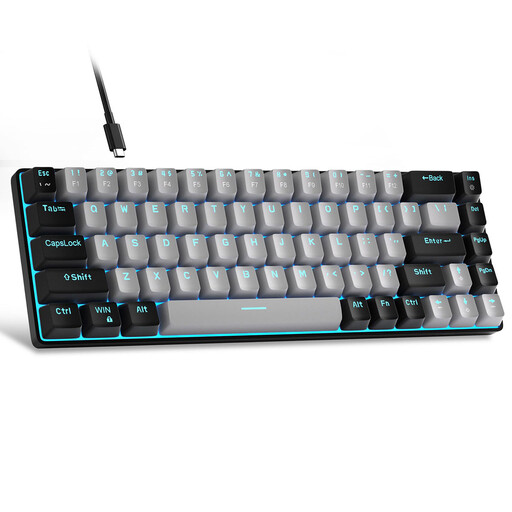
Why This Fits Their Persona: This 68-key layout is an excellent compromise. It's almost as compact as a 60% keyboard but retains the crucial arrow keys. Ideal for programmers and writers who also love to game.
It debunks the myth that compact always means impractical. By retaining the arrow keys, productivity isn't sacrificed, which can be a hurdle with pure 60% models.
Compact layout with dedicated arrow keys; Blue switches for precise tactile feedback in typing and gaming.
A high-quality wired gaming keyboard is the foundation of any great setup. To complete the atmosphere, a well-designed gaming keyboard with lighting can be complemented by other accessories. Products like the Yeelight Aries Monitor Light Bar reduce eye strain at night, while intelligent WiFi wall lights can immerse the entire room in the game world.
A cohesive setup doesn't end with the keyboard. Discover our range of lighting solutions to complete your gaming station.
1. Is a wired gaming keyboard better than a wireless one? For competitive gaming, a wired keyboard generally offers a more stable connection and lower latency (input lag). You don't have to worry about dead batteries or wireless interference. Wireless models provide more flexibility and a cleaner setup but are often more expensive and require battery management.
2. What should I know about the QWERTY US layout? Many gaming keyboards are sold with the international QWERTY (US) layout. Compared to other regional layouts (like German QWERTZ), the Z and Y keys are swapped, and special characters or umlauts are in different places or only accessible via key combinations. You can change your operating system's language settings to "English (US)" to ensure a 1:1 match between the physical keys and the output. This is often a non-issue for pure gaming, but it requires some adjustment when typing text in other languages.
3. How long does a mechanical keyboard last? The lifespan is often rated in millions of keystrokes per switch, with common values being 50 million keystrokes or more. With normal use, a well-built mechanical keyboard can last for many years, significantly longer than traditional rubber-dome keyboards. The robust construction and replaceable keycaps also contribute to their longevity.