
Lieferung heute & morgen

Qualitätsgarantie

Willkommens-Angebote freischalten: KOSTENLOSE Lieferung | Bis zu 80 % RABATT | Kostenlose 30-Tage-JoyPlus-Testphase
App herunterladen
Finding the right mechanical gaming keyboard can quickly become overwhelming. The market is flooded with models promising impressive features and flashy designs. But all too often, a crucial detail is overlooked, leading to buyer's remorse. As a Joybuy Product Recommendation Officer, I'm here to help you spot the common pitfalls and make an informed decision based on objective criteria.
It's especially frustrating when your new keyboard arrives, only to find it has the wrong key layout. Many models advertised online use the standard American QWERTY layout, which can be impractical for users in other regions who are accustomed to different standards. Another common mistake is focusing on flashy RGB lighting while neglecting fundamental quality features like build construction or hot-swappable switches. This can easily lead you to a product that looks great but offers neither a pleasant typing experience nor long-term durability.
To find a keyboard that will meet your needs for the long haul, you should examine three core aspects before making a decision. These parameters are far more critical for daily use than many marketing buzzwords.
The correct regional layout is a basic requirement for efficient typing and familiar use. When browsing products, explicitly look for the layout that matches your region. Beyond that, the form factor is crucial for ergonomics and the amount of space available on your desk.
The mechanical switches under each keycap define the typing feel and response time. Linear switches (e.g., Red or Black switches) offer a smooth, consistent keystroke with no resistance, and are highly popular with gamers for their speed and quiet actuation.
A crucial feature for future-proofing is hot-swap capability. A hot-swap keyboard allows you to change out the mechanical switches without any soldering. This offers two key advantages: you can customise the typing feel later on, or easily replace a faulty switch yourself, significantly extending the device's lifespan.
The way the circuit board (PCB) is mounted inside the case has a major impact on the sound and feel of typing. While many standard keyboards use a rigid screw-in design (tray mount), higher-end models are increasingly adopting a gasket mount construction. Here, the PCB is "suspended" between silicone or foam gaskets. This dampens vibrations, creates a fuller, more pleasant sound profile, and provides a softer, more cushioned typing feel with every keystroke.
Based on the criteria above, we have identified several models that are well-suited for different user profiles.
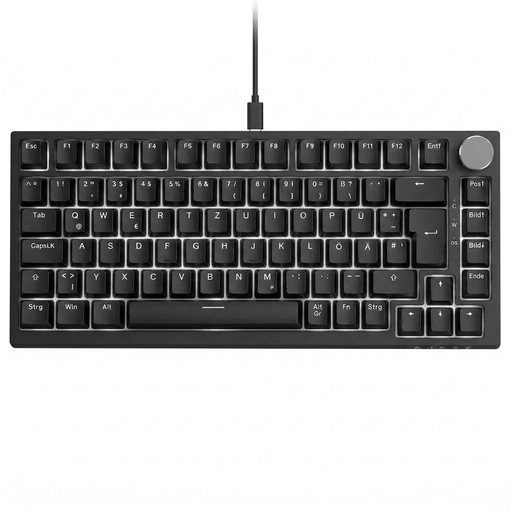
Why This Fits Their Persona: Ideal for users looking for a compact keyboard for both gaming and productivity. The 75% layout saves space while retaining the F-keys and arrow keys. The integrated volume knob allows for quick media control without interrupting your game or workflow.
This model offers a proper regional QWERTZ layout and focuses on practical features like its gasket mount structure and rotary knob, rather than just aesthetics.
The combination of a keyboard with a volume knob, hot-swap capability, and five-layer sound dampening offers a high-value package for daily use.
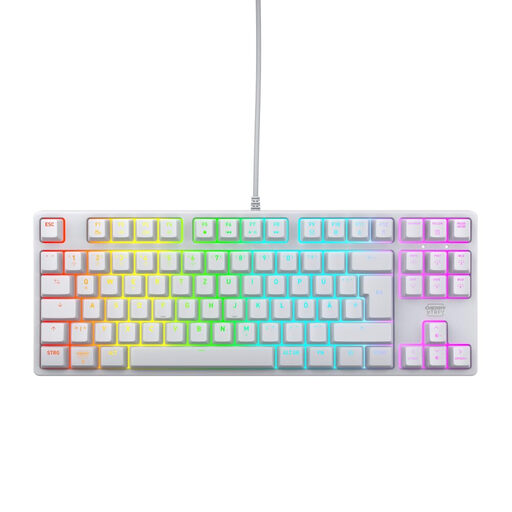
Why This Fits Their Persona: Perfect for gamers who value proven quality and reliability. The compact TKL layout is an established standard in esports, and the CHERRY MX2A RED switches represent precise, durable performance.
This model focuses on the essentials: a robust construction with a metal plate and industry-leading switches from a renowned German manufacturer. It's a tool, not a toy.
Equipped with CHERRY MX2A RED linear switches, rated by the manufacturer for over 100 million actuations. Features full N-key rollover for flawless input.

Why This Fits Their Persona: For users who want to enter the world of customisable keyboards. This RGB keyboard not only offers dynamic lighting but also the complete freedom to personalise the typing feel by swapping out the switches.
Unlike keyboards that only look "customisable," this model offers genuine modularity with its hot-swap sockets. No expensive soldering equipment is required to change switches.
Full hot-swap capability for compatible 3-pin switches and a gasket-mount structure. The included Sea Salt switches provide a smooth, linear typing feel right out of the box.
We have compiled a complete, up-to-date list of products that fully meet these strict selection criteria and all relevant safety standards.
A TKL (Tenkeyless) keyboard is essentially a full-size keyboard without the number pad. The navigation cluster (arrow keys, Insert, Delete, etc.) remains in its traditional block. A 75% keyboard is even more compact, as it pushes the arrow and navigation keys right up against the right edge of the main key cluster, eliminating the empty space between them.
Yes, absolutely. Although tactile switches (with a noticeable "bump" on actuation) are often recommended for heavy typists, linear switches are also excellent for writing. Their smooth and consistent key travel can reduce finger fatigue during long typing sessions. Ultimately, the choice comes down to personal preference.
Not always. Many modern RGB keyboards, including some of the models mentioned here, allow you to control lighting effects, colours, and brightness directly via key combinations (e.g., using the FN key). Optional software usually offers more advanced customisation, such as creating your own effects or syncing the lighting with games, but it's often not required for basic functionality.