
Lieferung heute & morgen

Qualitätsgarantie

Willkommens-Angebote freischalten: KOSTENLOSE Lieferung | Bis zu 80 % RABATT | Kostenlose 30-Tage-JoyPlus-Testphase
App herunterladen
The mechanical keyboard market can be overwhelming. Vague marketing terms and a flood of models make it difficult to make an informed decision. As a Joybuy Product Recommendation Officer, my job is to cut through the noise and provide objective, practical advice to help you avoid costly mistakes.
When searching for a mechanical gaming keyboard, there are several common pitfalls that can lead to disappointment and unnecessary expense.
To make an informed choice, you should focus on the technical specifications that directly impact performance, typing feel, and longevity.
Mechanical switches define the feel and sound of every keystroke. The three main categories are:
A keyboard's internal construction has a significant impact on its typing feel and acoustics. A modern design popular among enthusiasts is the gasket mount keyboard. In this build, the plate on which the switches are mounted is isolated from the case by silicone or foam gaskets. This results in a softer, more cushioned typing feel and reduces vibrations, producing a fuller and more pleasant sound.
A hot-swap keyboard allows you to change mechanical switches without any soldering. This is a crucial advantage for both longevity and personalisation. You can experiment with different switch types to find your personal preference. If a single switch fails, it can be easily replaced instead of having to replace the entire keyboard.
Instead of making a one-size-fits-all recommendation, we have selected models tailored to specific user profiles and their unique requirements.
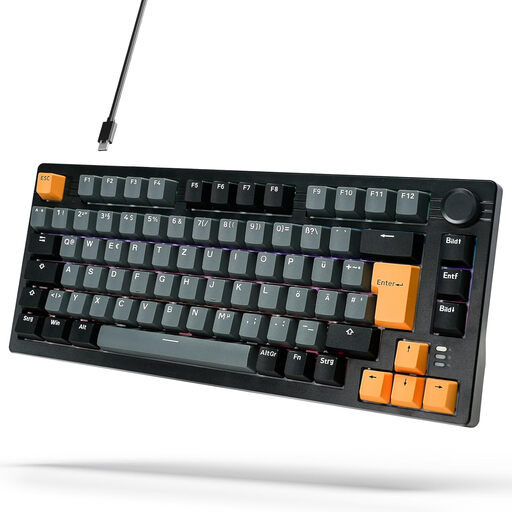
Why it's a match: It offers features often found only in more expensive models, including a German QWERTZ layout, gasket-mount construction, and a convenient volume knob. Ideal for users seeking a high-quality typing experience for daily use and casual gaming without breaking the bank.
Instead of just a "gaming" label, it delivers tangible technical benefits like the gasket mount design for better sound and a more pleasant typing feel. The correct German layout prevents frustration when typing.
Gasket-mount construction for a cushioned typing feel; integrated volume knob.
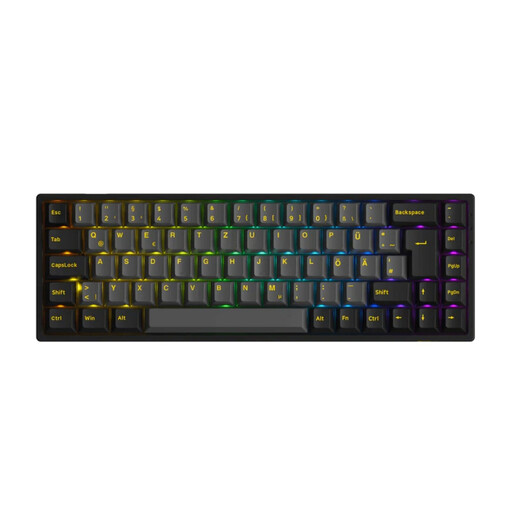
Why it's a match: This keyboard combines a compact 65% form factor with a full German ISO-DE (QWERTZ) layout. Its tri-mode connectivity (Bluetooth, 2.4G, wired) makes it a flexible wireless gaming keyboard. The hot-swap feature also allows for switch customisation.
It bypasses the layout trap with a true German layout and offers genuine, long-term value with its hot-swap capability, instead of empty durability claims.
Flexible tri-mode connectivity (wired and wireless); full German layout in a compact 65% form factor.

Why it's a match: Designed specifically for competitive FPS games like Valorant or CS2. Its magnetic switches with Rapid Trigger allow for instant key reset and an adjustable actuation point starting from 0.2 mm. The 8000Hz polling rate ensures extremely low latency. Note: This model uses a US (QWERTY) layout.
It focuses exclusively on measurable performance advantages (latency, actuation speed) and forgoes unnecessary gimmicks. This is a tool for maximum performance, not just a cosmetic accessory.
Magnetic switches with Rapid Trigger for minimal input delay; 8000Hz polling rate.
We have compiled a complete, up-to-date list of products that fully meet these strict selection criteria and German safety regulations.
Linear switches have a smooth keystroke and are quiet, making them ideal for fast-paced gaming. Tactile switches offer a noticeable bump that confirms key activation without being loud, making them well-suited for a mix of typing and gaming. Clicky switches produce an audible click and provide the most distinct feedback, which many heavy typists appreciate.
Modern wireless technologies, especially 2.4GHz connections via a dedicated USB receiver, now offer latency that is virtually indistinguishable from a wired connection. For most gamers, including those in the competitive scene, a wireless gaming keyboard is therefore a completely viable option that also helps create a cleaner desk setup. Bluetooth connections tend to have higher latency and are better suited for typing or casual gaming.
For a basic cleaning, disconnect the keyboard from your computer. Use a keycap puller to gently remove the keycaps. Clean the caps with lukewarm soapy water and let them dry completely. You can use compressed air to clear dust and crumbs from between the switches. Wipe the case with a slightly damp cloth. Be careful not to let any liquid get inside the keyboard.