
Lieferung heute & morgen

Qualitätsgarantie

Willkommens-Angebote freischalten: KOSTENLOSE Lieferung | Bis zu 80 % RABATT | Kostenlose 30-Tage-JoyPlus-Testphase
App herunterladen
The search for the right mechanical gaming keyboard can quickly become overwhelming. The market is flooded with models that promise high performance, but not every product lives up to its advertising. As a Joybuy Product Recommendation Officer, I'm here to help you separate the wheat from the chaff and make an informed decision that fits your setup and your needs.
Many buyers invest in new PC Gaming Accessories only to discover after a short time that their new keyboard doesn't offer the expected precision or durability. You should be aware of two common pitfalls:
To avoid making a bad purchase, it's crucial to understand the technical fundamentals. Three core parameters determine the performance and feel of your future keyboard.
The switch type under each key defines the typing feel, volume, and response speed. The three most common types are:
The size of the keyboard, also known as the form factor, has a direct impact on ergonomics and the available space on your desk.
When making your selection, be sure to pay close attention to the specified layout. For the US market, the QWERTY (ANSI) layout is the standard.
Modern mechanical keyboards often offer other useful features:
Based on the criteria mentioned, we have identified a few models that are suitable for different user profiles.

Why This Fits Their Persona: This model is ideal for users who want a high-quality, customizable keyboard. The gasket-mount design and hot-swap capability appeal to enthusiasts who value a dampened typing feel and modifiability. The practical volume knob and compact 75% format also make it perfect for daily use.
With its explicit German QWERTZ layout, it bypasses the most common pitfall for German buyers. The use of genuine mechanical switches and solid construction clearly distinguish it from marketing-only "gaming" products.
German QWERTZ layout, hot-swappable for 3-pin switches, gasket-mount structure for a softer typing feel, and an integrated volume knob.
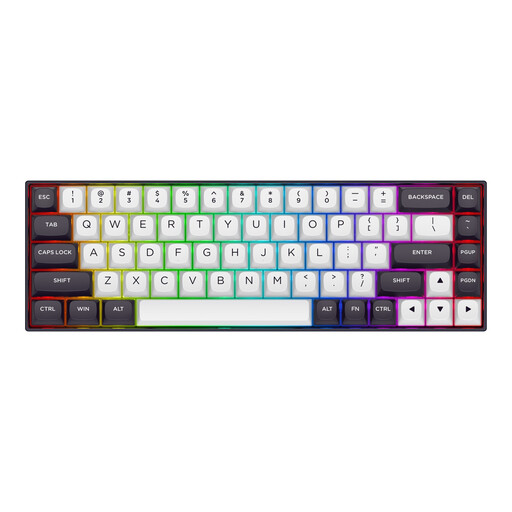
Why This Fits Their Persona: Designed for FPS players where every millisecond counts. The magnetic switches with Rapid Trigger functionality and the 8000Hz polling rate offer extremely low latency. The compact 65% format (US layout) maximizes space for mouse movements.
This model is a highly specialized tool, not just for show. Instead of gimmicks, it focuses on objectively measurable performance metrics like Rapid Trigger and an 8000Hz polling rate, which can provide a real advantage in competitive games.
Magnetic Hall effect switches with an adjustable actuation point (0.2-4.0 mm), extremely fast response time, and a sturdy aluminum case. Note the QWERTY US layout.
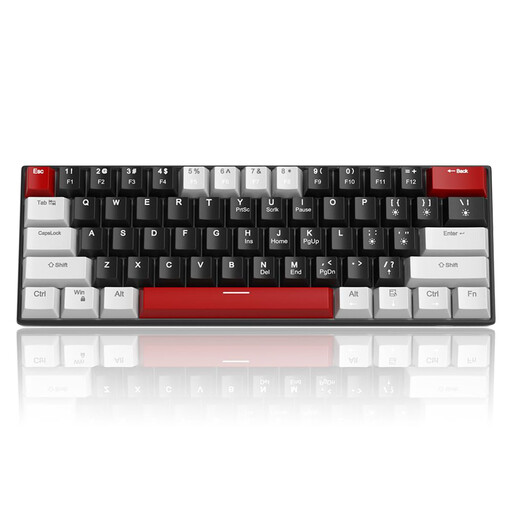
Why This Fits Their Persona: For beginners who want to make the leap from a membrane to a mechanical keyboard without a large investment. The linear red switches provide a true mechanical feel suitable for gaming and typing. The compact 60% keyboard format saves space and is easy to transport.
Despite its affordable price, this is a genuine mechanical keyboard with linear switches, not a mushy membrane model. It offers essential gaming features like Anti-Ghosting and a stable, wired keyboard connection.
Very compact and portable design, linear and quiet Red Switches, and a detachable USB-C cable. A solid entry into the world of mechanical keyboards. Note the QWERTY US layout.
We've compiled a complete, up-to-date list of products that fully meet these strict selection criteria and local safety regulations.
The main difference lies in the technology beneath the keys. Mechanical keyboards use an individual, spring-loaded switch for each key. This results in a more precise, tactile feel and greater durability. Normal (membrane) keyboards use a rubber dome sheet under the keys, which makes contact with a circuit board when pressed. This feel is often described as "mushy" and is less precise.
The lifespan is typically determined by the durability of the switches. Many mechanical switches, such as those from CHERRY or Gateron, are rated for 50 to 100 million keystrokes. With normal use, a well-maintained mechanical keyboard can last for many years, often significantly longer than a conventional membrane keyboard.
For competitive gaming, a wired keyboard is often recommended. The reason is latency: a wired USB connection provides an extremely stable and fast signal transmission without the risk of interference or a dead battery. While modern wireless technologies (e.g., 2.4GHz RF) have greatly reduced latency, a wired connection remains the gold standard for maximum reliability in crucial gaming moments.