
Lieferung heute & morgen

Qualitätsgarantie

Willkommens-Angebote freischalten: KOSTENLOSE Lieferung | Bis zu 80 % RABATT | Kostenlose 30-Tage-JoyPlus-Testphase
App herunterladen
The search for the right mechanical gaming keyboard can quickly become overwhelming. Manufacturers advertise a flood of technical terms and features, but not all of them offer genuine value. Before you make a decision, it's crucial to understand the most common pitfalls that often lead to disappointment and unnecessary expense.
Many buyers are swayed by marketing buzzwords without scrutinizing the technology behind them. This often results in a purchase that fails to meet their actual needs.
To make an informed decision, you should focus on three key technical characteristics. These are the primary determinants of your keyboard's performance, comfort, and longevity.
Mechanical switches define the typing feel and response speed. The three basic types are:
A more recent innovation is keyboards with Hall Effect switches, often marketed as a Rapid Trigger keyboard. These allow the actuation and reset points of the keys to be precisely configured via software. This enables extremely fast reactions, as the key doesn't need to fully return to be triggered again—a clear advantage in competitive games.
The size of the keyboard directly impacts ergonomics and the available space on your desk.
Modern keyboards offer more than just a USB port.
Based on the criteria mentioned, we have curated a selection of keyboards for various needs.
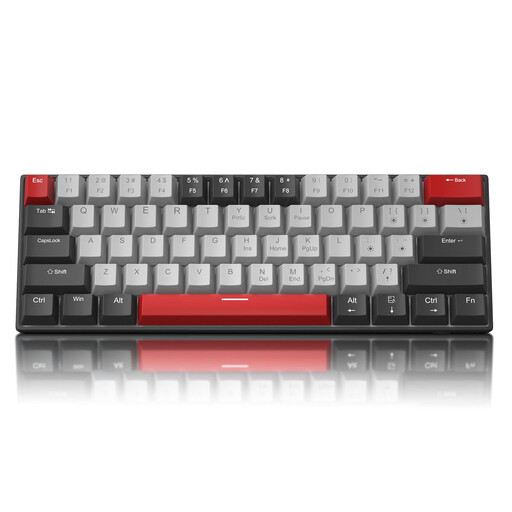
Why This Fits Their Persona: This model offers an entry into the world of mechanical keyboards at a very accessible price point. The compact 60% keyboard format is ideal for setups with limited space, focusing on the essential keys for gaming and typing.
It focuses on the core function—a solid mechanical typing feel—without driving up the price with complex extra features. Note: This model features a standard QWERTY US layout, making it ready to use out of the box for most English-speaking users and a good choice for programmers.
Very compact and portable design. It provides a true mechanical experience (available with blue or red switches) at a fraction of the cost of premium models.
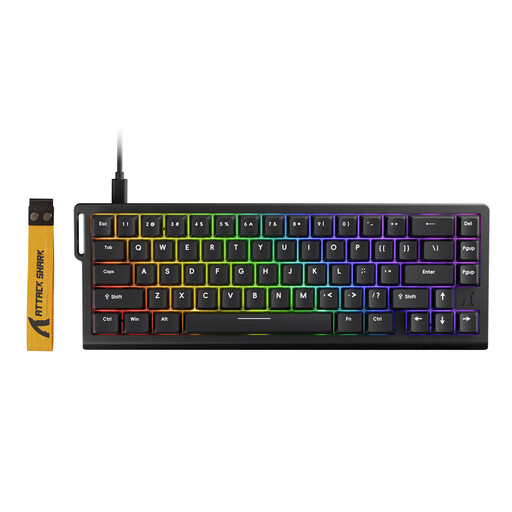
Why This Fits Their Persona: Engineered for maximum speed and precision. The magnetic switches with Rapid Trigger technology and the extremely high 8000 Hz polling rate are tailored directly to the needs of esports players, where milliseconds matter.
Its features aren't just for marketing; they offer a measurable performance advantage. The ability to adjust the actuation point from 0.1 mm to 3.4 mm is a concrete tool for performance enhancement, not a gimmick.
Adjustable actuation point for ultra-fast reactions. 8000 Hz polling rate for virtually zero-latency input. The hot-swap capability also allows for customisation with compatible switches.
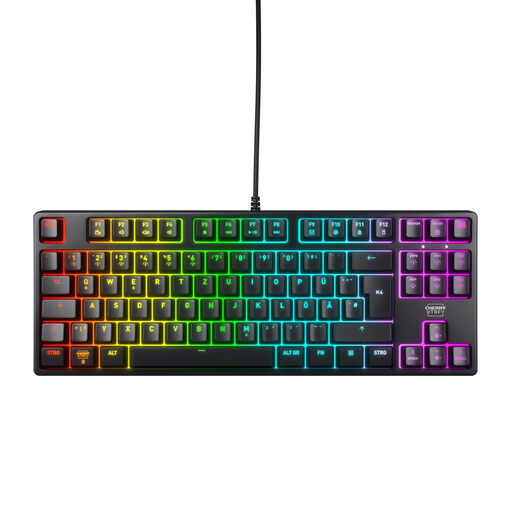
Why This Fits Their Persona: This keyboard combines robust build quality with high-end components for long-term durability. The space-saving TKL keyboard design and reliable switches make it a perfect tool for both gaming and productive work.
It solves the two biggest problems directly: it is available in the correct regional QWERTY layout and uses proven CHERRY MX2A red switches, which are renowned for their durability and consistent quality. No guesswork on layout or switch quality.
Extremely durable CHERRY MX2A switches (>100M actuations). Sturdy construction with a metal plate. N-Key Rollover and 1000 Hz polling rate for precise inputs.
We have compiled a complete, real-time list of products that fully satisfy these strict selection criteria and UK safety regulations.
What is the difference between red, blue, and brown switches? The main difference lies in the typing feel and sound profile. Red switches are linear and quiet, ideal for fast-paced gaming. Blue switches are tactile and produce a loud click, which many people appreciate for typing. Brown switches are the middle ground: tactile but quiet, making them good all-rounders for gaming and office work.
How long does a mechanical gaming keyboard last? The lifespan is largely determined by the quality of the switches. High-quality switches, like those from CHERRY MX, are often rated for over 50 or even 100 million keystrokes. With normal use, a well-built mechanical keyboard can last for many years, significantly longer than conventional rubber-dome keyboards.
Is a wireless gaming keyboard suitable for competitive play? Yes, modern wireless technologies are absolutely competitive. A wireless gaming keyboard with a 2.4 GHz radio connection offers a signal rate (polling rate) of 1000 Hz or more, which corresponds to a latency of 1 millisecond—identical to wired models. Bluetooth connections tend to have higher latency and are better suited for casual gaming or office tasks.