
Lieferung heute & morgen

Qualitätsgarantie

Willkommens-Angebote freischalten: KOSTENLOSE Lieferung | Bis zu 80 % RABATT | Kostenlose 30-Tage-JoyPlus-Testphase
App herunterladen
For many PC gamers, a mechanical gaming keyboard is a cornerstone of their setup. However, the market is saturated with marketing buzzwords and technical specs that make an informed decision difficult. Instead of falling for empty promises, it's crucial to understand the features that genuinely impact performance and user experience. This guide will help you navigate common pitfalls and find a keyboard that truly meets your needs.
When searching for the right model, buyers often encounter the same issues, leading to disappointment and unnecessary expense.
To make an informed choice, focus on the following technical parameters that have a direct impact on your keyboard's performance and longevity.
Mechanical switches can be broadly divided into three categories:
An increasingly important feature is the hot-swap keyboard. This allows you to change the mechanical switches without soldering. It offers tremendous flexibility to customise the typing feel, replace individual faulty switches, or mix and match switch types for different keys (e.g., linear switches for WASD, tactile for others).
The Polling Rate, measured in Hertz (Hz), indicates how often the keyboard reports its status to the computer. While 1000 Hz has long been the standard for gaming peripherals, modern keyboards now offer an 8000Hz polling rate. This reduces input lag to an absolute minimum—a tangible advantage in competitive games where every millisecond counts.
When it comes to connectivity:
The size of the keyboard directly affects the available desk space.
A premium construction method like the gasket mount keyboard is becoming increasingly popular. Here, the PCB with the switches is mounted on silicone gaskets instead of being screwed directly to the case. This provides a dampened, more flexible, and often quieter typing sound and feel.
Here are some recommendations tailored to specific user profiles that avoid the pitfalls mentioned above.
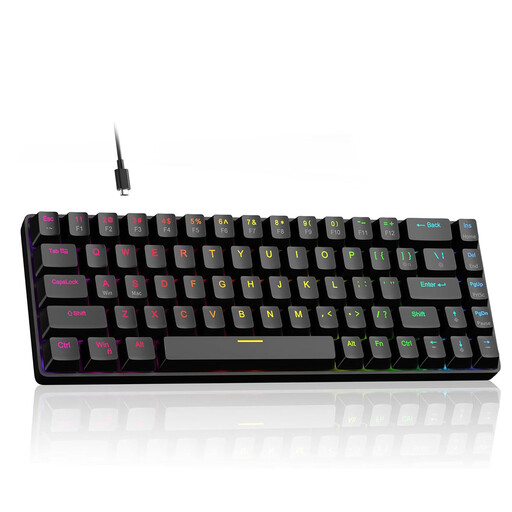
Why It's a Match: Engineered for maximum speed. The combination of Hall Effect magnetic switches, an adjustable actuation point, and Rapid Trigger technology enables instantaneous key responses that can provide the decisive edge in fast-paced games.
This model is more than just a "gaming" label. It delivers demonstrable performance features with its 8000Hz polling rate and customisable magnetic switches, directly targeting the needs of e-sports players.
Extremely low latency and customisable key response thanks to Rapid Trigger technology.
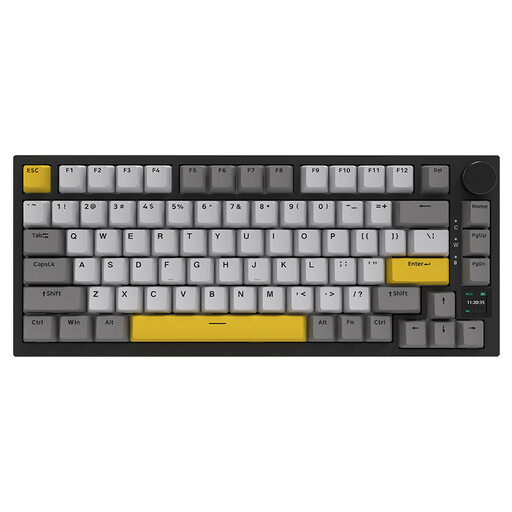
Why It's a Match: A versatile powerhouse. Its tri-mode connectivity (Wired, 2.4GHz, Bluetooth) offers maximum flexibility, while the gasket mount structure and dampening foams ensure a superior typing experience for both work and play.
It debunks the myth of slow wireless connections with a low-latency 2.4GHz mode. The gasket-mount structure is a genuine engineering feature for a better typing feel, not just an empty marketing term.
High flexibility through tri-mode connectivity and a premium typing feel thanks to its gasket-mount design.
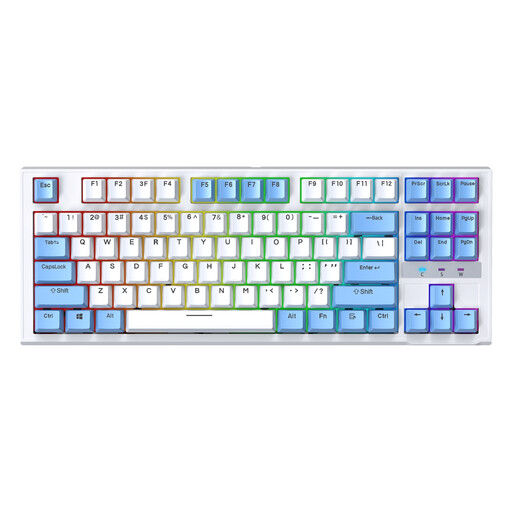
Why It's a Match: Delivers the core benefits of a mechanical keyboard at an accessible price point. The compact TKL keyboard layout is ideal for gaming setups, and its hot-swap capability offers a degree of future-proofing that is rare in this price range.
Instead of investing in expensive but often unnecessary extra features, this model focuses on the essentials: a solid mechanical feel and the valuable hot-swap feature for future upgrades.
Hot-swap capability in an affordable TKL format, ideal for entry-level users and future customisation.
We have compiled a complete, up-to-date list of products that fully meet these strict selection criteria.
What is the difference between a mechanical keyboard and a regular keyboard? The main difference lies in the technology beneath the keys. Regular keyboards (membrane keyboards) use a rubber dome sheet to press a contact on a circuit board. Mechanical keyboards use an individual, spring-loaded switch for every single key. This results in a more precise, consistent, and often more satisfying typing feel, as well as a significantly longer lifespan.
How long does a mechanical gaming keyboard last? The lifespan is often measured in millions of keystrokes per switch. Most mechanical switches are rated for 50 to 100 million actuations. With average use, a well-maintained mechanical keyboard can last for many years, often far longer than a conventional membrane keyboard. With a hot-swap keyboard, the lifespan can be virtually extended indefinitely by replacing individual switches.
Is a wireless gaming keyboard really fast enough for competitive gaming? Yes, as long as it uses the right technology. A wireless gaming keyboard with a dedicated 2.4GHz connection offers latency so low that it is practically indistinguishable from a wired connection. Many professional e-sports players now use wireless peripherals. However, you should be cautious with models that only offer Bluetooth as a wireless option, as the latency can be too high for demanding gaming.