
Lieferung heute & morgen

Qualitätsgarantie

Willkommens-Angebote freischalten: KOSTENLOSE Lieferung | Bis zu 80 % RABATT | Kostenlose 30-Tage-JoyPlus-Testphase
App herunterladen
A mechanical gaming keyboard can remain a reliable choice for gaming, programming or everyday typing for many years—provided its layout, switches and connectivity match your actual needs. However, eye-catching RGB effects or high polling rates often cause buyers to overlook more important details.
This buying guide from the Joybuy Product Recommendation Officer provides an objective overview of the relevant specifications and explains what users in Germany should consider before buying in 2026.
Many listings appear suitable at first glance but use a US QWERTY layout. German users will then lack, among other things, the familiar arrangement of “Z” and “Y”, certain special characters and often the ISO Enter key. A keyboard with a German layout should be explicitly labelled QWERTZ or “German Layout”.
Anyone who regularly writes German text, programmes or works in an office should not focus solely on the number of keys. Replacing the keycaps afterwards does not automatically change the operating system layout or the shape of individual keys.
The term “mechanical feel” may refer to a membrane or hybrid design. The MageGee TS91, for example, is described as offering a mechanical typing feel, while its product specifications also mention membrane technology. Anyone looking for a genuine mechanical keyboard should look for specific information about the switch type, hot-swap sockets and PCB.
Blue switches are also typically associated with a clearly audible clicking sound. This can be enjoyable while gaming, but may be distracting in shared spaces or an office.
A 2.4 GHz keyboard with a high polling rate may be interesting for certain games. However, its practical benefit also depends on the game, computer, connection and individual typing technique. A specification such as 8,000 Hz is therefore not, on its own, a sufficient reason to choose a keyboard.
For many users, a correct layout, reliable wireless switching, suitable switches and solid construction matter more than a single performance specification.
The form factor affects the number of keys, desk space and workflow:
For Germany, the designation QWERTZ keyboard or German ISO layout should be clearly stated in the technical specifications. For products with US QWERTY, it is advisable to check the operating system layout before buying.
Mechanical switches are commonly described as linear, tactile or clicky:
A hot-swappable keyboard allows compatible switches to be replaced without soldering. Compatibility is important: some PCBs accept both 3-pin and 5-pin switches, while others support only one type. The keyboard should be disconnected from power before changing switches; bent pins can damage the sockets.
A wired gaming keyboard does not require charging and provides a direct connection via USB or USB-C. This is practical for stationary PC setups and long gaming sessions.
A wireless mechanical keyboard, by contrast, can help keep the desk more organised. Bluetooth is often suitable for laptops, tablets and multiple devices, while 2.4 GHz generally connects through a USB receiver. With tri-mode models, buyers should check that all desired modes are actually supported and that a receiver is included.
A keyboard with RGB lighting, or an RGB keyboard, mainly changes the appearance and visibility of the keys. It does not replace clear key legends and, on its own, says nothing about durability.
PBT keycaps are listed for several products and are generally considered more resistant to developing a glossy finish than many ABS keycaps. This is a material characteristic, not a guarantee of a specific service life. Detachable wrist rests, adjustable feet and a volume control can make everyday use more comfortable. A gasket-mount keyboard uses elastic elements between the case and plate, which can create a softer typing feel. The specific effect depends on the overall construction.
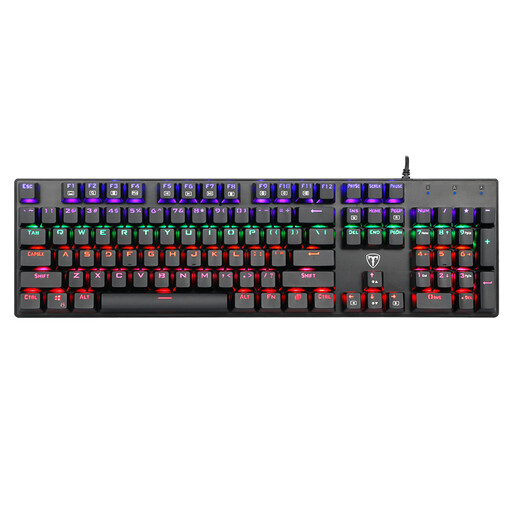
Why This Fits Their Persona: This full-size keyboard is aimed at beginners who need a number pad, RGB lighting and a wired connection for PC or Mac.
The specifications list 104 keys, blue switches and anti-ghosting. However, the layout is US QWERTY and should be checked against the user’s German workflow before buying.
104 keys, RGB backlighting, detachable keycaps and USB connectivity.
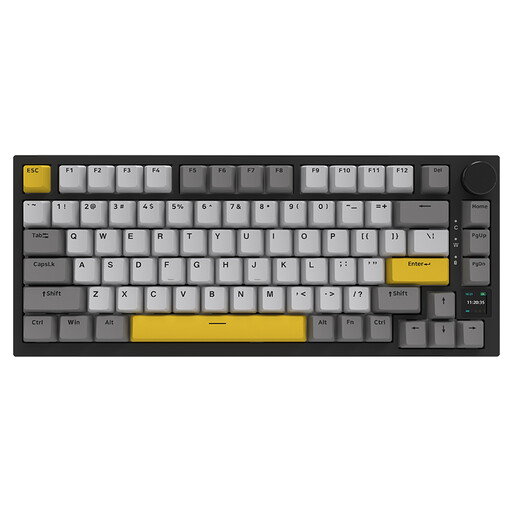
Why This Fits Their Persona: Suitable for users who want to combine a compact setup with multiple connection options, a volume control and customisable components.
The 75% form factor retains the arrow and function keys. Hot-swap support, gasket mounting and multiple connection options reduce reliance on a fixed configuration.
Bluetooth, 2.4 GHz and USB-C; TFT display, RGB lighting, PBT keycaps and hot-swap functionality.
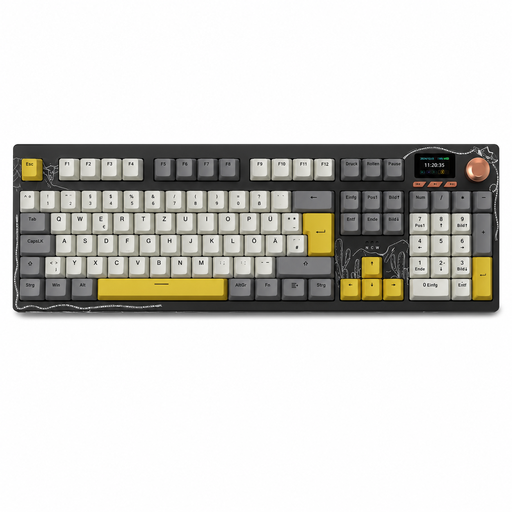
Why This Fits Their Persona: Designed for heavy typists, programmers, data entry and gaming at a German workstation when a number pad and flexible device connectivity are required.
The explicitly stated German QWERTZ layout avoids the common layout pitfall. The full-size arrangement integrates a number pad, function keys and navigation cluster.
Tri-mode connectivity, a 10,000 mAh battery according to the product specifications, TFT colour display, rotary control and hot-swap support.
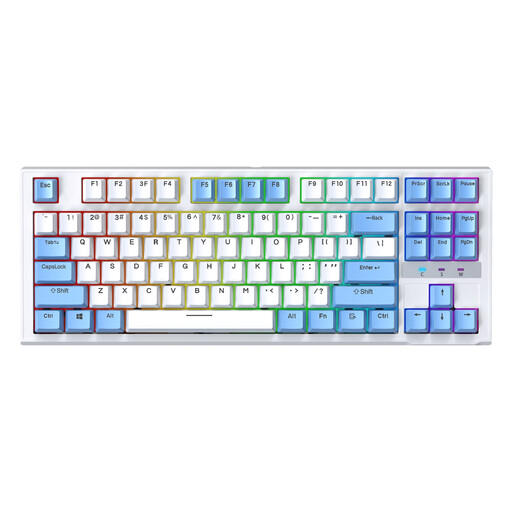
Why This Fits Their Persona: The TKL form factor is aimed at gamers and desk users who do not need a number pad and want more room for their mouse.
The product name clearly specifies 87 keys, wired operation and replaceable hot-swap switches. This makes the configuration easier to verify before buying.
TKL format, RGB backlighting, USB connectivity and hot-swap switches according to the product specifications.
We have put together a current selection of products that take these criteria into account and may be suitable for use in Germany.
Yes, provided the switches, noise level and layout are suitable. Linear or tactile switches can work well for extended typing. Clicky switches, on the other hand, produce a clearly audible sound. For German text, a QWERTZ keyboard with an ISO layout is generally more practical than a US model.
Service life depends on the switches, keycaps, electronics, usage and maintenance. Manufacturers sometimes specify millions of keystrokes; these figures should be understood as technical manufacturer ratings and are not a guarantee of actual service life. Dust, liquids and a heavily strained cable can shorten the keyboard’s lifespan.
Power consumption depends primarily on the wireless standard, battery capacity and lighting. RGB effects can reduce battery life. If you do not want to charge the keyboard regularly, choose a wired gaming keyboard. With wireless models, check the charging port, battery specifications and whether USB-C operation is supported.