
Lieferung heute & morgen

Qualitätsgarantie

Willkommens-Angebote freischalten: KOSTENLOSE Lieferung | Bis zu 80 % RABATT | Kostenlose 30-Tage-JoyPlus-Testphase
App herunterladen
A mechanical gaming keyboard can serve you well for gaming, writing and programming for many years. However, models differ considerably in terms of layout, switch technology, connectivity and expandability. An eye-catching gaming keyboard with RGB lighting is therefore not automatically suitable for every desk or use case.
Typical purchasing decisions fail on three points:
The form factor affects the amount of space required and the keys available:
For users in Germany, a QWERTZ keyboard is particularly relevant. Also check that the key legends actually match the German ISO layout. With a US layout, key positions and special characters may differ from the arrangement you are used to.
Mechanical switches determine the feel, sound and actuation force required. Linear switches such as the Red or Sea-Salt switches described for the AJAZZ AK820 model have no pronounced tactile bump. Tactile and clicky variants provide different feedback when pressed and can be louder.
A hot-swap keyboard allows you to change compatible switches without soldering. The manufacturer’s specification is crucial:
With a Hall Effect keyboard, magnetic sensors measure the position of the key press. A Rapid Trigger keyboard can configure actuation and reset based on key movement. This can be interesting for certain fast-paced games, but it is no substitute for practice, suitable settings and a stable connection. According to the product details, the AULA WIN60HE and MageGee keyboard are designed for magnetic Hall Effect switches. Ordinary mechanical switches must not be used in these keyboards.
A USB-C keyboard with a cable does not require a battery and offers a straightforward connection. A wireless mechanical keyboard, on the other hand, can connect via Bluetooth, 2.4 GHz or USB-C. For desktop use, check whether a receiver is included, which devices are supported and whether the keyboard can be used with a wired connection while charging.
The polling rate indicates how often inputs are reported to the computer. Figures such as 1,000 or 8,000 Hz may sound impressive, but should be considered in relation to the connection, system and game. For many users, a reliable USB connection, N-key rollover and well-designed firmware are more important than a peak figure on the specification sheet.
Other practical features include:
The following models meet different requirements. The details are based on the product information provided for each model.
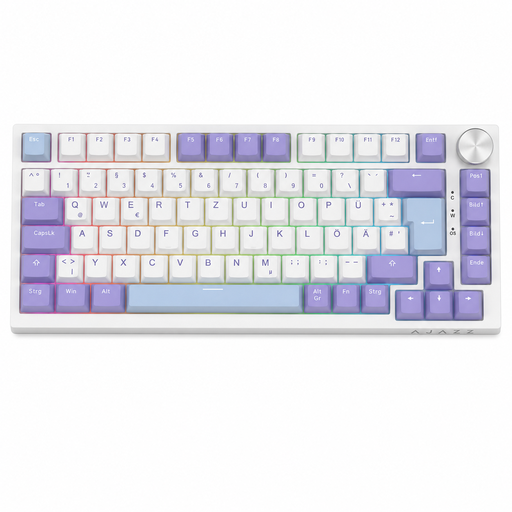
Why this product suits this profile: The German QWERTZ layout with 82 keys, USB-C connection and volume control is designed for gaming, working from home and everyday typing.
The German key arrangement reduces the risk of unsuitable key legends. Hot-swap sockets for compatible 3-pin switches allow later customisation without soldering.
75% form factor with function keys and arrow keys, RGB lighting, gasket construction and a detachable USB-C cable.
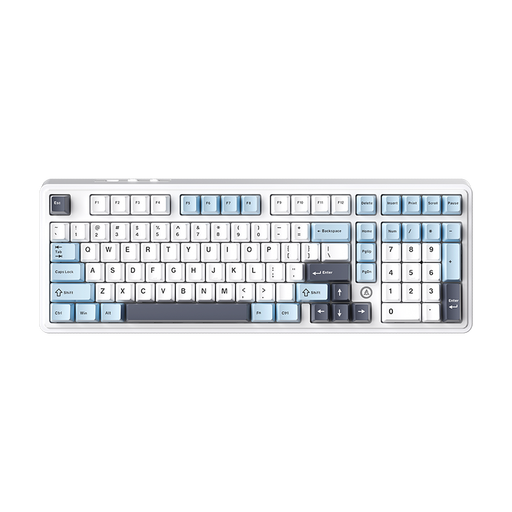
Why this product suits this profile: The 98% form factor combines a compact layout with a number pad and offers wired, Bluetooth and 2.4 GHz connectivity.
The three connection options avoid locking you into Bluetooth or a cable. According to the product details, the hot-swap PCB supports 3-pin and 5-pin switches.
97 keys, metal rotary knob, gasket structure, multi-layer dampening and, according to the product description, a large battery capacity.
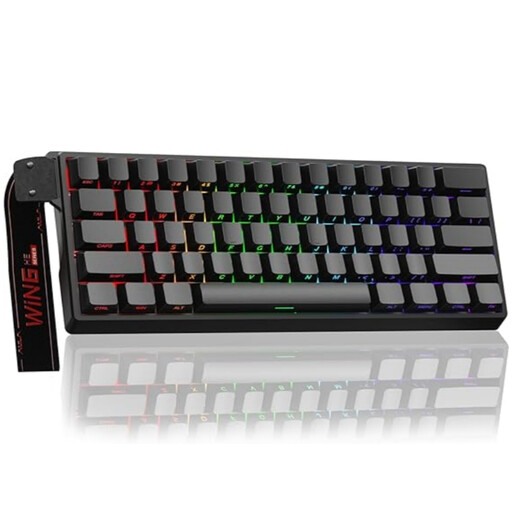
Why this product suits this profile: This compact keyboard is aimed at users who want to compare Rapid Trigger, adjustable actuation and a high polling rate in detail.
The product details explicitly specify magnetic Hall Effect switches. This makes it clear that ordinary 3- or 5-pin switches must not be used.
60% form factor, RGB lighting, USB-C cable and, according to the product details, adjustable actuation point and 8,000 Hz polling rate.
We have put together a complete, regularly updated list of products that fully meet these strict selection criteria and the safety regulations applicable in the EU.
Check the following before placing your order:
Its lifespan depends on the switches, keycaps, PCB, cleaning and usage. Manufacturer specifications such as 50 million keystrokes generally refer to specific switch components and are not a guarantee of the lifespan of the entire keyboard. A hot-swap keyboard can make maintenance easier because individual compatible switches can be replaced.
Yes, provided the volume, layout and form factor are right. Linear switches can be suitable for smooth, consistent typing, while clicky switches are often perceived as louder in shared spaces. A QWERTZ keyboard, volume control and programmable keys can make everyday work even easier.
That depends on the game and your personal settings. Rapid Trigger and an adjustable actuation point offer additional configuration options, but are not essential for every application. If you mainly write, programme or work with spreadsheets, you may benefit more from a suitable layout, comfortable switches and a full set of navigation keys.