
Lieferung heute & morgen

Qualitätsgarantie

Willkommens-Angebote freischalten: KOSTENLOSE Lieferung | Bis zu 80 % RABATT | Kostenlose 30-Tage-JoyPlus-Testphase
App herunterladen
A mechanical gaming keyboard can serve you for many years, whether you use it for gaming, programming or writing. But with so much choice, it’s easy to end up with the wrong one. Product names such as “Pro”, “Ultra Fast” or “Gaming Performance” tell you little about how well a keyboard will actually suit your needs. The key factors are the layout, switch technology, connection type and compatibility with your setup.
Models with an 8000 Hz polling rate theoretically check for new inputs more often than keyboards with a 1000 Hz rate. In practice, the difference depends on the game, hardware, software and how you use the keyboard. For many people, the right layout, reliable switches and a stable connection matter more than a single headline figure.
A keyboard may be advertised as having a “mechanical feel” but still use a membrane or scissor mechanism. For example, the MageGee TS91 is specifically described as having a membrane design with a mechanical typing feel. If you want to swap switches or customise how they actuate, you’ll need a genuinely mechanical hot-swappable keyboard.
A 60% keyboard saves space, but typically has no dedicated arrow, function or navigation keys. A 65% keyboard usually adds arrow keys, while a 75% keyboard also includes a function-key row. Before you buy, consider whether you regularly use the F keys, Home, End, Insert or a number pad.
For users in Germany, a QWERTZ keyboard is often the simplest choice. On a US QWERTY layout, for example, Y and Z are in different positions, and the special characters and Return key position also differ. You may notice this when writing in German, programming or using keyboard shortcuts on Windows and macOS.
With conventional mechanical switches, the design and characteristics determine whether the keystroke feels linear, tactile or clicky. A hot-swappable keyboard lets you replace compatible switches without soldering. Check the stated compatibility, such as 3-pin or 5-pin switches.
A Hall Effect keyboard uses magnetic sensing. On suitable models, you can adjust the actuation point in software. According to its product listing, the AULA WIN60HE is designed exclusively for magnetic Hall Effect switches; ordinary 3-pin or 5-pin switches must not be used. Features such as Rapid Trigger may appeal to FPS players, but depend on the software, firmware and game support.
A wireless mechanical keyboard can connect via Bluetooth, 2.4 GHz or USB-C. A tri-mode keyboard combines all three options. Bluetooth is often useful for tablets and multiple devices, while 2.4 GHz or a wired connection may be more practical for desktop gaming.
For RGB lighting, check whether you can control the effects directly from the keyboard, through Windows software or on macOS too. A wireless RGB keyboard also uses more power when the lighting is on. So, always consider battery-life claims alongside the lighting level they’re based on.

Why it suits this profile: This compact wired keyboard is designed for people short on desk space who want RGB lighting and a mechanical typing feel at an accessible price.
The product description clearly states that it has a membrane design with a mechanical feel. So buyers won’t expect it to have replaceable mechanical switches.
61-key layout, RGB modes, USB connection and stated IPX4 certification for the circuit board.
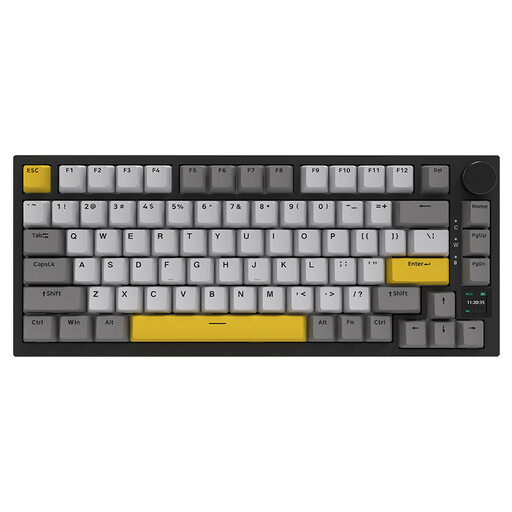
Why it suits this profile: The 75% layout combines a compact footprint with arrow and function keys. Tri-mode connectivity and hot-swap support give you flexibility when putting together your setup.
The connection options are clearly listed as USB, Bluetooth and 2.4 GHz. According to the product listing, the hot-swap socket supports both 3-pin and 5-pin switches.
4000 mAh battery, RGB lighting, volume control and compatibility with PCs, Macs, tablets and mobile devices.

Why it suits this profile: FPS players and anyone who wants to customise actuation can benefit from this compact Hall Effect keyboard with Rapid Trigger mode.
The product warning clearly states that it can only be used with magnetic Hall Effect switches. This helps prevent you from choosing incompatible switches.
60% layout, magnetic hot-swappable switches, adjustable actuation point, Rapid Trigger and a stated 8000 Hz polling rate.

Why it suits this profile: The German QWERTZ layout makes everyday use in Germany easier. Its 75% layout is suited to work, gaming and longer writing sessions.
The product is clearly listed as having a German QWERTZ layout, so buyers won’t need to make do with different keycaps afterwards.
Tri-mode operation, hot-swap support, RGB lighting, volume control and a stated 8000 mAh battery.
We’ve put together a comprehensive, regularly updated list of products that meet these strict selection criteria and fully comply with the safety regulations in force in the EU.
A 75% keyboard usually offers the best balance between saving space and being easy to use. For FPS gaming alone, a 60% or 65% keyboard may be enough. If you work with spreadsheets regularly, choose a model with a number pad or at least dedicated navigation keys.
Its lifespan depends on the switches, circuit board, cable, battery and how well you look after it. Dust and liquids can cause damage, whatever type of switch it uses. A hot-swappable keyboard can be easier to maintain if compatible replacement parts are available. On wireless models, the battery is also a consumable component.
Battery life usually falls when RGB lighting is left on, brightness is high and 2.4 GHz is used frequently. To make the battery last longer, dim or switch off the lighting. If you need the most predictable performance, connect via USB-C or choose a model with an easy-to-read battery indicator.