
Lieferung heute & morgen

Qualitätsgarantie

Willkommens-Angebote freischalten: KOSTENLOSE Lieferung | Bis zu 80 % RABATT | Kostenlose 30-Tage-JoyPlus-Testphase
App herunterladen
A mechanical gaming keyboard can provide reliable performance for many years when gaming, writing and working. However, choosing the right one is more challenging than RGB effects and high polling rates might suggest. With compact models in particular, the wrong layout, limited compatibility or unclear switch specifications can quickly lead to a disappointing purchase.
This buying guide explains which technical details really matter and which models suit different usage profiles.
A 60% gaming keyboard saves plenty of space, but usually omits separate arrow, function and navigation keys. These functions are then placed on a secondary layer and accessed using the Fn key. This may be sufficient for FPS games, but can reduce convenience when working with spreadsheets, programming or office applications.
A 65% gaming keyboard often adds arrow keys, while a 75% gaming keyboard also includes a row of function keys. If you regularly use F keys, Home, End or Insert, check the exact key layout before buying.
Many models sold internationally are US-layout keyboards with a QWERTY arrangement. For German users, this means that the familiar positions of “Z” and “Y”, as well as some German special characters, may be missing or different. A QWERTZ keyboard is generally more straightforward for German-language typing.
Important: changing the language settings in Windows or macOS does not change the labelling on the keycaps. If you are looking for a mechanical gaming keyboard with a German layout, look specifically for “QWERTZ”, “ISO-DE” or “German Layout”.
A polling rate of 8000 Hz means that the keyboard reports its input to the computer more frequently than a 1000 Hz model. This can be interesting in certain FPS scenarios, but requires suitable hardware and software. For office work or everyday gaming, factors such as switch feel, layout and build quality are often more important.
Terms such as “Rapid Trigger” and “Hall Effect” should not be assessed in isolation either. What matters is whether the actuation and reset points can be adjusted in software and whether these functions are compatible with the operating system you use.
Before buying, measure the available space on your desk. As a general guide:
Choosing a compact gaming keyboard can leave more room for your mouse. However, this advantage is lost if frequently used commands can only be accessed through key combinations.
Mechanical switches are often divided into three categories:
A hot-swap keyboard has replaceable switch sockets. This allows compatible 3-pin or 5-pin switches to be changed without soldering. Before buying, check whether the keyboard actually supports the pin configuration you want.
A Hall-effect keyboard uses magnetic detection. With suitable models, actuation points can be adjusted precisely in the software. A Rapid Trigger keyboard can register the key again as soon as it starts moving back up. This is particularly relevant for rapid direction changes in competitive games, but it is no substitute for practice, suitable settings and a stable connection.
A wired gaming keyboard does not require a battery and provides a constant USB connection. A detachable USB-C cable makes transport and replacement easier. A wireless mechanical keyboard, on the other hand, offers greater flexibility, but its battery capacity, charging time and connection methods should be checked.
When it comes to RGB, remember that a mechanical RGB keyboard, or a keyboard with RGB lighting, offers different lighting modes, but this alone says nothing about the quality of its switches or keycaps. For everyday use, PBT keycaps, N-key rollover and a stable stand are also relevant features. A volume control can make operation easier while gaming or working.
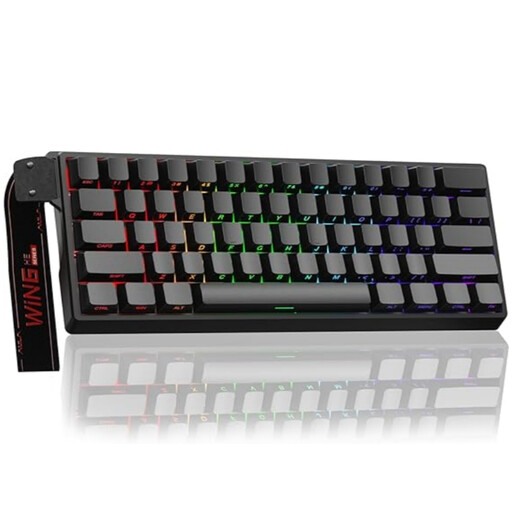
Why this product suits this profile: The 60% format is designed for smaller desks and FPS games. According to the product details, the magnetic switches are hot-swappable. Rapid Trigger, an adjustable actuation point and an 8000 Hz polling rate are also specified.
The product name explicitly mentions the magnetic switches and adjustable actuation. Nevertheless, check before buying whether the US layout or your preferred layout is available.
60% design, wired connection, magnetic hot-swap switches and a specified 8000 Hz polling rate.
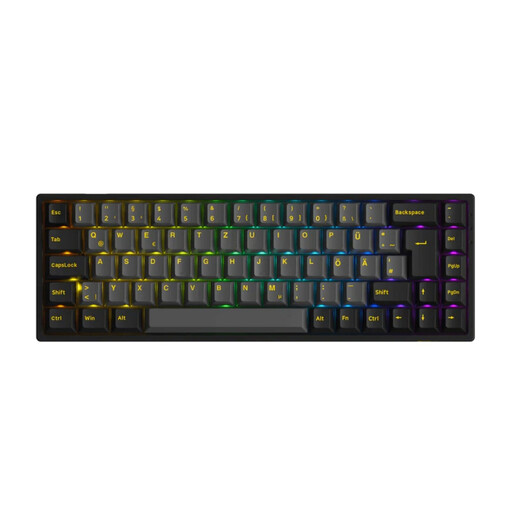
Why this product suits this profile: The 65% format combines arrow keys with a compact design. It can connect via Bluetooth 5.0, 2.4 GHz or USB-C. This model features an ISO-DE layout, RGB lighting and replaceable 3-pin and 5-pin switches.
The German ISO-DE layout reduces the risk of confusing it with a US-layout keyboard. The three connection options allow it to be adapted for desktops, laptops and mobile devices.
ISO-DE layout, tri-mode connectivity, RGB, hot-swap and 1000 Hz in wired and 2.4 GHz modes.
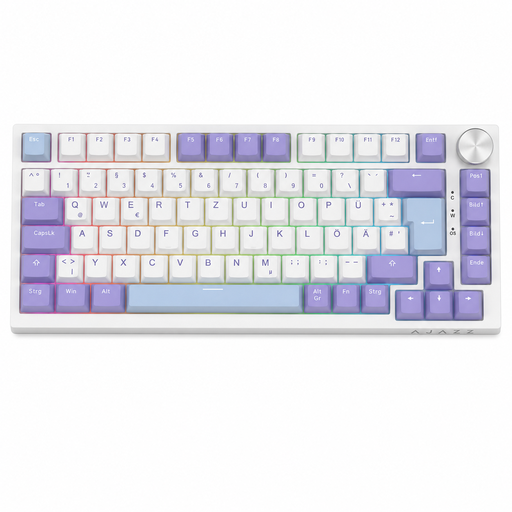
Why this product suits this profile: The 75% layout provides a function-key row, arrow keys and navigation keys in a width of approximately 327 mm. Gasket mount, hot-swap, RGB and a volume control appeal to prolific typists and gamers.
The QWERTZ layout caters to the German keyboard arrangement. The available standard keys reduce the need for many Fn combinations that can be inconvenient with 60% models in everyday office use.
German QWERTZ layout, 82 keys, USB-C cable, gasket mount, 3-pin hot-swap and volume control.
We have put together a complete, regularly updated list of products that fully meet these strict selection criteria and the safety regulations applicable in the EU.
60% or 65% models are often chosen for FPS games because they take up less space and leave more room to move the mouse. If you regularly use function keys or arrow keys, a 65% or 75% keyboard is generally more practical.
Its lifespan depends on the switch type, keycaps, electronics and usage. Manufacturer claims of up to several tens of millions of keystrokes generally refer to the switches. A hot-swap keyboard may remain usable for longer because individual faulty switches can be replaced. Liquids, dust and improper removal can shorten its lifespan regardless of these specifications.
A wireless mechanical keyboard requires energy for its wireless connection and lighting. RGB lighting can reduce battery life, while wired models do not require battery management. USB is often more straightforward for a permanent desktop setup; for multiple devices or a tidy desk, tri-mode connectivity may be more practical.