
Lieferung heute & morgen

Qualitätsgarantie

Willkommens-Angebote freischalten: KOSTENLOSE Lieferung | Bis zu 80 % RABATT | Kostenlose 30-Tage-JoyPlus-Testphase
App herunterladen
A mechanical gaming keyboard should provide precise inputs while gaming and remain comfortable for everyday use. For buyers in Germany, however, choosing the right model is not always straightforward. Important differences can easily be overlooked among 60% models, TKL keyboards, magnetic switches and eye-catching RGB lighting.
As a Joybuy Product Recommendation Officer, I filter the relevant product details and show you what really matters when making your choice.
Many compact keyboards are offered with a QWERTY US layout. The arrangement differs in places, including the “Y” and “Z” keys. Depending on the model, German special characters may also be missing or accessible only through key combinations. If you regularly write in German, look specifically for a QWERTZ gaming keyboard or “ISO-DE”.
A product can be compatible with Windows and Mac while still not having a German keyboard layout. Operating system compatibility and key layout should therefore be checked separately.
Some models use membrane or dome switches but advertise a “mechanical feel”. This may be sufficient for occasional gaming, but technically it is not the same as a mechanical keyboard. Look for specific information about the switch type, such as linear, tactile or magnetic switches.
With a hot-swappable keyboard, you should also check which sockets are supported. 3-pin and 5-pin switches are not automatically compatible with every PCB.
A mechanical keyboard with RGB offers customisable lighting, but RGB functionality alone says nothing about typing feel or build quality. A high polling rate is also mainly relevant for certain competitive gaming scenarios. It requires suitable hardware, software and a game in which very fast inputs make a practical difference.
With magnetic Hall effect switches, features such as an adjustable actuation point and Rapid Trigger are worth considering. For office work or strategy games, layout, noise levels and comfort are often more important than maximum technical specifications.
The size determines which keys are directly available:
If you spend a lot of time gaming with a mouse, a compact gaming keyboard can give you more room. Office users, on the other hand, should check whether frequently used keys are missing or can only be accessed through Fn combinations.
Linear switches move smoothly without a clearly noticeable actuation point. They are often chosen for fast-paced gaming inputs. Tactile switches provide noticeable feedback when actuated. Clicky switches produce additional noise and are not always suitable for shared spaces.
Depending on the model, magnetic switches allow you to adjust the actuation depth. This information should come directly from the product data sheet. A stated lifespan in keystrokes is a technical guideline, not a guarantee of a specific service life.
A wired gaming keyboard does not need to be charged and transmits inputs without wireless pairing. A detachable USB-C cable makes transport and replacement easier. A wireless mechanical keyboard gives you greater freedom of movement, but requires battery or rechargeable battery management.
With a keyboard for PC and Mac, check whether only the connection is supported or whether the key legends, special keys and software also work with both systems. Bluetooth, 2.4 GHz wireless and USB-C may offer different functions and polling rates depending on the model.
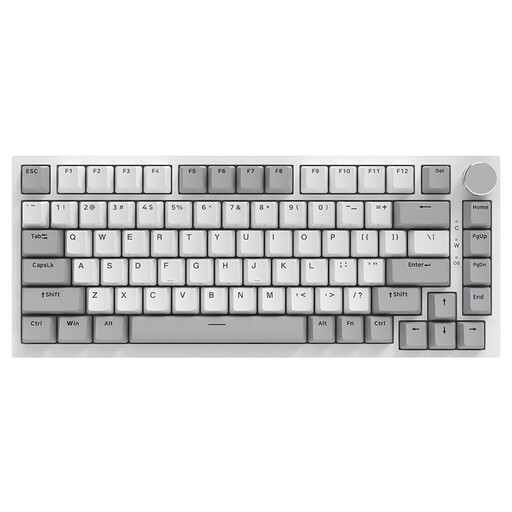
Why this product suits this profile: The 75% layout combines a compact form factor with arrow keys and function keys. The wired USB-C connection is straightforward and suitable for PC, Windows and Mac.
The product details explicitly state that this is a German QWERTZ model with hot-swap support and mechanical linear switches.
82 keys, a volume control, RGB lighting and a gasket-mount design according to the product description.
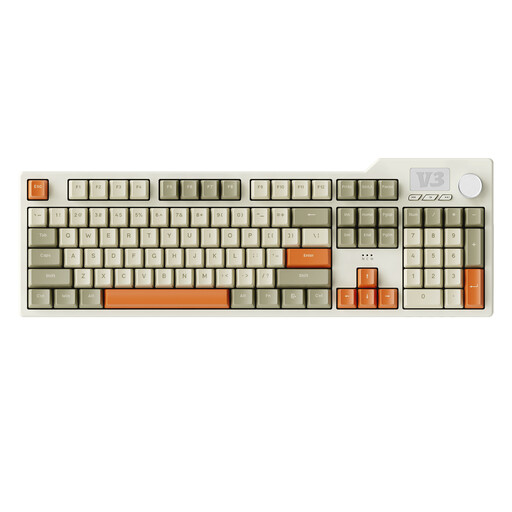
Why this product suits this profile: The full-size design with 104 keys and a number pad is suitable for office work, spreadsheets and gaming involving numerous standard commands.
The specifications list hot-swap support for 3-pin and 5-pin switches, as well as several sound-dampening materials. This means modifications can be made without soldering.
PBT keycaps, RGB and white lighting, plus volume and media controls via a slider.
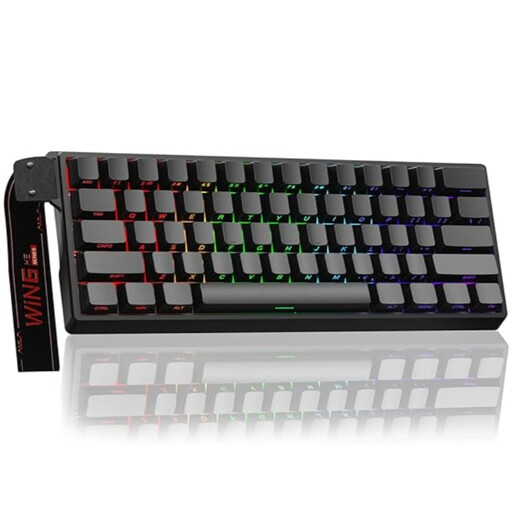
Why this product suits this profile: The compact 60% format is aimed at gamers who need plenty of room for mouse movements and are happy to use a US layout.
The product name indicates magnetic, hot-swappable switches, Rapid Trigger and a wired design. The layout should be checked carefully before purchase.
Adjustable actuation point, Rapid Trigger mode, RGB lighting and a stated polling rate of 8,000 Hz.
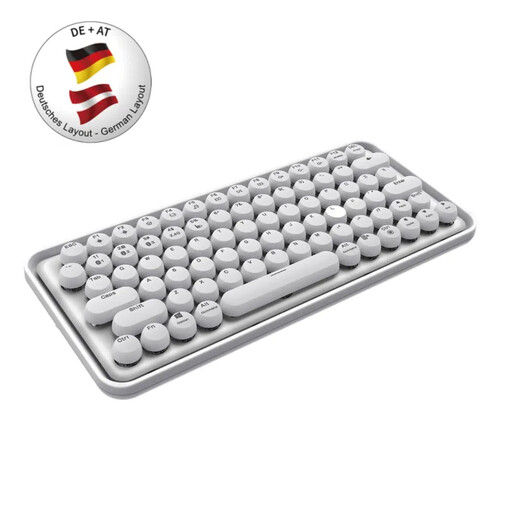
Why this product suits this profile: According to the product details, this QWERTZ keyboard supports Bluetooth 3.0, Bluetooth 5.0 and 2.4 GHz wireless, as well as Windows and Mac.
The German layout is explicitly listed. Nevertheless, before buying, you should check whether the desired connection and the stated mechanical design are suitable for your intended use.
Multi-device operation, an integrated battery, multimedia keys and a stated wireless range of up to 10 metres.
We have put together a complete, regularly updated list of products that fully meet these strict selection criteria and the safety regulations applicable in the EU.
Service life depends on the switch type, usage, dust, liquids and mechanical stress. Manufacturers often state a number of keystrokes. This figure serves as a technical guide and does not automatically describe the lifespan of the entire device.
Yes, provided the noise level, layout and form factor are suitable. Linear switches and sound-dampened cases may be better suited to shared spaces than clicky switches. For frequent numerical input, a full-size keyboard with a number pad is more practical than a 60% keyboard.
RGB mainly affects lighting and customisation. Polling rate describes how often the device reports its status to the computer. For most users, layout, switches, key availability, connection and ergonomic use should be considered first. Top technical specifications are relevant only when the rest of the hardware and the specific use case are suited to them.