
Lieferung heute & morgen

Qualitätsgarantie

Willkommens-Angebote freischalten: KOSTENLOSE Lieferung | Bis zu 80 % RABATT | Kostenlose 30-Tage-JoyPlus-Testphase
App herunterladen
A mechanical gaming keyboard can deliver precise input for gaming, typing and programming. However, a model with RGB lighting, lots of keys or a high polling rate won’t automatically be the right fit for your setup. The key differences often come down to layout, switch technology, connectivity and ease of maintenance.
An RGB gaming keyboard can add visual flair to your setup and make it easier to see the keys in low light. But the lighting says little about switch quality, input latency or durability. Also check whether you can adjust the brightness, control individual keys and use the software with your operating system.
When choosing a wireless mechanical keyboard, check whether it uses Bluetooth, 2.4 GHz wireless or USB-C. Bluetooth is often a good choice for a laptop, tablet or office use, while 2.4 GHz is designed for PC gaming. USB-C is a practical option for a direct connection without relying on a battery. A tri-mode keyboard combines all three connection types, but needs regular charging and a compatible USB receiver.
A 60% keyboard saves space, but usually does away with the function row, arrow keys and dedicated navigation keys. A 75% keyboard generally retains the function row and arrow keys, but leaves out the number pad. For office work, spreadsheets and programming, a 98% or full-size keyboard may be a better fit.
If you regularly write in German, look specifically for a QWERTZ keyboard. On US models with a QWERTY layout, for example, the ‘Z’ and ‘Y’ keys are in different places. Special characters and the Enter key may also be arranged differently. A German gaming keyboard with a QWERTZ layout means less adjustment and helps you avoid pressing the wrong key combinations.
Don’t just check the product name. Also look at:
Mechanical switches differ in how they feel and sound:
Lifespan figures, such as 50 million keystrokes, are manufacturer estimates, not a guarantee for every use case. Dust, liquids, heavy-handed typing and improper switch replacement can all shorten a keyboard’s lifespan.
A hot-swap keyboard lets you replace compatible switches without soldering. Check whether it supports 3-pin and 5-pin switches, and whether your new switches are mechanically and electrically compatible.
A gasket-mount keyboard suspends the plate inside the case using cushioning materials. Combined with layers of foam, this can give the keyboard a softer typing feel and reduce case resonance. However, this design is no substitute for well-tuned switches or stable stabilisers.
A keyboard with a volume control is handy for gaming, video calls and media playback. Before buying, check whether the control only adjusts the volume or also handles features such as muting, lighting and connection selection.
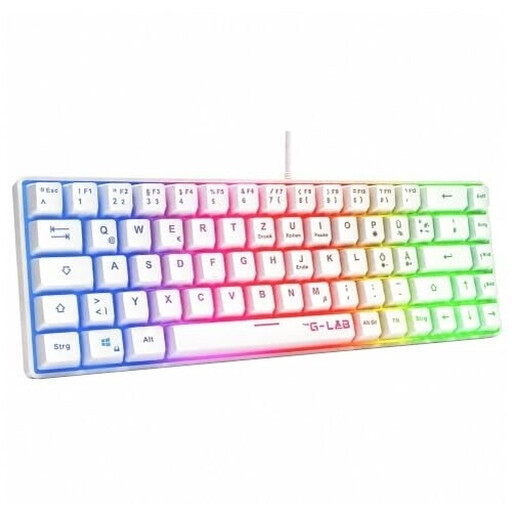
Why this product suits this profile: This wired 60% model is for users short on desk space who prefer a German QWERTZ layout. It’s a membrane keyboard with a mechanical-style typing feel, not a mechanical keyboard.
The product description clearly states that it has a membrane design, so it’s not confused with a keyboard using genuine mechanical switches. The USB connection works without a battery or pairing.
60% form factor, QWERTZ layout, rainbow RGB lighting and compatibility with PC, PS4, PS5 and Xbox.

Why this product suits this profile: This 65% model combines a German QWERTZ layout, low-profile MX Speed switches and three connection options for gaming and use with multiple devices.
The product details specify the layout, switch type and connection options, making it easier to look beyond RGB marketing alone.
2.4 GHz wireless, Bluetooth and USB-C; 69 keys; N-key rollover; customisable RGB lighting via CHERRY UTILITY.

Why this product suits this profile: This compact mechanical keyboard is designed for users who need arrow keys, function keys and a volume control, but can manage without a number pad.
The German layout is clearly specified. The wired USB-C connection means you don’t rely on a battery or wireless signal, while hot-swap supports compatible 3-pin switches.
82 keys, gasket-mount construction, five damping layers, Sea-Salt linear switches, RGB lighting and a rotary knob.

Why this product suits this profile: This 68-key model is aimed at FPS gamers looking for magnetic switches, Rapid Trigger and a short actuation point that they can fine-tune in the software.
The key gaming features are clearly stated: adjustable actuation from 0.2 to 4.0 mm and Rapid Trigger. Bear in mind that it has a US QWERTY layout.
Magnetic linear switches, 8000 Hz polling rate according to the product details, 65% form factor and detachable USB-C cable.
We’ve put together a complete, regularly updated list of products that meet these strict selection criteria and fully comply with the safety regulations in force in the EU.
If you regularly write in German, a QWERTZ layout is usually the easiest option. Also consider the size: a 75% keyboard has arrow and function keys, while 65% models are even more compact. With US QWERTY models, you may need to adjust the key mapping and special characters in the software.
Lifespan depends on the switches, keycaps, how you use the keyboard and how well you look after it. Manufacturers often quote figures in the tens of millions. These refer to defined switch cycles, not the keyboard as a whole. Liquids, harsh cleaning, bent pins during hot-swap replacements and consistently heavy typing can all affect durability.
Power consumption depends mainly on RGB brightness, battery capacity and connection type. Lighting can significantly reduce battery life. If you want to work for longer between charges, dim the RGB or switch it off temporarily. For a fixed PC setup, a wired mechanical gaming keyboard is the simpler option.