
Lieferung heute & morgen

Qualitätsgarantie

Willkommens-Angebote freischalten: KOSTENLOSE Lieferung | Bis zu 80 % RABATT | Kostenlose 30-Tage-JoyPlus-Testphase
App herunterladen
A mechanical gaming keyboard can be used for many years for gaming, writing and programming. However, eye-catching RGB effects, high polling rates and terms such as “gaming performance” do not automatically lead to the right buying decision. Layout, switches, connectivity and your actual usage are what really matter.
Many attractively priced models come with a QWERTY US layout. The key arrangement differs in several ways, including the positions of Z and Y, umlauts and special characters. This may not be an issue for occasional gaming. However, if you write in German, programme or work in an office, you should specifically look for a QWERTZ keyboard.
Changing your operating system layout does not alter the different keycap labelling. Always check the product images and technical details before ordering.
Some compact models are advertised as offering “Mechanical Feel”. They may use a membrane or hybrid construction. This is not necessarily a disadvantage, but technically it is not the same as a traditional mechanical keyboard with an individual switch for each key.
If you want to replace switches, adjust the actuation feel or use different keycaps, you need a genuine hot-swappable keyboard with compatible mechanical switches.
A gaming keyboard with RGB lighting looks striking in product images. For everyday use, however, features such as a detachable USB-C cable, the number of keys, volume control and the accessibility of the arrow or function keys are also important.
A 60% keyboard saves space, but usually omits separate arrow, navigation and function keys. A 75% keyboard provides these sections in a more compact format. A TKL keyboard without a number pad offers many users a good balance between comfort and extra room for the mouse.
Also pay attention to the dimensions of the case. A model with a compact layout is not necessarily narrow if the case has wide edges or a large frame.
Linear switches offer a smooth key travel without a perceptible tactile bump. Tactile switches provide noticeable feedback when actuated. Clicky switches also produce a distinct sound and are not always suitable for shared spaces.
With a hot-swappable keyboard, compatible switches can be changed without soldering. Pin compatibility is important: depending on the PCB, the keyboard may support 3-pin or 5-pin switches, for example. The term “hot-swappable” therefore does not mean that every switch will fit.
A Hall Effect keyboard uses magnetic sensors instead of traditional contacts. With a rapid trigger keyboard, actuation can be configured according to the movement of the key. This is particularly interesting for users who want to control quick changes of direction precisely in compatible games. Make sure that the software and the settings you want are actually supported.
A wired keyboard does not require a battery and transfers inputs directly via USB. A wireless mechanical keyboard, on the other hand, can connect via Bluetooth or a 2.4 GHz receiver. Tri-mode models often combine Bluetooth, 2.4 GHz and USB-C.
For PC and Mac, you should assess compatibility based on more than just the operating system. Special keys, software support and the physical keyboard layout may also differ. If you switch between devices every day, choose a mechanical keyboard for PC and Mac with documented multi-device support.
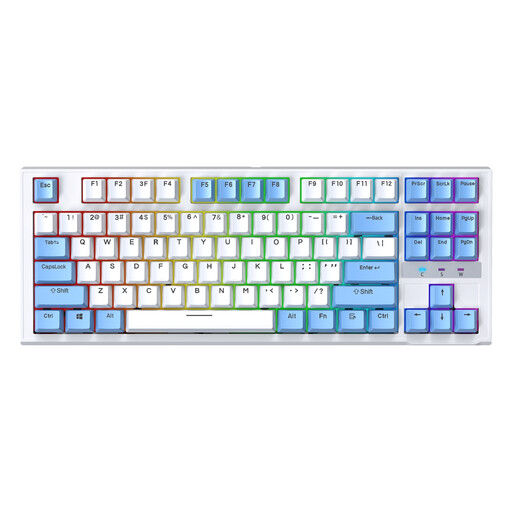
Why this product suits the profile: The TKL format leaves out the number pad, creating more room for the mouse. The wired design is straightforward for a stationary PC or Mac workstation.
The product name explicitly mentions mechanical switches, hot-swap support and RGB lighting. The US layout should be taken into account before buying.
87 keys in a TKL format, replaceable switches and RGB backlighting.

Why this product suits the profile: The German QWERTZ layout, a volume control and 82 keys cover gaming, office work and extended typing sessions.
The QWERTZ layout reduces the adjustment period for German-speaking users. Hot-swap sockets are specified for compatible 3-pin switches.
75% layout, PBT keycaps, RGB lighting, USB-C cable and CNC volume knob.
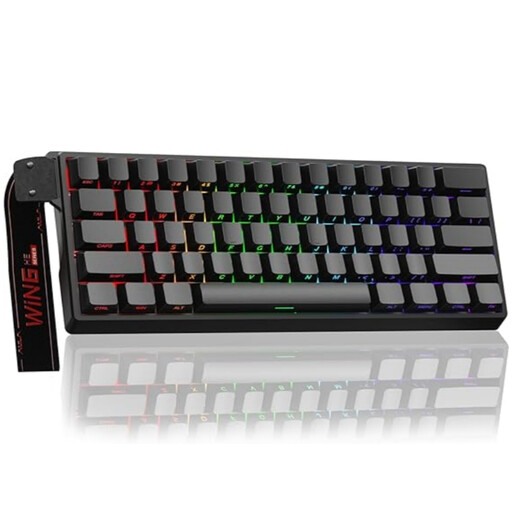
Why this product suits the profile: This keyboard is designed for users looking for a compact 60% format with Hall Effect switches, an adjustable actuation point and rapid trigger mode.
The product details explicitly identify Hall Effect switches. These are not interchangeable with standard 3- or 5-pin switches.
Adjustable actuation, rapid trigger mode, 8,000 Hz polling rate and RGB lighting.
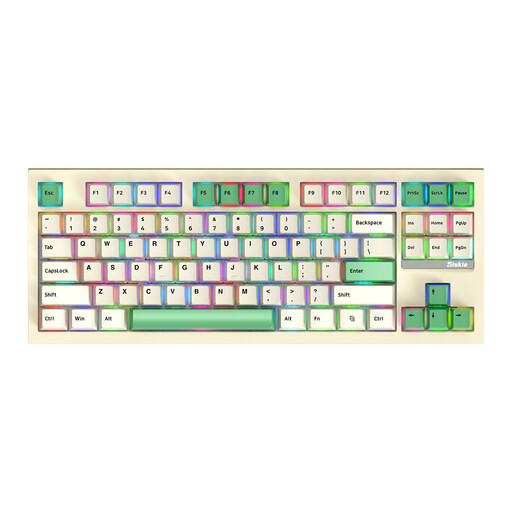
Why this product suits the profile: The 87-key TKL format combines Bluetooth, 2.4 GHz and USB connectivity for flexible use with different devices.
The three connection methods are clearly specified. Nevertheless, you should check the battery life in the product description before buying.
87 keys, hot-swap function, RGB lighting, plus Bluetooth, 2.4 GHz and USB connectivity.
We have put together a complete, regularly updated list of products that fully meet these strict selection criteria and the safety regulations applicable in the EU.
Yes, provided that the volume and switch type suit your workplace. Linear or tactile switches are often quieter than clicky versions. A keyboard with a volume control, QWERTZ layout and separate function keys can make everyday work easier.
Its lifespan depends on the switches, keycaps, cleaning and usage. Individual product specifications may state up to 50 million keystrokes, for example. This figure is provided by the manufacturer and is not a guaranteed period for the device as a whole. Hot-swappable models can be adjusted more easily if a switch is faulty or does not suit your preferences.
Power consumption depends mainly on the RGB lighting, wireless standard and battery capacity. Bluetooth or 2.4 GHz models need to be charged regularly. A wired keyboard does not require separate battery maintenance, but it does remain tethered to a USB port.