
Lieferung heute & morgen

Qualitätsgarantie

Willkommens-Angebote freischalten: KOSTENLOSE Lieferung | Bis zu 80 % RABATT | Kostenlose 30-Tage-JoyPlus-Testphase
App herunterladen
A mechanical gaming keyboard can be a great addition to your setup for gaming, programming and writing. However, models vary considerably in layout, switch technology, connectivity and customisation options. If you focus only on RGB lighting or a high polling rate, you can easily overlook important details.
Some gaming keyboards promise a mechanical typing feel but use a membrane or hybrid design. That’s not necessarily a drawback, but it isn’t technically the same as a traditional mechanical keyboard with individual mechanical switches. So check the product description carefully:
For example, the MageGee TS91 is described as having a “mechanical feeling” and uses a membrane design. It may be worth considering if you’re new to mechanical-style keyboards, but it shouldn’t be mistaken for a fully mechanical gaming keyboard.
Many compact models have a US QWERTY layout. The key arrangement differs from the QWERTZ keyboard commonly used in Germany. Switching layouts can be inconvenient in the office or when writing longer texts, particularly for the Y and Z keys, umlauts, special characters and certain key combinations.
US QWERTY may be fine for gaming with English-language software or for international use. But if you regularly write in German, choose a German QWERTZ keyboard or check before buying that you can reliably change the operating system’s keyboard layout.
Figures such as 8,000 Hz or particularly short actuation distances are mainly relevant in certain competitive gaming situations. They don’t automatically make a keyboard the right choice for everyone. Your software, game and system may also need to support a high polling rate.
For many buyers, the right layout, comfortable switches, a stable connection and straightforward controls matter more than headline performance figures.
The size affects how much desk space the keyboard takes up and how easy it is to reach important keys:
A compact gaming keyboard can free up more room for your mouse. For spreadsheet work, bookkeeping or frequent number entry, a full-size or TKL keyboard may be more practical.
Linear switches move smoothly and are often chosen for fast inputs. Tactile switches provide noticeable feedback as you press a key. Clicky switches make a clearly audible sound, which can be distracting in a shared office or during streams.
A hot-swap keyboard has sockets for replaceable switches. Check whether it supports 3-pin or 5-pin switches and whether the replacement switches you want are compatible. This lets you adjust the keyboard to suit your typing preferences later, without soldering in the switches.
A wired keyboard doesn’t need a battery and gives you a consistent connection. A wireless mechanical keyboard offers more flexibility, but needs charging or batteries. Tri-mode models combine USB-C, Bluetooth and 2.4 GHz wireless.
Extra features such as an RGB keyboard, programmable keys, N-key rollover or a keyboard with a volume control should suit the way you actually use it. RGB lighting can make the keys easier to see in a dark room, but it’s no substitute for the right layout or switches.

Why it suits this profile: The 61-key layout takes up little space and offers RGB lighting and a wired connection for PC and Mac. However, the description specifies a membrane design with a mechanical feel.
The product details make it clear that this differs from a traditional mechanical keyboard. This helps buyers make a more realistic assessment of its value for money.
60% layout, RGB modes, 400 g weight and support for Windows, Mac, PS4 and Xbox One, according to the product details.
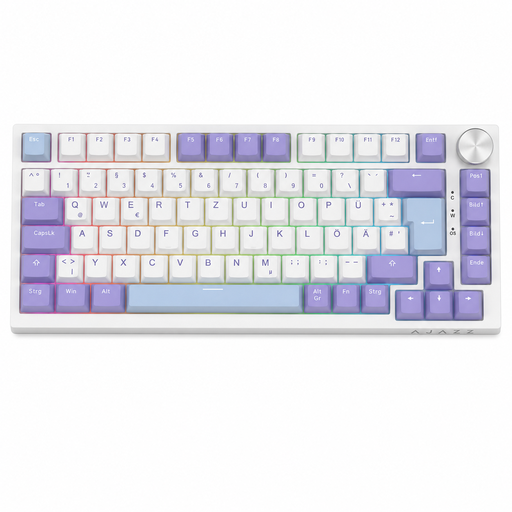
Why it suits this profile: The 82-key layout combines arrow and function keys with a compact case. The German QWERTZ layout is designed for local office work, typing and gaming.
The layout is explicitly identified as QWERTZ. Hot-swap, USB-C and a documented key count also make it easier to check the technical details before buying.
QWERTZ layout, 75% form factor, hot-swap, RGB lighting, volume control and five layers of sound dampening, according to the product description.

Why it suits this profile: The 68-key form factor is aimed at users who need room for wide mouse movements in FPS games and want to use magnetic switch features.
The specifications list Hall Effect switches, an adjustable actuation distance of 0.2 to 4.0 mm and Rapid Trigger. These are more specific than a general claim of fast response.
Magnetic switches, Rapid Trigger, 8,000 Hz polling rate, detachable USB-C cable and Windows/macOS compatibility, according to the manufacturer.

Why it suits this profile: The 75% layout, three connection options and hot-swap make it a good fit if you switch between a gaming PC, laptop and other devices.
Wired, Bluetooth and 2.4 GHz wireless are listed separately. This makes it easy to check in advance whether your preferred device and connection mode are supported.
Tri-mode connectivity, 4,000 mAh battery, 3-/5-pin hot-swap, RGB lighting and a multi-function knob, according to the product description.
We’ve put together a complete, regularly updated list of products that meet these strict selection criteria and fully comply with the safety regulations in force in the EU.
A 75% keyboard is a good middle ground: it keeps the arrow and function keys while taking up less space than a full-size keyboard. A 60% keyboard is best suited to users who are comfortable using Fn combinations. If you enter numbers frequently, consider whether you need a number pad.
Its lifespan depends on the switch type, case, keycaps, how often you use it and how well you look after it. Figures such as “50 million keystrokes” are manufacturer ratings for specific switches, not a guarantee of the lifespan of the entire keyboard. Dust, liquid and damaged hot-swap sockets can shorten its usable life. Clean the device only as instructed, and disconnect it from the power supply first.
Power consumption mainly depends on the RGB lighting, wireless standard and battery capacity. Turning the lighting off or dimming it will typically extend battery life. A wired gaming keyboard may be more practical for regular gaming at a fixed PC, while tri-mode models offer greater flexibility across multiple devices.