
Lieferung heute & morgen

Qualitätsgarantie

Willkommens-Angebote freischalten: KOSTENLOSE Lieferung | Bis zu 80 % RABATT | Kostenlose 30-Tage-JoyPlus-Testphase
App herunterladen
A mechanical gaming keyboard should respond quickly, feel comfortable to type on and take up as little desk space as possible. In practice, however, poor purchases are caused not only by technical details, but also by unclear product specifications. Buyers most often overlook the keyboard layout, the actual wireless technology and whether the switches can be replaced.
This buying guide from the Joybuy Product Recommendation Officer helps you assess marketing claims objectively and choose the right keyboard for gaming, office work, programming or mobile devices.
Many compact models are offered with a QWERTY US layout. This means the key positions differ from those on a German QWERTZ keyboard. That is often not a problem for gaming, but it can be annoying when typing German text or using programming shortcuts.
Before buying, you should therefore check:
A wireless mechanical keyboard can connect via Bluetooth, 2.4 GHz or both options. Bluetooth is often suitable for tablets, smartphones and notebooks. A 2.4 GHz keyboard with a USB receiver, on the other hand, is a practical option for a direct wireless connection on compatible PCs and laptops. For maximum predictability, USB-C cable operation remains relevant.
Look for a clearly specified tri-mode keyboard with:
Also check whether the receiver is included and how you switch between devices.
An RGB keyboard with high brightness, animations or reactive lighting effects uses more energy than a keyboard without lighting. Manufacturers’ battery-life claims should therefore always be considered in conjunction with the lighting and connection method.
A large battery capacity is not the only indicator of quality, either. The charging port, battery-level indicator and ability to continue using the keyboard via cable while it is charging are equally important.
The 75% layout usually has around 80 to 84 keys. It retains the arrow keys and a function row, while taking up less space than a keyboard with a full number pad. A compact keyboard of this size is therefore suitable for gaming, working from home and programming.
A 65% layout saves even more space, but often does without the top row of function keys. When choosing, consider the following:
Mechanical switches differ in factors such as actuation force, sound and actuation characteristics. Linear switches move smoothly, while tactile variants provide feedback at the actuation point. The term “gaming” alone says nothing about the preferred switch characteristics.
A hot-swap keyboard allows compatible switches to be replaced without soldering. Check whether the PCB supports 3-pin and 5-pin switches. The included tools, the switches’ design and the availability of suitable replacement parts are also relevant.
PBT keycaps are often chosen for their material properties. On many models, they are more resistant to developing a shiny, worn appearance than ABS keycaps. Even so, the profile, surface and lettering method all affect the typing feel.
Useful additional features may include:
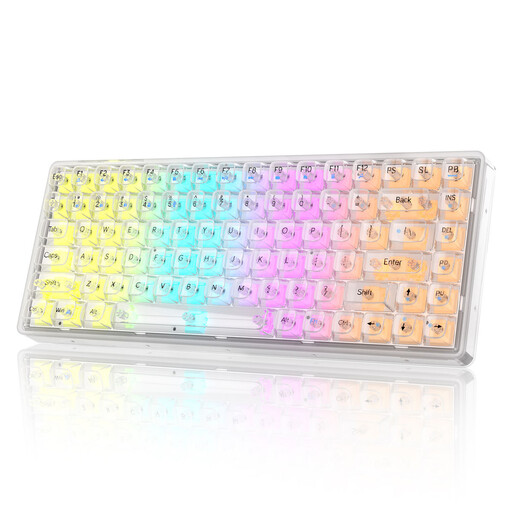
Why this product suits this profile: This model combines a compact design with RGB lighting and wired, Bluetooth and 2.4 GHz connectivity. The QWERTY US layout should be checked carefully before buying.
All three connection options are clearly specified. This means the keyboard is not limited to Bluetooth or wired operation.
Transparent PBT keycaps, RGB lighting and Crystal Switches; supports PC, Windows and macOS according to the product specifications.
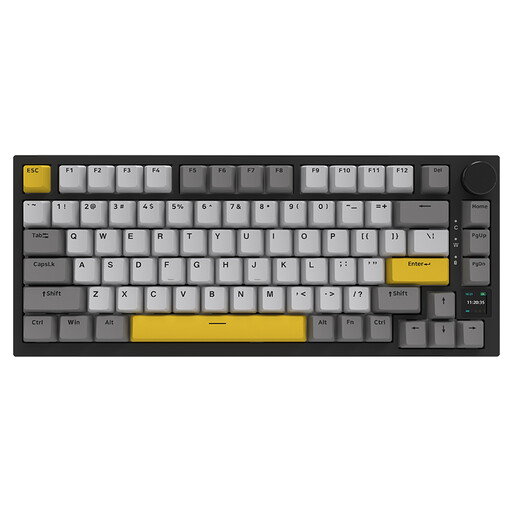
Why this product suits this profile: The 75% layout combines compact dimensions with arrow and function keys. An TFT display, hot-swap support and a rotary knob appeal to users who want to customise their keyboard.
The specifications list Bluetooth 5.1, 2.4 GHz and USB-C, along with hot-swap functionality. This clearly describes both the connection methods and the option to customise the switches later.
4000-mAh battery, RGB lighting, PBT keycaps, gasket-mount structure and compatibility with Windows and macOS according to the product description.
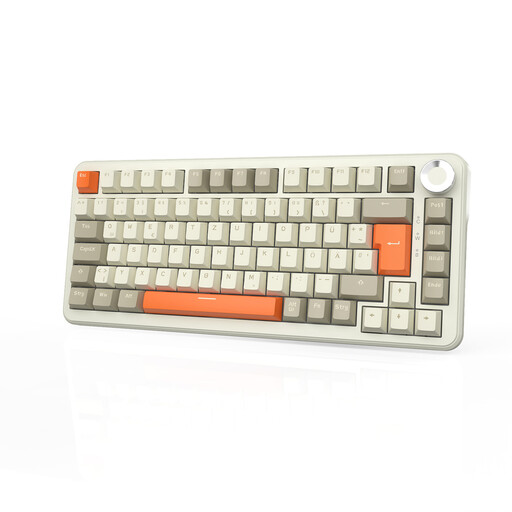
Why this product suits this profile: This model is aimed at users specifically looking for a German QWERTZ layout, wireless use and options for customisation.
The product name explicitly states that it has a German QWERTZ layout. Tri-mode connectivity and hot-swap switches are also specified.
8000-mAh battery, 75% layout, PBT keycaps, RGB lighting and volume control according to the product specifications.
We have put together a complete, regularly updated list of products that fully meet these strict selection criteria and the safety regulations applicable in the EU.
Models with clearly stated Windows and macOS compatibility, as well as an operating-system switch, are practical. With QWERTY models, remember that the physical key labels do not match the German QWERTZ standard.
Its lifespan depends on the switches, keycaps, battery, case and usage. Mechanical switches can be replaced if the keyboard has a hot-swap PCB. This allows a single worn switch to be replaced without replacing the entire keyboard.
Yes, activated lighting generally uses more energy than switched-off LEDs. Brightness, animations, wireless mode and frequency of use all affect the actual battery life. If you want to work wirelessly for longer, dim the lighting or switch it off temporarily.