
Lieferung heute & morgen

Qualitätsgarantie

Willkommens-Angebote freischalten: KOSTENLOSE Lieferung | Bis zu 80 % RABATT | Kostenlose 30-Tage-JoyPlus-Testphase
App herunterladen
A mechanical gaming keyboard can make a real difference when you’re gaming, programming or typing. But product descriptions can also lead to the wrong purchase: a high polling rate tells you little about how a keyboard feels to type on, RGB lighting can’t make up for poor build quality, and a US layout can quickly become impractical for everyday use in Germany.
This buying guide explains which specifications really matter and which models suit different types of users.
Many budget wireless gaming keyboards use a QWERTY keyboard layout based on the US standard. The Z and Y keys are swapped, and depending on the model, German special characters or a suitable Enter key may be missing. This may not matter for gaming, but it can be inconvenient when typing, programming or working on Windows or macOS.
If you work in Germany regularly, look specifically for a QWERTZ keyboard, an ISO-DE version or German key legends. You can change the software layout on QWERTY models, but the legends printed on the keys will stay the same.
The sound depends on more than the switches. The case, stabilisers, plate, keycaps and sound-dampening material all affect the result. A linear switch may actuate smoothly, but a hollow case or rattling stabilisers can make the keyboard noisier.
That’s why features such as a gasket-mount keyboard, multiple layers of foam or pre-lubricated switches are worth looking out for. They’re useful design features, but they don’t guarantee a particular noise level in every environment.
A wireless mechanical keyboard can connect via Bluetooth, 2.4 GHz or USB-C. Bluetooth is often a good choice for laptops, tablets and smartphones. A 2.4 GHz keyboard with a USB receiver is worth considering for a desktop PC and gaming, as the connection is designed for low latency. Wired mode also means you don’t have to rely on the battery charge.
When buying a tri-mode keyboard, check that it really offers all three connection types, how many devices it can save and whether the receiver is included.
The size determines how much desk space the keyboard takes up and which keys it has:
A full-size keyboard is useful for spreadsheets, data entry and certain workflows. For FPS games, smaller desks and mobile workstations, a 65% or 75% model may be more practical.
Linear switches move without a noticeable tactile bump. Tactile switches provide feedback you can feel when they actuate, while clicky switches also make a distinct clicking sound. The right choice depends on your typing style and surroundings.
A hot-swap keyboard lets you replace compatible switches without soldering. Check whether it supports 3-pin and 5-pin switches. Magnetic switches have different technical requirements. Models with adjustable actuation points may let you set the activation point between 0.1 and 2.0 millimetres, for example. This feature is particularly useful if you want to fine-tune actuation for gaming or typing.
PBT keycaps are considered more resistant to the shine that can develop with use than many ABS keycaps. However, the material alone doesn’t tell you anything about the profile, legends or compatibility. On RGB models, also check whether the legends allow the lighting to shine through.
Useful extras include a volume dial, programmable keys, macros and onboard profile storage. A display, found on some models, can show the connection mode, battery level or lighting settings. For everyday use, the key thing is whether the accompanying software works with Windows or macOS.

Why this product suits this profile: The 81-key layout saves space and combines a US QWERTY layout with wired, Bluetooth and 2.4 GHz connectivity. It’s a good fit if you’re looking for a compact keyboard for your PC, laptop and mobile devices.
All three connection types are explicitly listed. Support for hot-swappable 3-pin and 5-pin switches makes it easy to customise the keyboard later without soldering.
75% layout, 4000-mAh battery, RGB lighting and multifunction dial; support for connecting five devices is also listed.
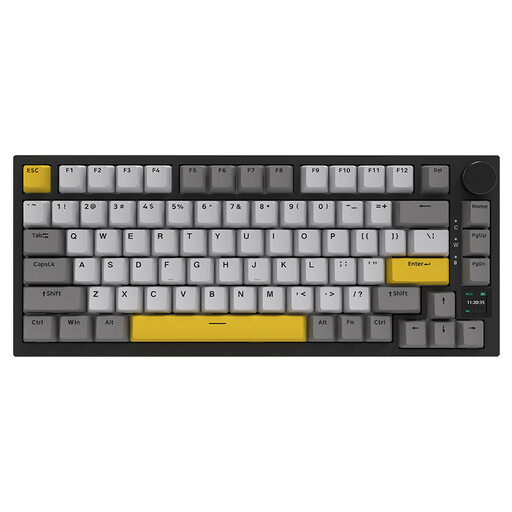
Why this product suits this profile: The combination of a gasket-mount design, sound-dampening material, TFT display, PBT keycaps and tri-mode connectivity will appeal to custom keyboard enthusiasts and people working from home.
The specifications clearly list the design features used: gasket mount, flex-cut plate, multiple layers of foam and hot-swap support.
82 keys in a 75% layout, 4000-mAh battery, TFT colour screen, RGB lighting and compatibility with Windows and macOS.

Why this product suits this profile: This wired model is designed for users looking for an adjustable actuation point, a high polling rate and fast input for competitive gaming or programming.
The magnetic switches and actuation range of 0.1 to 2.0 millimetres are clearly specified. So the feature is described in concrete terms, rather than simply using a generic gaming claim.
8000-Hz polling rate in wired mode, adjustable actuation points, 75% layout, hot-swap PCB and volume dial.

Why this product suits this profile: The German QWERTZ version combines a space-saving 75% layout with tri-mode connectivity, PBT keycaps and a battery for extended use at home or on the go.
The QWERTZ layout is stated in the product name. Bluetooth, 2.4 GHz and USB-C connectivity are also listed, along with replaceable switches.
75% layout, 8000-mAh battery, Flying Fish switches, RGB lighting, programmable dial and five layers of sound-dampening material according to the product description.
We’ve put together a complete, regularly updated list of products that meet these strict selection criteria and fully comply with the safety regulations applicable in the EU.
A 75% keyboard offers a good balance: it usually keeps the arrow and function keys while removing the number pad. If you enter numbers frequently, choose a 96% or full-size keyboard. For maximum room to move your mouse, 65% and 75% keyboards are more compact.
Lifespan depends on the switch type, usage, dust, spills and build quality. Some manufacturers rate certain switches for, say, 50 million keystrokes. These are manufacturer figures, not a guarantee of the lifespan of the entire device. Replaceable switches and separately available keycaps can make maintenance easier.
RGB lighting uses more power than having the lights switched off. Brightness, lighting mode, connection type and battery capacity all affect battery life. For regular use, choose a model with a USB-C charging port and a clear battery indicator. Wired mode is also available as a direct alternative for long gaming or work sessions.