
Lieferung heute & morgen

Qualitätsgarantie

Willkommens-Angebote freischalten: KOSTENLOSE Lieferung | Bis zu 80 % RABATT | Kostenlose 30-Tage-JoyPlus-Testphase
App herunterladen
A mechanical gaming keyboard should respond accurately when you play, feel comfortable to type on and work as flexibly as possible with your PC, Mac or mobile devices. In practice, unclear details about layout, wireless standards and switch types often lead to the wrong purchase. If you’re buying in Germany, it’s particularly important to check a few technical details before placing your order.
Many models sold internationally have a QWERTY keyboard layout, often in the US version. The positions of the ‘Z’ and ‘Y’ keys are swapped, and German labels and some familiar special characters may be missing. You can configure a QWERTY keyboard to use German settings in Windows or macOS, but the labels on the keycaps then won’t match what you type.
If you regularly write in German, look specifically for a QWERTZ keyboard or an ISO-DE layout. A QWERTY keyboard may be suitable for gaming, programming and using English-language software.
A wireless mechanical keyboard can connect via Bluetooth or 2.4 GHz wireless. Bluetooth is usually a good choice for laptops, tablets and smartphones. A 2.4 GHz wireless keyboard with a receiver is convenient for desktop use, as you can plug the receiver directly into your PC. USB-C wired mode remains a useful alternative when you want consistently low latency.
A tri-mode keyboard usually combines Bluetooth, 2.4 GHz and USB-C. Before buying, check how many Bluetooth devices it can remember, whether a receiver is included and whether using the lighting significantly reduces the stated battery life.
An RGB gaming keyboard may offer plenty of options for personalisation, but using the lighting takes more power. A figure of ‘8000 mAh’ or ‘10,000 mAh’ isn’t a reliable point of comparison on its own, as battery life is also affected by the wireless module, polling rate and lighting brightness.
The term ‘custom keyboard’ isn’t consistently defined either. What matters are specific features such as hot-swap sockets, compatible switches, programmable keys, the materials used for the keycaps and software support.
The keyboard’s form factor affects both the space it takes up and its functionality:
A compact mechanical keyboard leaves more room for your mouse. If you enter numbers frequently, choose a full-size or 96 per cent keyboard instead.
Linear switches move smoothly without a noticeable tactile bump. Tactile switches provide feedback when pressed, while clicky switches also make a distinct clicking sound. Details such as actuation force, pre-travel and total travel help you compare switches. For example, the KEYSME Lunar 01 is listed with an actuation force of 45 gf, 1.9 mm of pre-travel and 4.0 mm of total travel.
A hot-swap keyboard lets you replace compatible switches without soldering. Pin compatibility is important: many models support both 3-pin and 5-pin switches, while some support only one type. Switch off the keyboard and check the switch model before fitting new switches.
With a gasket-mount keyboard, the PCB isn’t fixed rigidly to the case but is supported by cushioning. This can make typing feel softer and reduce case resonance. The actual effect depends on the plate, foam layers, switches and case design.
PBT keycaps are often preferred by people who type a lot, as they’re more resistant to wear than many ABS keycaps. If you’re choosing a mechanical keyboard with PBT keycaps, also check how the legends are applied, for example, using double-shot or dye-sublimation.
Programmable keys, macros and a gaming keyboard with a rotary knob can make customisation easier. A rotary knob can control the volume or brightness, for example. For RGB, check whether the product description refers to basic backlighting, individually lit keys or side lighting.
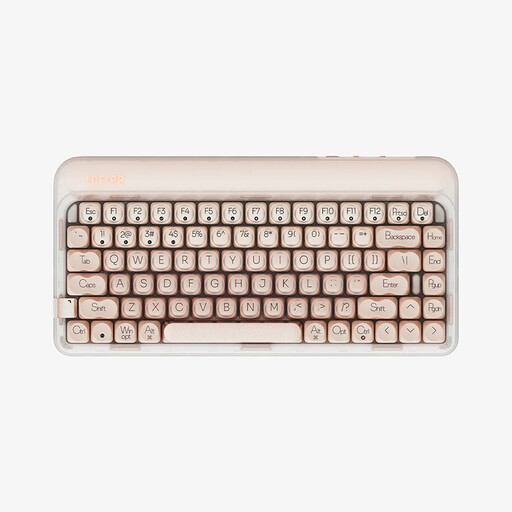
Why this product suits this profile: The 84-key layout combines a compact footprint with arrow and function keys. USB-C, Bluetooth 5.3 and 2.4 GHz support a range of devices.
Three connection options and hot-swap functionality reduce the risk of having to buy a completely new keyboard if you want to make changes later.
84 keys, gasket-mount construction, 1000 Hz polling rate and a 4000 mAh battery, according to the product details.

Why this product suits this profile: This keyboard is designed for users looking for adjustable switches, PBT keycaps, a rotary knob and multi-layer damping in an 87-key layout.
The product details specifically list 5-pin hot-swap, PBT dye-sublimated keycaps and three connection options, rather than relying on vague marketing terms.
4000 mAh battery, programmable rotary knob, detachable rhythm light bar and CE and RoHS markings, according to the supplier.

Why this product suits this profile: The German QWERTZ version is well suited to people who type a lot in Germany, while the 75 per cent layout, RGB and rotary knob make it practical for gaming and work.
The clearly stated QWERTZ layout avoids the common mistake of confusing it with a US QWERTY keyboard. Hot-swap functionality and three operating modes are also listed.
8000 mAh battery, according to the product details, PBT keycaps, gasket-mount construction and a 75 per cent layout with a function row.
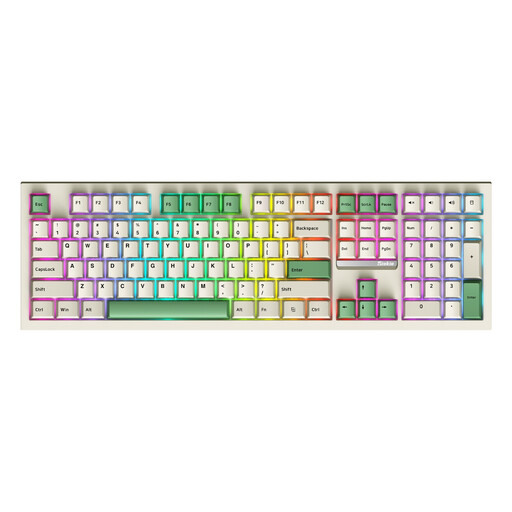
Why this product suits this profile: Its 108 keys, including a number pad, are useful for spreadsheets, office work and games where extra keys or a full keyboard layout are needed.
The full-size layout means frequent users won’t need to rely on a separate number pad or extra macro keys after buying it.
108 keys, hot-swap, RGB lighting, plus Bluetooth, 2.4 GHz and USB-C, according to the product description.
We’ve put together a complete, regularly updated list of products that meet these strict selection criteria and fully comply with the safety regulations in force in the EU.
For writing in German, an ISO-DE layout QWERTZ keyboard is usually the easiest option. You can enable the German keyboard layout on a QWERTY keyboard, but the characters printed on the keys won’t change.
A tri-mode keyboard can be suitable for gaming if it offers a 2.4 GHz mode with a receiver and a wired USB-C mode. For fast-paced games, you’ll want a stable connection. Bluetooth is better suited to mobile devices and general use; check the technical specifications for details of the polling rate and switching functions.
Its lifespan depends on the switches, hot-swap sockets, keycaps, battery and how well it’s maintained. Figures such as ‘50 million’ or ‘600 million’ keystrokes usually refer to the switches themselves, not necessarily the entire keyboard. Dust, liquids and improper disassembly can shorten its lifespan.