
Lieferung heute & morgen

Qualitätsgarantie

Willkommens-Angebote freischalten: KOSTENLOSE Lieferung | Bis zu 80 % RABATT | Kostenlose 30-Tage-JoyPlus-Testphase
App herunterladen
A mechanical gaming keyboard can provide a clearly defined actuation point and consistent key feedback for gaming, programming or writing. At the same time, models vary considerably in layout, form factor, connection options and maintenance features. Focusing only on RGB lighting or a high stated lifespan can mean overlooking important buying criteria.
Many budget-friendly keyboards are offered with a QWERTY US layout. The key arrangement differs in several respects, including Y and Z. Depending on the version, German special characters or the typical ISO Enter key may also be missing. For gaming, some of these differences can be addressed through software or operating system settings. However, they can take some getting used to and lead to input errors when writing German text, programming or working with shortcuts.
If you regularly write in German, look specifically for a QWERTZ keyboard rather than relying solely on the product images. The actual key labels and physical layout are what matter.
A wireless mechanical keyboard may support Bluetooth, 2.4 GHz wireless or both standards. Bluetooth is practical for laptops, tablets and multiple devices. With compatible devices, a 2.4 GHz receiver can provide a more direct connection. For stationary setups, USB-C remains an option without relying on battery power.
When choosing a tri-mode keyboard, check that it genuinely includes Bluetooth, 2.4 GHz and USB-C. Switching between devices, the position of the receiver and the available charging options are also relevant.
An RGB keyboard primarily changes the appearance and visibility of the keys. It says nothing about switch quality, noise levels or typing comfort. Check whether the lighting can be configured individually, whether the legends allow light to shine through and whether the brightness can be switched off completely.
A keyboard with Rapid Trigger, or magnetic Hall-effect switches, can allow the actuation and reset points to be adjusted through software. This is particularly interesting for fast-paced FPS games. However, the stated precision is a technical manufacturer specification, not a general promise of better gaming results. Software compatibility, firmware support and the actual range of adjustment should be checked before buying.
Mechanical switches can broadly be categorised according to how they feel when pressed:
The colour of a switch is not a uniform industry standard for every characteristic. Information about actuation force, key travel and compatibility is more meaningful than the colour designation alone.
The size determines which keys remain directly accessible:
A compact form factor is not automatically more ergonomic. Look for adjustable feet, a stable underside, a suitable wrist rest and a neutral hand position. An ergonomic mechanical keyboard should not merely be raised; its height should be adjustable to suit your desk.
A gaming keyboard with hot-swap allows compatible switches to be replaced without soldering. Before buying, check whether 3-pin and 5-pin switches are supported and whether the fitted stabilisers can be replaced. PBT keycaps on many custom keyboards are designed to resist wear; ABS keycaps can be lighter and may allow clearer illumination.
Removable USB-C cables, a supplied keycap puller and accessible areas for cleaning are practical features. Drainage holes or a design described as splash-resistant are no substitute for handling liquids carefully. The manufacturer’s specific safety instructions remain decisive.
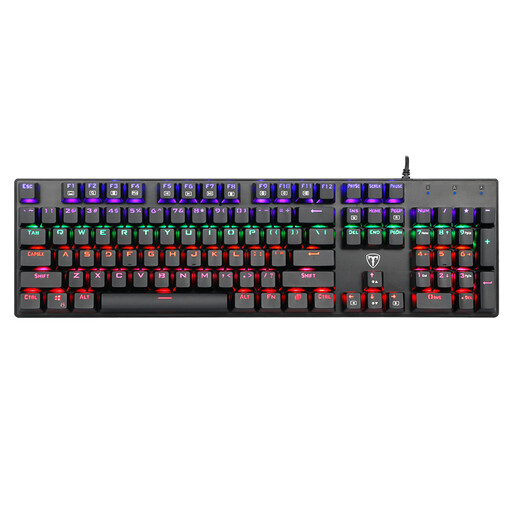
Why this product suits the profile: This wired full-size model offers 104 keys, blue switches and a US QWERTY layout for users who want to get started without relying on a battery or wireless connection.
USB power eliminates charging breaks. Removable keycaps and four drainage holes make maintenance easier, but do not replace protection against liquids.
104 keys, RGB or LED backlighting, Win lock and, according to the manufacturer, anti-ghosting for all keys.
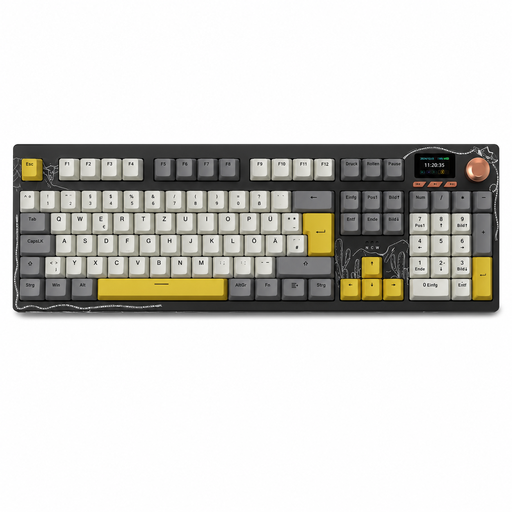
Why this product suits the profile: The German QWERTZ version with 104 keys combines office work, gaming and data entry in one full-size keyboard.
The German layout reduces adjustment issues. Tri-mode connectivity and a hot-swap base provide flexibility with both devices and switches.
Bluetooth, 2.4 GHz wireless and USB-C, TFT colour display, multifunction knob and replaceable switches.
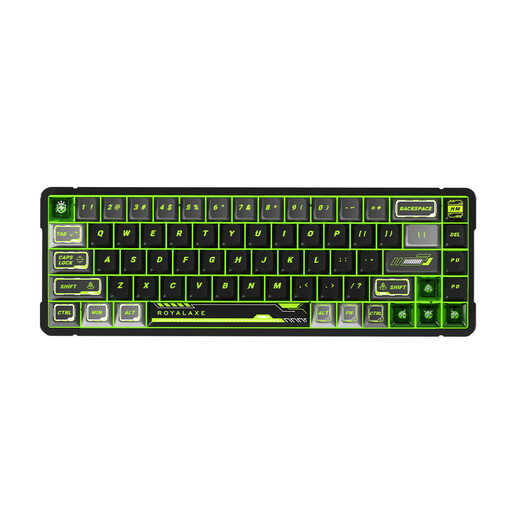
Why this product suits the profile: This compact board is aimed at FPS players who want to make targeted use of magnetic switches and adjustable actuation parameters.
The actuation function is not merely an additional RGB feature; it is linked to magnetic Hall-effect switches. Software support should be checked before buying.
Aluminium frame, magnetic switches and, according to the product description, Rapid Trigger with RT precision of 0.001 mm.

Why this product suits the profile: The German QWERTZ layout, quiet tactile low-profile switches and connection to up to three devices are well suited to workstations using Windows, macOS or tablets.
The layout is designed for German-language input. This version uses subtle white lighting instead of purely decorative RGB illumination.
Bluetooth and Logi Bolt, Easy-Switch for up to three devices, USB-C charging and, according to the product description, up to 15 days of battery life with the lighting switched on.
We have put together a complete, regularly updated list of products that fully meet these strict selection criteria and the safety regulations applicable in the EU.
Its lifespan depends on the switches, keycaps, usage and maintenance. Manufacturers sometimes quote figures such as 50 million keystrokes. This describes the intended switch rating under specific conditions and does not automatically represent the lifespan of the entire device. With compatible replacement switches, hot-swap models can be easier to maintain.
Yes, provided the noise level and layout are suitable. Quiet tactile or linear switches are generally less noticeable in shared workspaces than clicky blue switches. A QWERTZ keyboard and a suitable wrist rest make longer writing sessions more comfortable.
Power consumption mainly depends on the lighting, wireless standard and battery capacity. RGB lighting can reduce battery life. If you want to preserve battery power, you can reduce the lighting or use USB-C. With Bluetooth and 2.4 GHz models, it is worth checking the charging time, battery indicator and power-saving features.