
Lieferung heute & morgen

Qualitätsgarantie

Willkommens-Angebote freischalten: KOSTENLOSE Lieferung | Bis zu 80 % RABATT | Kostenlose 30-Tage-JoyPlus-Testphase
App herunterladen
A mechanical gaming keyboard should enable fast input, work reliably and suit your desk setup. In practice, however, three issues are particularly likely to lead to a disappointing purchase: an unsuitable layout, unclear information about the switch type and features that look impressive but are rarely used in everyday life.
As a Joybuy Product Recommendation Officer, I filter the relevant product data and assess it according to specific usage scenarios. What matters is not how comprehensive a product description sounds, but whether the layout, connection, number of keys and switch technology suit your needs.
Many listings are described as a “gaming keyboard” for PC and Mac, but use a QWERTY US layout. For users in Germany, this may mean that the labels and positions of Z, Y, umlauts and special characters do not match the input they are used to.
If you regularly write German text, look specifically for a QWERTZ keyboard. With a US layout, you can often activate German as the operating system language, but the labelling on the keycaps will still be different.
A keyboard with a “mechanical feel” may use a membrane or hybrid construction. This is not the same as a mechanical keyboard with individual switches beneath each key. According to the product information, the MageGee TS91 is explicitly described as using a membrane construction with a mechanical typing feel.
Before buying, check that it clearly states whether the keyboard uses mechanical switches, membrane keys or Hall-effect switches.
An RGB keyboard can make the keys easier to see and complement your setup visually. However, it says little about stability, layout or typing feel. Similarly, high polling rates are not essential for every use case. For office work and heavy typing, a suitable layout, a volume control and a comfortable key height may be more important.
The form factor determines which keys are readily accessible and how much room is left for your mouse:
Language is just as important as size. If you prefer German keycaps, look specifically for “German QWERTZ” when choosing any mechanical keyboard.
Linear switches provide a smooth key travel without a noticeable tactile bump. Tactile switches provide feedback during the key travel. Clicky switches also produce a clearly audible sound. The perceived volume and typing feel are also affected by the case, keycaps and sound-dampening material.
A hot-swappable keyboard allows you to replace compatible switches without soldering. Check the pin compatibility carefully: some models support both 3-pin and 5-pin switches, while Hall-effect keyboards require special magnetic switches.
A wired USB-C keyboard does not need to be charged and provides a direct connection. A wireless mechanical keyboard is more flexible, but must be charged or used with a cable. Tri-mode models combine USB-C, Bluetooth and 2.4 GHz wireless connectivity.
A high polling rate may be interesting for certain gaming scenarios. However, you should also consider driver support, compatibility with Windows or macOS and the availability of replacement switches. A volume control is particularly useful if you regularly adjust audio output while gaming or during video conferences.
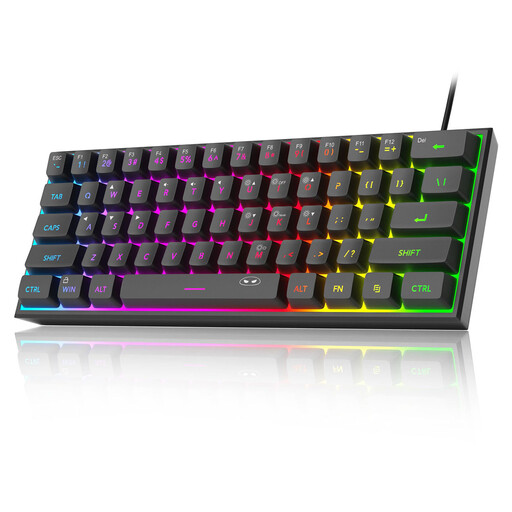
Why this product suits the profile: The 61-key design takes up very little space and is suitable for straightforward gaming or office setups. The product is listed as compatible with Windows, Mac, PS4 and Xbox One.
The description transparently states that it uses membrane keys with a mechanical feel. If you expect genuine mechanical switches, you can take this difference into account before buying.
60% format, RGB lighting and wired use. According to the product information, the PCB is IPX4-certified; the USB connection is excluded from this rating.
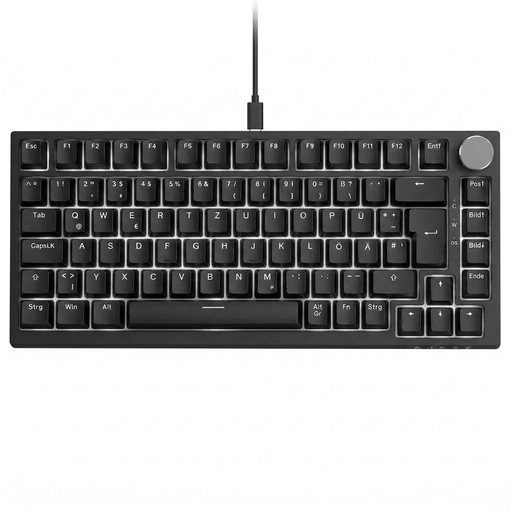
Why this product suits the profile: The 82 keys incorporate function keys, arrow keys and navigation controls in a compact format for gaming, office work and everyday typing.
The German QWERTZ layout is clearly stated. The hot-swap function supports compatible 3-pin switches, allowing you to customise the keyboard without soldering.
Gasket-mount construction, PBT keycaps, RGB lighting, detachable USB-C cable and CNC volume control according to the product information.
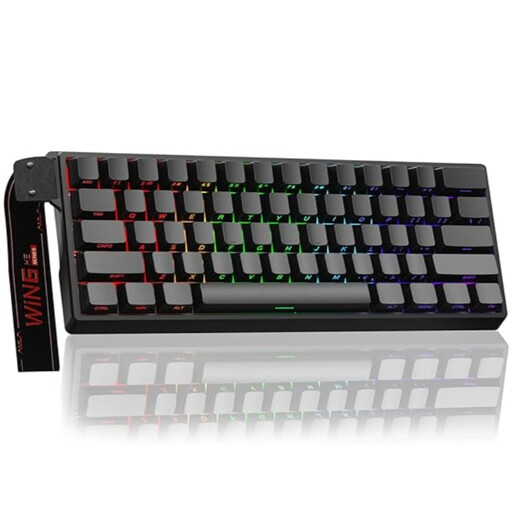
Why this product suits the profile: This 60% keyboard is aimed at users looking for a very compact gaming keyboard with an adjustable actuation point and Rapid Trigger mode.
The product information explicitly mentions magnetic Hall-effect switches. Standard 3-pin or 5-pin switches are not compatible, according to the safety notice.
Adjustable actuation point, Rapid Trigger function, hot-swap support for magnetic switches and a stated polling rate of 8,000 Hz.
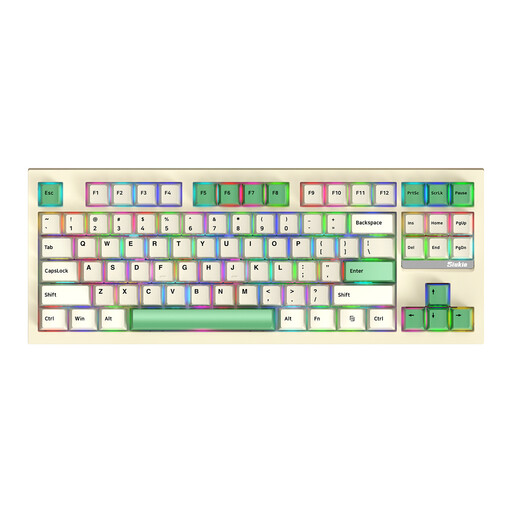
Why this product suits the profile: This TKL keyboard combines 87 keys with Bluetooth, 2.4 GHz wireless and wired connectivity. This makes it suitable for PCs, Macs and changing workstations.
The three connection options reduce reliance on a single interface. Even so, check which receiver and layout are included before use.
87 keys, RGB lighting, hot-swap functionality and Bluetooth, 2.4 GHz and USB-C connectivity according to the product information.
We have put together a complete, regularly updated list of products that fully meet these strict selection criteria and the safety regulations applicable in the EU.
Yes, provided the volume, layout and switch type suit your workplace. Linear switches can feel smooth, while clicky switches may be clearly audible in shared spaces. A keyboard with sound-dampening material or quieter switches may be more practical in this situation.
Its lifespan depends on the switches, keycaps, cable, hot-swap sockets and daily use. Manufacturer specifications such as 50 million keystrokes are technical estimates for particular switches, not a guarantee of the lifespan of the entire keyboard. Dust, liquids and improper switch replacement can reduce its durability.
No. A Rapid Trigger keyboard may appeal to users who want to fine-tune the actuation and reset points. The right software is essential for this. For casual gamers, office users and heavy typists, conventional mechanical switches with a suitable key layout are often sufficient.