
Lieferung heute & morgen

Qualitätsgarantie

Willkommens-Angebote freischalten: KOSTENLOSE Lieferung | Bis zu 80 % RABATT | Kostenlose 30-Tage-JoyPlus-Testphase
App herunterladen
A mechanical gaming keyboard can be a reliable choice for gaming and typing for many years. The key is to find a layout, form factor and switch type that suit your everyday needs. Many poor purchases aren’t caused by a lack of RGB lighting, but by overlooked details: a US layout on a German Windows system, missing navigation keys or switches that become uncomfortable during everyday typing.
An RGB keyboard mainly changes the look of the keys and how easy they are to see. It doesn’t tell you whether the keyboard has mechanical switches, anti-ghosting or a comfortable design. Rainbow lighting doesn’t automatically mean you can customise each key individually, either. Before buying, check whether the lighting modes, brightness and software controls are actually listed.
A 60% keyboard usually leaves out dedicated function, arrow and navigation keys. A 65% keyboard often adds arrow keys and some navigation keys. A 75% keyboard also retains a row of function keys. A TKL keyboard usually does away with the number pad while keeping most of the other keys.
The extra space is useful for FPS players who make broad mouse movements. But if you regularly work with spreadsheets, programme or write a lot of documents, don’t underestimate the missing keys.
Mechanical linear switches can feel direct and consistent. A Hall effect keyboard detects key position magnetically and, depending on the model, lets you adjust the actuation point. Features such as Rapid Trigger can be useful for competitive gaming, but they’re no substitute for a suitable layout, a stable connection or a good sitting position. Claims such as an 8,000 Hz polling rate should also be considered alongside actual software support and the game you play.
For German-speaking users, a QWERTZ keyboard is usually the straightforward choice. The Y and Z keys, as well as special characters, then match the German key labels and selected operating system layout. With a US QWERTY keyboard, the key labels may not match what you type. This can affect umlauts, punctuation and keyboard shortcuts.
For example, the XPG SORCERER MINI has a 65% form factor and mechanical XPG Red switches, but its product details specify a US QWERTY layout. This may suit international users, but if you type in German every day, check this carefully before buying.
On a mechanical keyboard, each switch is fitted individually beneath a keycap. Linear Red switches offer a smooth keypress without a noticeable tactile bump. Tactile switches provide feedback when they actuate. The noise level also depends on the keycaps, case, dampening and your typing style.
A hot-swap keyboard lets you replace compatible switches without soldering. Check whether it supports 3-pin or 5-pin switches, and whether it uses conventional mechanical or magnetic switches. Hot-swap doesn’t mean that any switch will fit.
A USB-C keyboard with a detachable cable is easy to carry and simpler to replace if the cable gets damaged. A wired connection doesn’t need a battery or wireless pairing. A wireless gaming keyboard, on the other hand, gives you more freedom to move, but needs charging and may offer different connection modes depending on the model.
PC gamers should also check which operating systems are supported. For consoles, compatibility should be clearly stated in the product details. Software features such as macros, lighting profiles and Rapid Trigger may depend on Windows programmes and may not be available on every platform.
Adjustable feet let you change the typing angle. A wrist rest can be useful with a large full-size keyboard, while compact models usually leave more room for mouse movement. If you often adjust the volume, a keyboard with a volume control or dedicated media keys can come in handy.
Check the dimensions against your desk. A 75% model with around 82 keys takes up much less space than a full-size keyboard with a number pad, while offering more versatility for word processing and programming than a 60% model.
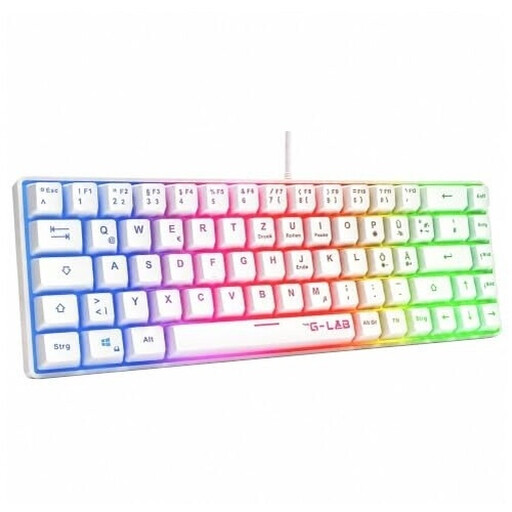
Why this product suits this profile: Its 60% form factor, German QWERTZ layout and USB plug-and-play connection make it a good fit for anyone short on space who doesn’t need mechanical switches.
The QWERTZ layout is clearly specified, helping you avoid a common mistake: buying a keyboard with an unsuitable US layout.
Compact 60% form factor, RGB rainbow lighting and compatibility with PC, PS4, PS5 and Xbox, according to the product details.

Why this product suits this profile: Its 75% layout combines function keys, arrow keys and navigation keys in a compact case, with a German QWERTZ layout.
The product details specify hot-swap support for compatible 3-pin switches. That means you can replace them later without soldering, rather than having to replace the whole keyboard.
Mechanical Sea-Salt switches, a detachable USB-C cable, RGB lighting and a volume control are all clearly listed.
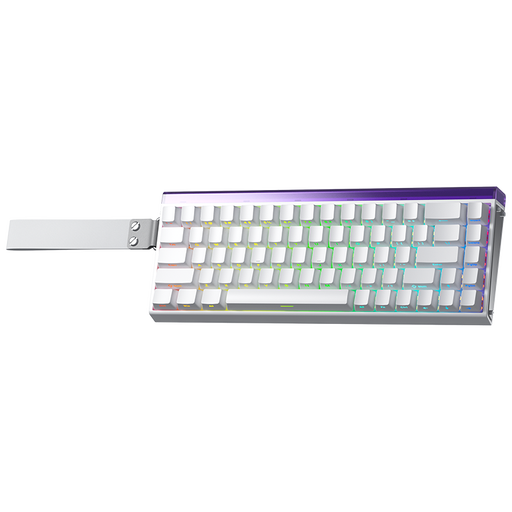
Why this product suits this profile: This compact model is aimed at FPS players looking to make the most of magnetic switches, adjustable actuation and Rapid Trigger.
The magnetic technology isn’t just a general claim: the product details specify 0.01 mm adjustable actuation, Rapid Trigger and an 8,000 Hz polling rate.
68-key layout, Hall effect switches and RGB lighting, with wired connectivity and a US layout.
If you want a number pad and media keys, the Logitech G213 is a full-size gaming keyboard with a German QWERTZ layout, five RGB lighting zones, a wrist rest and volume controls. However, it uses membrane rather than mechanical switches. The uRage Exodus 600, by contrast, combines a German full-size layout with Outemu Red switches, RGB lighting, a volume wheel, macro memory and a detachable cable.
Programmers and frequent typists should also consider key size, the spacing of the arrow keys and noise levels. A compact mechanical keyboard won’t automatically suit every working environment. In a shared office, quieter switches and a dampened design may matter more than a high polling rate.
We’ve put together a complete, regularly updated list of products that meet these strict selection criteria and fully comply with the safety regulations in force in the EU.
Yes, as long as the switch type, keyboard angle and layout suit you. Linear switches can feel smooth and consistent, while tactile switches provide extra feedback. A sturdy build and a comfortable hand position are also important for longer typing sessions.
A 60% or 65% keyboard leaves more room for your mouse. A 75% or TKL keyboard is a good choice if you regularly use the function and arrow keys. The right size depends on the games you play, how you work and how much space you have.
Its lifespan depends on the switches, keycaps, cable, dust and exposure to liquids. Manufacturers sometimes quote figures such as 50 million keypresses for certain switches. This is a technical guide for that particular component, not a guarantee of how long the whole keyboard will last. Regular cleaning with a dry or slightly damp cloth, along with careful use, can help keep it in good condition.