
Lieferung heute & morgen

Qualitätsgarantie

Willkommens-Angebote freischalten: KOSTENLOSE Lieferung | Bis zu 80 % RABATT | Kostenlose 30-Tage-JoyPlus-Testphase
App herunterladen
A mechanical gaming keyboard should deliver precise input, suit your desk and perform reliably during longer gaming or work sessions. In practice, however, it is not just technical differences that can lead to the wrong purchase; unclear product information can also be a problem. As a Joybuy Product Recommendation Officer, I therefore filter the most important features and assess them according to specific usage scenarios.
A gaming keyboard with RGB may look attractive, but it reveals little about the switches, case stability or software. Check whether it really offers individually addressable or zoned lighting, and how many effects, brightness levels or customisation options are specified. Simple backlighting may be enough for visibility, while RGB is primarily a matter of personal set-up.
Some compact models are described as offering a “mechanical feel” even though they use a membrane construction. The MageGee TS91, for example, is described as a keyboard with a mechanical typing feel and an IPX4-certified PCB, but it should not be equated with a traditional mechanical switch design. If you are looking for a mechanical QWERTZ keyboard or a genuine hot-swap base, pay attention to the specific switch design and socket compatibility.
A US QWERTY layout can result in mismatched key labels and different special characters when used with German Windows or Mac settings. If you regularly write in German, programme or work in an office, you should choose a mechanical QWERTZ keyboard. Size is also important: a 60% keyboard saves space, but usually does without separate function keys and navigation clusters.
In addition to the number of keys, pay attention to the labelling, compatibility with Windows and macOS, and the position of the Delete, Home and Scroll Lock keys.
Linear switches move without a noticeable tactile bump or clicking sound. They are often chosen for fast input and smooth typing. Tactile switches provide noticeable feedback when activated, while clicky switches can also produce a distinct clicking sound.
A hot-swap keyboard allows you to replace compatible switches without soldering. However, you must check the stated compatibility: some models accept 3-pin and 5-pin switches, while others are designed only for specific magnetic Hall Effect switches. The AULA WIN60HE, for example, is designed exclusively for magnetic switches; standard mechanical 3-pin or 5-pin switches are not intended for it.
A gasket-mount keyboard positions the plate on cushioning elements. Combined with layers of foam, this can alter the case’s acoustic resonance and provide a softer typing feel. However, the term is not a universal measure of quality. What matters is the actual materials specified and the internal construction.
PBT keycaps are generally considered more resistant to wear than many ABS variants. Even so, you should check the profile, the lettering method and compatibility with replacement keycaps.
When it comes to connectivity, a wired mechanical keyboard offers straightforward use without a battery or pairing. A wireless mechanical keyboard with Bluetooth or a 2.4 GHz receiver is more flexible for use with multiple devices, but it needs to be charged. Tri-mode models combine 2.4 GHz, Bluetooth and USB-C. If you need a keyboard for PC and Mac, you should also check software support for the relevant operating system.
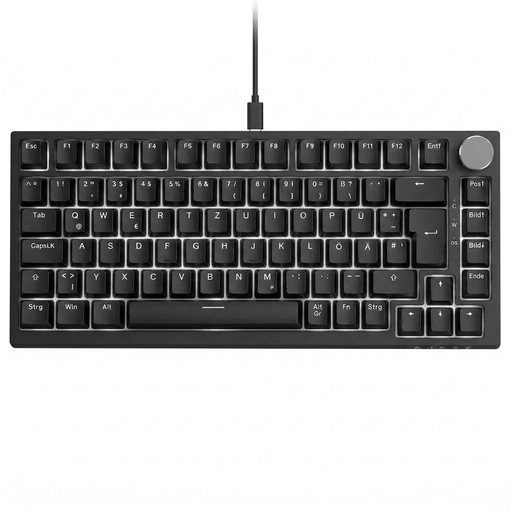
Why this product suits this profile: Its 82 keys combine function keys, arrow keys and navigation keys in a more compact format than a full-size keyboard.
The explicitly stated German QWERTZ layout reduces the risk of incorrectly labelled special characters. USB-C avoids battery and pairing concerns.
Linear red switches, hot-swap for compatible 3-pin switches, gasket construction, five damping layers and a volume control.
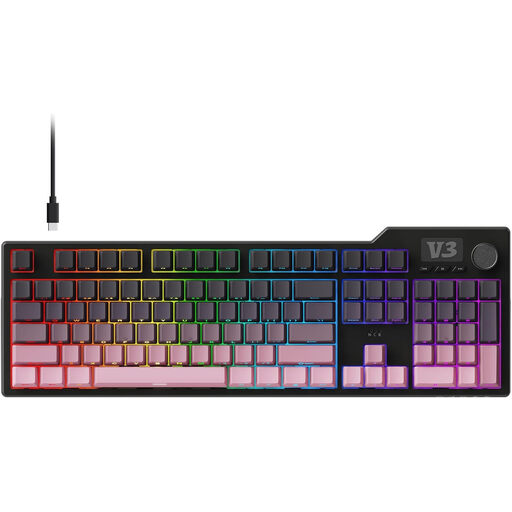
Why this product suits this profile: The number pad, programmable macros and PBT keycaps are ideal for heavy typists, programmers and users with complex workflows.
The specifications state 104 keys, hot-swap support for 3-pin and 5-pin switches, and a wired USB-C connection.
Gasket construction, five specified damping layers, linear Sea-Salt switches, PBT keycaps and a volume control.
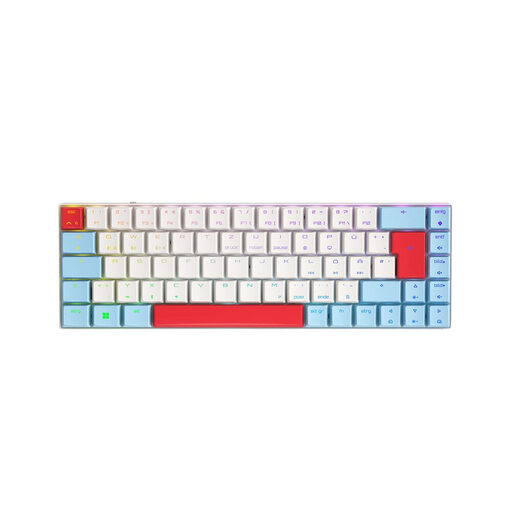
Why this product suits this profile: The compact format is ideal for small workspaces and users who switch between a PC, laptop or tablet.
Connectivity is not limited to one operating mode: according to the product information, 2.4 GHz, Bluetooth and USB-C are available.
CHERRY MX Low Profile Speed Switches, 65% layout, per-key RGB, N-key rollover and connectivity with up to three Bluetooth devices.
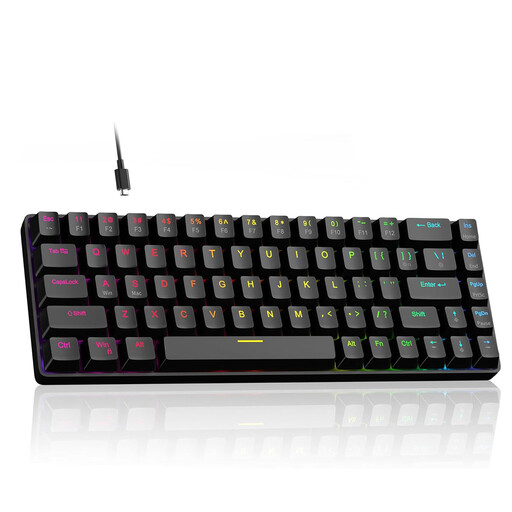
Why this product suits this profile: For users looking for a highly compact wired solution with an adjustable actuation point.
The product information explicitly lists Hall Effect magnetic switches, an adjustable actuation point from 0.1 to 4.0 mm and Rapid Trigger.
60% format with arrow keys, RGB lighting, hot-swap for compatible 3-pin switches and a stated polling rate of 8,000 Hz.
We have put together a complete, regularly updated list of products that fully meet these strict selection criteria and the safety regulations applicable in the EU.
Yes, provided its noise level, layout and form factor suit the workplace. Linear switches can activate smoothly, while clicky switches may be disruptive in shared spaces. A gasket-mount keyboard with damping layers can influence the case acoustics, but it does not replace consideration for the volume of the individual switches.
Its lifespan depends on the switches, keycaps, cable, hot-swap sockets and daily use. Manufacturer specifications such as 50 million or more keystrokes are technical benchmarks for specific components and are not a guarantee of the lifespan of the entire device. PBT keycaps and replaceable switches can improve maintainability.
That depends on how you use it. A wired mechanical keyboard does not need a battery and is well suited to a fixed PC workstation. A wireless model offers greater freedom of movement and can operate with multiple devices, but requires charging. For gaming, office work and Mac use, tri-mode keyboards are worth considering if USB-C, Bluetooth and 2.4 GHz are genuinely supported.