
Lieferung heute & morgen

Qualitätsgarantie

Willkommens-Angebote freischalten: KOSTENLOSE Lieferung | Bis zu 80 % RABATT | Kostenlose 30-Tage-JoyPlus-Testphase
App herunterladen
A mechanical gaming keyboard should enable fast input, feel comfortable when typing and fit your existing desk setup. In practice, however, some product claims can lead to disappointing purchases: RGB lighting says little about build quality, a compact layout may hide important keys, and high polling rates are not relevant for every use case.
This guide explains which technical specifications matter before you buy and which models suit different user profiles.
Some products advertise a mechanical typing feel but use membrane or hybrid technology. The MageGee TS91, for example, is described as a “Mechanical-Feel” keyboard. This means it offers a mechanical sensation, but it is not the same as a traditional mechanical keyboard with individual, replaceable switches.
If you want to change switches, adjust the actuation point or fine-tune the typing experience, look for specifications such as Mechanical Switches, Hot-Swap or Hall-Effect switches.
For users in Germany, a QWERTZ keyboard is often more practical than a US QWERTY layout. The positions of “Z” and “Y”, special characters and umlauts are different. A US layout can be useful for international software, certain games or programming environments, but it is not automatically suitable for touch-typing in German.
Before buying, check the actual key legends rather than relying solely on the product name.
A rapid-trigger keyboard or magnetic gaming keyboard can configure the actuation and reset points through software. This is particularly useful for rapid changes of direction in competitive games. A polling rate of 8,000 Hz, on the other hand, is only worthwhile if your PC, game and input chain can process this polling frequency. For office work, programming and everyday gaming, layout, switch feel and comfort are often more important.
The form factor determines which keys are immediately available:
Measure the available space and allow for the distance to your mouse. For FPS games, a shorter case can create more room for mouse movements; for working with numbers, a number pad remains practical.
Linear switches move without a noticeable tactile bump. They are often chosen for fast input, but they are not automatically quieter. The volume also depends on the keycaps, case, plate and sound dampening.
A hot-swap keyboard has sockets into which compatible 3-pin or 5-pin switches can be installed without soldering. Before changing them, check which switch types and PCB sockets are supported.
With a magnetic gaming keyboard, Hall-effect sensors measure the position of the switch. Depending on the model, this allows you to adjust actuation points, Rapid Trigger, Dynamic Key Switching and other functions. This technology is more complex and is mainly of interest to users who want to configure their inputs in detail for specific games.
A gasket-mount keyboard suspends the plate using dampening elements. Multi-layer inserts made from materials such as Poron, IXPE, PET, silicone or cotton can reduce resonance and hollow case sounds. The actual effect depends on the construction and combination of materials.
PBT keycaps are considered more resistant to developing a glossy, worn finish than many basic ABS keycaps. This is a material characteristic, but it is not by itself proof of overall quality. Also look for detachable cables, sturdy feet, clear compatibility information and a software description that is easy to understand.

Why this product suits this profile: The 61-key format saves space and offers RGB lighting for PC, Mac and selected consoles. The product description mentions a mechanical typing feel, but not traditional individual mechanical switches.
The “Mechanical-Feel” description is clearly explained. Buyers can decide whether a mechanical typing feel is sufficient or whether genuine switches are essential.
61 keys, several lighting modes and, according to the product information, an IPX4-certified PCB. The USB interface itself is not waterproof.
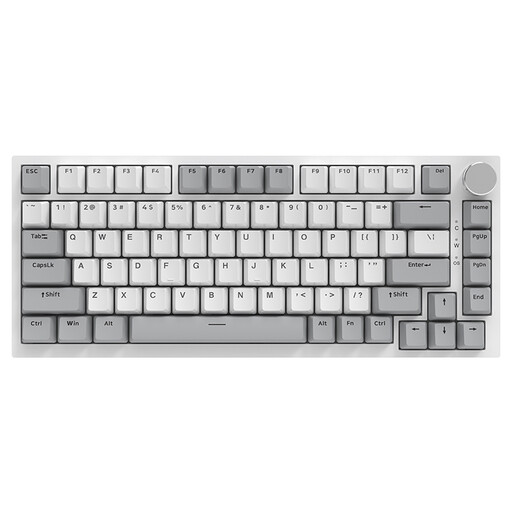
Why this product suits this profile: The 82-key layout combines function keys, arrow keys and navigation keys in a compact form. It is suitable for gaming, programming and everyday typing.
The specifications list concrete features rather than focusing only on RGB: a gasket-mount construction, five layers of sound dampening, PBT keycaps and hot-swap support.
Linear Sea-Salt switches, detachable USB-C cable, volume control and, according to the specifications, 20 RGB modes.

Why this product suits this profile: The 68-key keyboard is designed for players who prefer a compact layout and configurable magnetic switches for competitive titles.
The information clearly distinguishes between magnetic technology, Rapid Trigger and polling rate. This makes it easier to check whether these functions suit your playing style.
Adjustable actuation range from 0.2 to 4.0 mm according to the product information, Rapid Trigger, an 8,000 Hz polling rate and a detachable USB-C cable.
For frequent typists, programmers and spreadsheet users, a full-size keyboard such as the AJAZZ AK35I V3 with 104 keys and a number pad is an obvious choice. According to the product information, it also offers a volume control, programmable macros, PBT keycaps, linear switches and hot-swap compatibility with 3-pin and 5-pin switches.
If you need more room for your mouse, you can choose a 75% or 60% keyboard instead. With consoles, you should also check whether the particular game supports keyboard input and whether an adapter is required. A wired USB-C keyboard needs no pairing or battery charging; its detachable cable also makes it easier to transport.
We have put together a complete, regularly updated list of products that fully meet these strict selection criteria and the safety regulations applicable in the EU.
For typing and office work, a QWERTZ keyboard with German key legends is usually the simplest option. A US layout may still be suitable if you prefer international keyboard shortcuts or mainly work in English-language applications.
Service life depends on the switches, keycaps, PCB, usage and care. Some listings quote up to 50 million keystrokes for certain switches, for example. This is a manufacturer or product figure, not a guarantee of the actual service life of the complete device. Dust, liquid and damaged hot-swap sockets can shorten its lifespan.
A wired keyboard draws its power via USB. Consumption typically increases when the lighting is active and the brightness is higher. If you want to save energy, you can switch off the RGB or reduce the brightness. With a wired model, there is also no need to charge a battery regularly.