
Lieferung heute & morgen

Qualitätsgarantie

Willkommens-Angebote freischalten: KOSTENLOSE Lieferung | Bis zu 80 % RABATT | Kostenlose 30-Tage-JoyPlus-Testphase
App herunterladen
A mechanical gaming keyboard should respond precisely in games, perform reliably every day and suit your setup for as long as possible. The choice ranges from compact 60% keyboards to full-size models with a number pad. You can also choose from RGB lighting, wireless connectivity, hot-swap sockets and magnetic switches.
However, many purchasing decisions go wrong not because of the price, but because important details are overlooked. Three common pitfalls are particularly relevant:
The form factor determines which keys are directly accessible:
For German users, a QWERTZ keyboard is often the most straightforward choice. With a US-layout keyboard, check before buying whether the different key arrangement will be acceptable for everyday use.
Traditional mechanical switches use a physical switching contact. Linear switches offer a smooth keystroke, tactile variants provide noticeable feedback at the actuation point, and clicky switches produce a distinct clicking sound.
A hot-swap keyboard allows compatible switches to be replaced without soldering. It is important to check whether the PCB supports 3-pin and 5-pin switches. This should not be confused with Hall Effect models: a Hall Effect keyboard uses magnetic switches and sensors. Standard switches are not compatible with many such models.
With a Rapid Trigger keyboard, the reset movement can be detected without the key being fully released. This can be relevant for rapid changes of direction in FPS games. The practical effect depends on the game, settings and your personal input technique. Claims such as an adjustable actuation point of 0.01 mm should be treated as manufacturer or product specifications.
A wired mechanical keyboard does not need a battery and provides a consistent connection. A wireless mechanical keyboard offers greater flexibility, but needs to be charged. A tri-mode keyboard normally combines USB-C, Bluetooth and 2.4 GHz wireless connectivity. Before buying, check the battery capacity, receiver storage and device-switching options.
A gaming keyboard with RGB or an RGB keyboard may offer per-key lighting, fixed effects or brightness adjustment. However, RGB is no substitute for clearly readable legends and a suitable key height. For volume control, a keyboard with a volume dial is practical, as it lets you adjust the audio without using a key combination or opening the system menu.
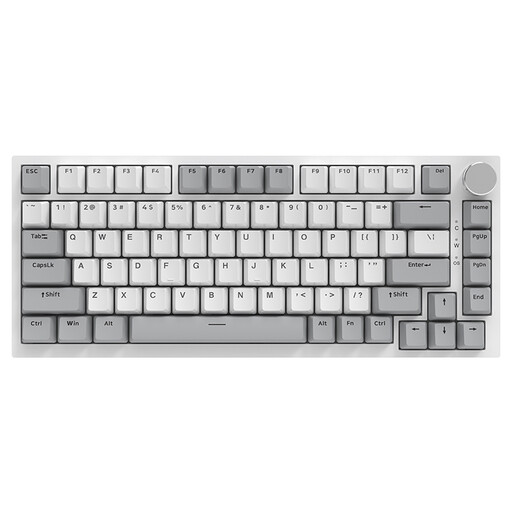
Why this product suits the profile: The wired 75% layout combines a compact form factor with arrow keys and 82 keys for gaming and everyday use.
The wired connection avoids charging breaks. Hot-swap support for 3-pin and 5-pin switches makes future customisation easier.
Gasket construction, PBT keycaps, RGB lighting and CNC volume dial according to the product description.

Why this product suits the profile: The German QWERTZ layout feels immediately familiar to users in Germany. Tri-mode connectivity and a volume dial expand its versatility.
The product specification explicitly states the QWERTZ layout. This avoids the common confusion with a US-layout keyboard.
75% layout, hot-swap function, PBT keycaps, RGB, plus 2.4 GHz, Bluetooth and USB-C connectivity according to the product data.
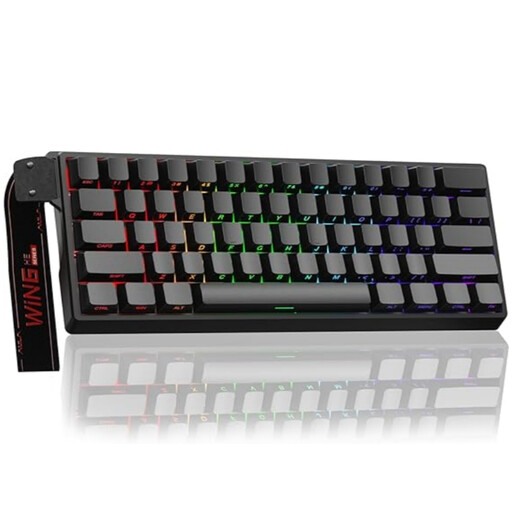
Why this product suits the profile: The 60% form factor is aimed at FPS players and users with limited desk space who want to use magnetic switches.
The product description states that only Hall Effect switches are compatible. This prevents the mistaken expectation that conventional 3-pin or 5-pin switches can be used.
Adjustable actuation point, Rapid Trigger mode, RGB and a polling rate of 8,000 Hz supported according to the product specification.

Why this product suits the profile: The keyboard is suitable for PCs, laptops, tablets and other devices when you want to switch between wired and wireless use.
The three connection methods and stated 4,000-mAh battery make power and connectivity planning more transparent than with a keyboard offering just one wireless standard.
75% layout, hot-swap base, 16.8 million RGB colours and a multifunction dial according to the product description.
We have put together a complete, regularly updated list of products that fully meet these strict selection criteria and the safety regulations applicable in the EU.
For regular typing in German, a QWERTZ keyboard is usually easier, as the key positions and special characters match the familiar German layout. A US-layout keyboard may be appealing for certain gaming setups or international keycaps. Before buying, compare the Y/Z, Enter, Shift and punctuation keys in particular.
Its lifespan depends on the switch design, keycaps, PCB, usage and care. Manufacturers often state a certain number of possible keystrokes; this figure is not a guaranteed everyday lifespan. A hot-swap keyboard is easier to maintain if a switch becomes faulty or is no longer suitable. Liquids, dust, heavy impacts and unsuitable cleaning products can shorten its lifespan.
Power consumption depends mainly on the wireless standard, lighting and battery capacity. RGB lighting generally requires more energy than switched-off or static lighting. If you want to work for long periods without charging, compare the stated battery capacity, expected lighting use and the option of wired operation.