
Lieferung heute & morgen

Qualitätsgarantie

Willkommens-Angebote freischalten: KOSTENLOSE Lieferung | Bis zu 80 % RABATT | Kostenlose 30-Tage-JoyPlus-Testphase
App herunterladen
A mechanical gaming keyboard can be a great choice for gaming, writing and work. However, the right choice depends on more than RGB lighting alone. The combination of layout, switch technology, connectivity and build quality is what really matters. If you focus only on eye-catching product claims, you can quickly end up with a keyboard that is impractical for everyday use in Germany.
A mechanical keyboard with RGB offers various lighting effects, but it does not change the quality of the switches, the stability of the case or how suitable the keyboard is for your particular workspace. Check whether the brightness, effects and, where applicable, software can actually be configured. Some models only feature fixed multi-colour lighting.
For many users in Germany, a QWERTZ gaming keyboard with German key labels is the more practical choice. A US layout may require some adjustment because the positions of Y, Z, umlauts and special characters differ. Even if you change the key mapping in Windows or macOS, the physical labels on the keys remain unchanged.
Also pay attention to the product description: terms such as “compact” or “75 per cent” describe the form factor, not the language of the layout.
A wireless mechanical keyboard can connect via Bluetooth, 2.4 GHz or both standards. Bluetooth is often suitable for several everyday devices, while a 2.4 GHz receiver can be practical with a desktop setup. A tri-mode keyboard usually combines Bluetooth, 2.4 GHz and USB-C.
Before buying, check the battery capacity, charging port, device switching and items included. For a dedicated gaming PC, a wired gaming keyboard may be the simpler solution, as it does not require you to plan around charging.
A compact mechanical keyboard leaves more room for your mouse. If you regularly enter numbers or use lots of office shortcuts, do not underestimate the lack of a number pad. You can find more form factors in the Discover layouts overview.
Mechanical switches differ in several ways, including their actuation type:
According to AULA’s product specifications, the Hero 68 features magnetic switches, an adjustable actuation point of 0.01 mm and Rapid Trigger. These details relate to the product configuration and should be checked against the relevant software and manual. A short actuation distance is not automatically comfortable for everyone.
If you are looking for a quiet keyboard for the office or home office, do not focus only on the word “silent”. Noise can also come from the keycaps, stabilisers, case and the impact on the underside. Sound-dampening mats can affect the sound profile, but they do not replace consideration for others in shared spaces.
A hot-swap keyboard lets you replace compatible switches without soldering. Check whether 3-pin or 5-pin switches are supported and whether the keycaps used match the layout. With a German QWERTZ layout, replacement keycap sets for special characters and umlauts are particularly important.
Many current models use a detachable USB-C connection. Wired operation provides a constant power supply and is well suited to long sessions. For PC and Mac, you should also check whether special keys, software and operating-system layout switching are supported. A mechanical keyboard for PC and Mac may be technically compatible without every function working identically on both systems.

Why this product suits this profile: This model combines a 75 per cent layout with German QWERTZ key labels and USB-C wired operation. It is therefore suitable for users looking for a compact mechanical keyboard without a battery or wireless pairing.
The stated QWERTZ layout reduces the risk of ending up with unsuitable US key labels. The wired connection avoids charging and pairing concerns.
82 keys, volume control, RGB lighting and hot-swap support for compatible 3- and 5-pin switches.
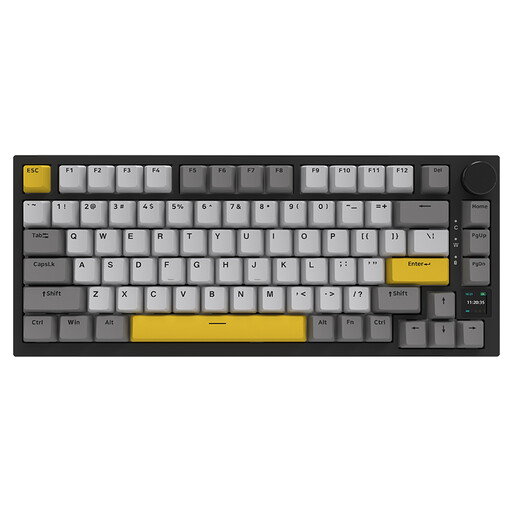
Why this product suits this profile: This version combines hot-swap functionality, gasket mount, RGB, a TFT display and three connection methods. It is aimed at PC and Mac users who want to customise their setup and use several devices.
Connectivity is clearly specified as USB-C, Bluetooth and 2.4 GHz. The display can show the connection mode and battery level, rather than providing this information exclusively through keyboard shortcuts.
4000-mAh battery according to the product specifications, PBT keycaps, TFT display, volume control and replaceable switches.
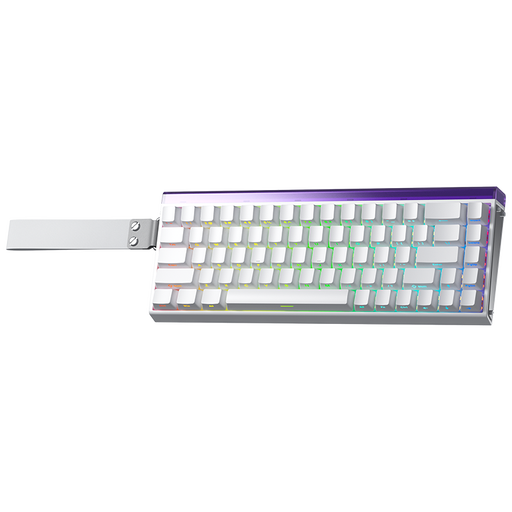
Why this product suits this profile: This 60 per cent model is aimed at gamers looking for a very compact form factor and magnetic switch technology with an adjustable actuation point.
The product specifications explicitly state that it uses US key labels. This means you can check before buying whether the layout suits German keyboard use.
Hall Effect magnetic switches, Rapid Trigger, 8K polling rate according to AULA product specifications and RGB lighting.
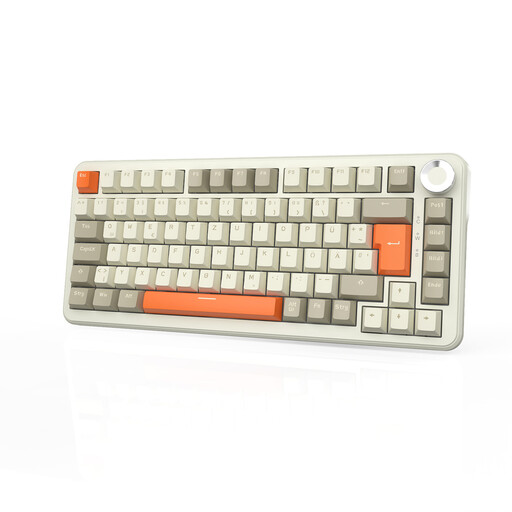
Why this product suits this profile: This 75 per cent keyboard is designed for long work and gaming sessions, offering QWERTZ, tri-mode connectivity and a volume control.
The German layout is explicitly stated. In addition, you can switch to USB-C when the battery is empty, provided the connection and cable are set up correctly.
According to the product specifications: 8000-mAh battery, 2.4 GHz, Bluetooth and USB-C, hot-swap for 3- and 5-pin switches, plus RGB.
We have put together a complete, regularly updated list of products that fully meet these strict selection criteria and the safety regulations applicable in the EU.
For users in Germany, a QWERTZ layout is usually the simpler option. Also check compatibility with Windows or macOS, the position of the umlauts and the connection type. With a US layout, you will need to adjust the software mapping and accept different key labels.
Its lifespan depends on the switches, keycaps, stabilisers, cable, battery and how the keyboard is used. Manufacturers often specify a certain number of keystrokes; this figure is not a blanket guarantee for the keyboard as a whole. Dust, liquid, excessive force when tilting keycaps and improper switch replacement can shorten its service life.
Yes, provided the noise level, layout and form factor suit the workplace. Linear or switches marketed as quiet may produce less noise, but the sound of each keystroke still depends on the entire construction. For long periods of typing, consider the keyboard height, wrist position and a suitable sitting posture; no particular form factor is equally ergonomic for everyone.