
Lieferung heute & morgen

Qualitätsgarantie

Willkommens-Angebote freischalten: KOSTENLOSE Lieferung | Bis zu 80 % RABATT | Kostenlose 30-Tage-JoyPlus-Testphase
App herunterladen
A mechanical gaming keyboard can serve you for many years when gaming, programming and writing every day. However, the choice can be overwhelming: compact layouts, RGB lighting, hot-swap sockets, magnetic switches and high polling rates are often prominently advertised. Not every feature is useful for every user.
Before buying, customers in Germany should avoid three common pitfalls in particular:
The form factor affects which keys are available and how much room remains for your mouse:
At a German workstation, the key legends are crucial. A US-layout keyboard may be technically compatible, but it does not automatically match the familiar German key arrangement.
Linear switches offer a smooth key travel without a pronounced resistance point. They are often chosen by gamers and people who type frequently because the keystroke remains predictable. The volume also depends on the spring, keycaps, case and dampening.
A hot-swap keyboard allows compatible switches to be replaced without soldering. It is important to distinguish between conventional 3-/5-pin switches and magnetic Hall Effect switches. These systems are not automatically compatible with one another.
With a gasket-mount keyboard, the plate is mounted using gaskets or elastic elements. This can reduce the transmission of vibrations and create a softer typing feel. However, claims about noise reduction should be understood as a construction feature rather than a guaranteed volume level.
A USB-C keyboard with a cable does not require a battery and provides a consistent power and data connection. A wireless mechanical keyboard offers greater flexibility and can connect to multiple devices via Bluetooth or 2.4 GHz. This means battery level, wireless range and switching times also need to be considered.
With magnetic keyboards, features such as Rapid Trigger and an adjustable actuation point may be interesting. According to the respective product information, the key travel can be configured in software on certain models. For occasional gamers, this benefit may be less important than a German layout, a volume control or a comfortable key arrangement.
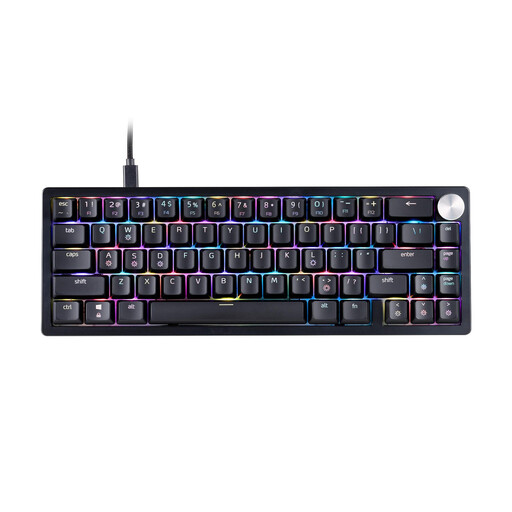
Why this product suits the profile: The 65 per cent format takes up little space while retaining the arrow keys. The USB-C connection is wired and straightforward.
The technical specifications explicitly state the US QWERTY layout. This means you can take the different key arrangement into account before buying.
65 per cent layout, XPG Red switches, RGB lighting, detachable USB-C cable and three-stage height adjustment.

Why this product suits the profile: The German QWERTZ layout combines compact dimensions with function keys, arrow keys and a volume control.
This version is identified as a QWERTZ model. Hot-swap support and the gasket construction make its adjustability clear.
82 keys, linear Sea-Salt switches, PBT keycaps, RGB lighting, USB-C cable and volume knob.
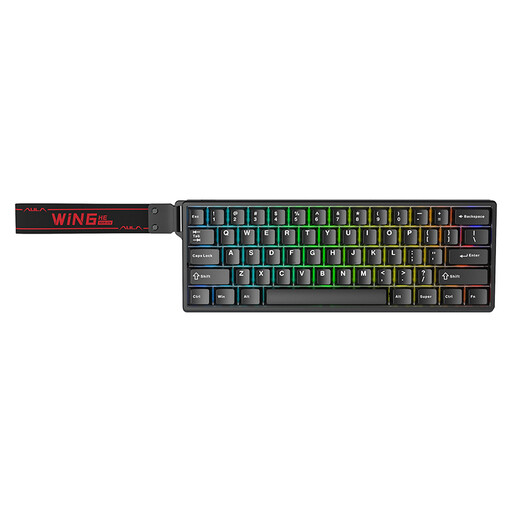
Why this product suits the profile: FPS players can specifically compare the magnetic Hall Effect technology, Rapid Trigger and compact form factor.
The product information states that only magnetic Hall Effect switches may be used. This prevents false expectations about conventional replacement switches.
According to the product information, an 8000 Hz polling rate, adjustable actuation point, Rapid Trigger mode, RGB and USB-C connection.
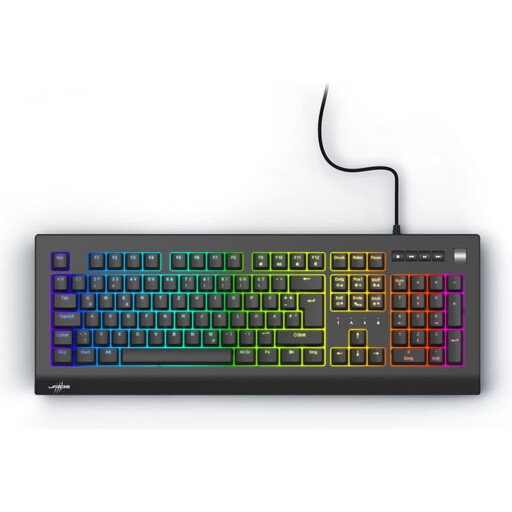
Why this product suits the profile: The full-size 100 per cent layout is suitable for office work, spreadsheets and gaming when the number pad is needed regularly.
The German QWERTZ layout and the technical information about the form factor are clearly stated. This helps avoid accidentally choosing a layout that is too compact.
Outemu Red switches, 109 keys, RGB lighting, volume wheel, four media keys, macros and N-key rollover according to the product information.
We have put together a complete, regularly updated list of products that fully meet these strict selection criteria and the safety regulations applicable in the EU.
Yes, provided the layout, volume and switches suit the intended use. Linear switches can be suitable for gaming and extended periods of typing. In a shared office, users should also consider dampening, keycap material and the keyboard’s individual noise level.
Its lifespan depends on the switches, keycaps, cable, care and usage. Some product specifications state up to 50 million keystrokes for certain switches. This figure is a manufacturer’s specification, not a guarantee of the keyboard’s actual overall lifespan. A hot-swap function can make maintenance easier, but it does not replace careful cleaning or protect against liquid damage.
Power consumption mainly depends on the connection, lighting and battery capacity. RGB lighting generally requires more energy than switched-off lighting or simple white backlighting. If you want to avoid charging breaks, you can choose a wired USB-C keyboard. With wireless models, you should also check the charging time, battery size and available operating modes.