
Lieferung heute & morgen

Qualitätsgarantie

Willkommens-Angebote freischalten: KOSTENLOSE Lieferung | Bis zu 80 % RABATT | Kostenlose 30-Tage-JoyPlus-Testphase
App herunterladen
A mechanical gaming keyboard can be a great choice for gaming, writing and work. However, eye-catching RGB effects, high polling rates and terms such as “Rapid Trigger” do not automatically make a model suitable. What matters is whether the layout, switches, connection and features fit your everyday needs.
A 60% keyboard saves a great deal of space, but usually omits the function keys, arrow keys and dedicated navigation keys. These functions are then accessed via secondary key assignments. If you regularly work with spreadsheets, programme or work from home, you will need to get used to additional key combinations.
A 75% keyboard, on the other hand, often includes a function row, arrow keys and selected navigation keys. An 80% TKL keyboard typically omits the number pad but retains most standard keys. Before buying, therefore, do not just check the percentage classification – check which keys are actually included.
With imported models, a US QWERTY layout is not unusual. The positions of Y and Z, as well as special characters and umlauts, differ from the German standard. For PC gamers who mainly use WASD controls, this may initially be less relevant. When writing German texts, working from home or using shortcuts, however, it can lead to input errors.
Look specifically for the designation German QWERTZ layout. Changing the language setting in Windows does not alter the physical legends on the keycaps.
A high polling rate, RGB lighting or magnetic switches are technical features, but they are not proof of quality on their own. With a wired keyboard, a high polling rate may be of interest for certain games. In everyday office use, however, the difference is usually less important than a suitable layout, comfortable key feel and a stable connection.
“Mechanical feel” does not necessarily mean that a keyboard has mechanical switches. The MageGee TS91, for example, is described as a membrane keyboard with mechanical feel. If you are specifically expecting replaceable mechanical switches, check the switch technology and hot-swap information in the technical specifications.
Mechanical switches consist of individual switches beneath the keycaps. Linear switches move without a clearly noticeable tactile bump and are often preferred for fast inputs. Tactile or clicky variants provide more feedback when actuated, but can be louder depending on the design and surroundings.
With a hot-swap keyboard, compatible switches can be replaced without soldering. The compatibility specification is important, such as 3-pin or 5-pin switches. Hot-swap does not mean that every switch will fit.
Magnetic switches, also known as Hall Effect switches, detect position using a magnetic field. Models with Rapid Trigger can adjust actuation and reset points through software. Before buying, check the specific settings, supported software and operating-system compatibility.
The main formats at a glance:
A smaller format can leave more room on your desk for swift mouse movements. For Excel, accounting or extensive numerical input, however, a number pad is particularly useful.
A wired keyboard does not need charging and provides a direct USB connection. A detachable USB-C cable makes transport and replacement easier. With a wireless keyboard, you should consider battery life, charging method, wireless standard and the number of devices that can be paired simultaneously.
An RGB keyboard can adjust brightness, colours and effects. This does not automatically affect input accuracy, however. A keyboard with a volume dial provides convenient direct access during gaming or media playback, but is only worthwhile if you use this feature regularly.
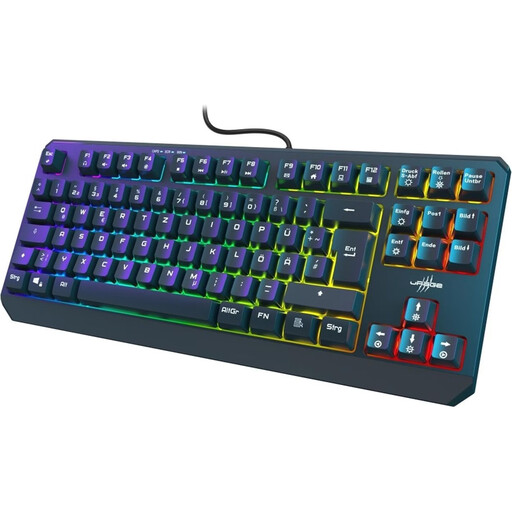
Why this product suits the profile: The TKL format with a German QWERTZ layout combines a smaller footprint with a familiar key arrangement for gaming and everyday use.
The product data explicitly states membrane technology rather than mechanical switches. This makes it easier to set realistic expectations for the typing feel before buying.
88 keys, 26-key rollover, WIN Lock, RGB lighting and a USB-C connection with a 1.80-m cable.
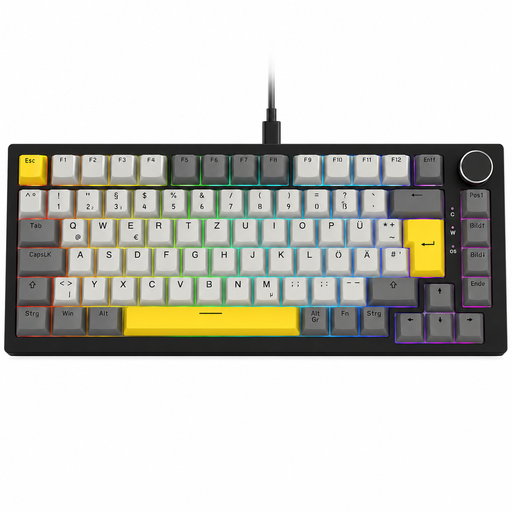
Why this product suits the profile: The German QWERTZ layout, hot-swap function and volume dial are designed for gaming, working from home and regular typing.
The 82 keys are clearly specified; compatible 3-pin and 5-pin switches, as well as a wired USB-C connection, are also listed.
Gasket construction, five layers of sound dampening, RGB lighting and a rotary dial with mute function.
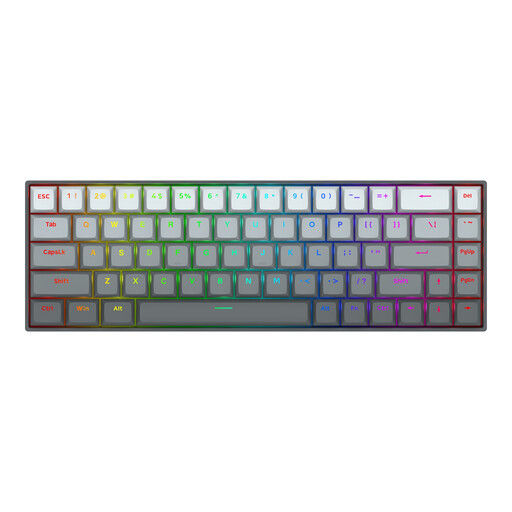
Why this product suits the profile: The 68-key format is aimed at users who need plenty of mouse space and are looking for adjustable magnetic switches for competitive gaming.
The specifications clearly state Hall Effect switches, an adjustable actuation travel of 0.2 to 4.0 mm and Rapid Trigger. This makes it easier to compare the keyboard with conventional mechanical switches.
8000-Hz polling rate, 68 keys, aluminium top plate, RGB lighting and detachable USB-C cable.
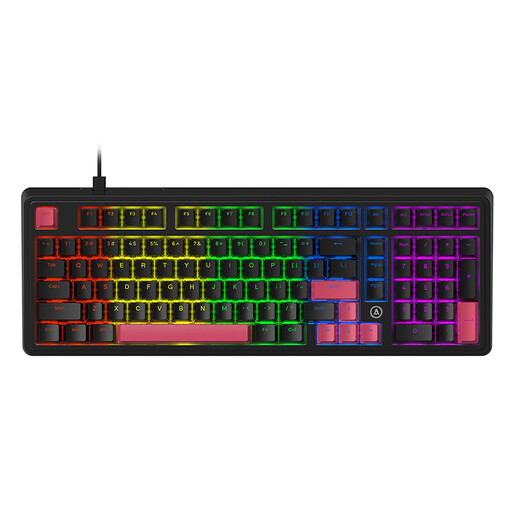
Why this product suits the profile: The 98% layout retains the number pad while offering mechanical customisation options for gaming and productive work.
According to the product description, the hot-swap function supports 3-pin and 5-pin switches. This provides a defined basis for future customisation without soldering.
Avocado linear switches, PBT keycaps, five layers of sound dampening and gasket construction.
We have put together a complete, regularly updated list of products that fully meet these strict selection criteria and the safety regulations applicable in the EU.
Yes, provided the volume, layout and key feel are right for you. Linear switches can feel smooth and consistent, while clicky variants may be disruptive in shared spaces. Sound-dampened constructions and a German QWERTZ layout are practical for longer typing sessions.
Its lifespan depends on the switches, keycaps, usage and care. Individual products may, for example, be rated for up to 50 million keystrokes. This manufacturer specification is a technical guideline, not a guarantee for the lifespan of the entire keyboard. Dust, liquids, damaged cables and improper switch removal can shorten its service life.
A wired gaming keyboard normally draws its power via USB. Consumption increases due to factors including bright RGB lighting and high polling rates. For running costs, such devices are generally less significant than wireless models, as there is no battery to charge. If you want to save power, you can switch off the lighting or reduce its brightness.