
Lieferung heute & morgen

Qualitätsgarantie

Willkommens-Angebote freischalten: KOSTENLOSE Lieferung | Bis zu 80 % RABATT | Kostenlose 30-Tage-JoyPlus-Testphase
App herunterladen
A mechanical gaming keyboard should enable fast inputs, feel comfortable to use and suit your desk. However, eye-catching RGB effects or high polling rates do not automatically make one keyboard the right choice. The key factors are layout, switch technology, connectivity and expandability.
A 60% keyboard saves space, but usually does without separate arrow, navigation and function keys. These commands are then accessed through a function layer. For FPS players, the extra room for mouse movements can be useful. However, anyone who regularly works with spreadsheets, programmes or writes a lot of documents will often need a 75% keyboard, a TKL keyboard or a model with a number pad.
Some offers use QWERTY keycaps, whereas QWERTZ layout is generally used in Germany. The positions of Y and Z, as well as special characters, differ. Although you can change the layout in Windows, the legends on the keycaps remain unchanged. Before buying, make sure the product is explicitly listed as “German QWERTZ” or “ISO-DE”.
A Rapid Trigger keyboard with magnetic switches can adjust actuation and reset points using software. This is particularly interesting for certain FPS play styles. A polling rate of 8,000 Hz describes how often the keyboard is queried, but it does not replace good ergonomics, reliable software or suitable switches. These features are not essential for office work and everyday use.
The form factor determines which keys are directly accessible:
Also check the dimensions in millimetres. A compact gaming keyboard can vary in width or height despite having a similar percentage designation.
Mechanical switches differ in how they feel when pressed:
With a hot-swappable keyboard, compatible switches can be replaced without soldering. It is important to check whether 3-pin or 5-pin switches are supported. Hot-swappable does not mean that every switch is automatically compatible. Noise levels also depend on the case, keycaps, dampening and desk surface.
A wired gaming keyboard connected via USB-C does not require a battery or wireless pairing. For desktop gaming PCs, this is a straightforward solution. With wireless models, check Bluetooth, 2.4 GHz wireless, battery capacity and the options for switching between devices.
An RGB keyboard offers various lighting effects and brightness levels. This improves visibility in dark surroundings, but does not automatically affect input accuracy. A volume control is useful if you frequently adjust audio. Check whether the control also works as a mute button.
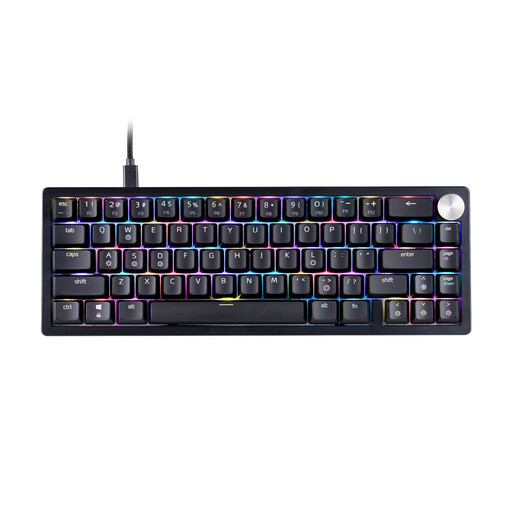
Why this product suits the profile: The 65% format combines a space-saving design with arrow keys. The wired USB-C connection is a straightforward choice for a desktop PC.
The product details clearly specify the US QWERTY layout. This lets you check before buying whether the key legends suit your intended use.
Mechanical XPG Red switches, RGB lighting, three-stage height adjustment and a detachable USB-C cable.

Why this product suits the profile: The 82-key layout includes function keys, arrow keys and navigation controls. The German layout is suitable for gaming, office work and extended typing sessions.
The explicitly stated German QWERTZ layout prevents the common confusion with a US keyboard. Hot-swap supports compatible 3-pin switches without soldering.
Gasket construction, five layers of dampening, RGB lighting, USB-C connection and a volume control with mute function.
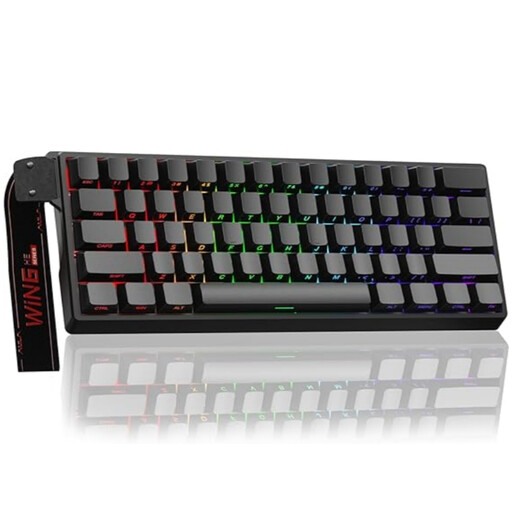
Why this product suits the profile: This model is aimed at users who want to combine an ultra-compact format with adjustable actuation and a Rapid Trigger function for fast in-game inputs.
The product description specifies magnetic, hot-swappable switches, along with adjustable actuation and Rapid Trigger. This makes the technical requirements clear.
Hall Effect technology, 0.01 mm adjustable actuation according to the product details, an 8,000 Hz polling rate and RGB lighting.
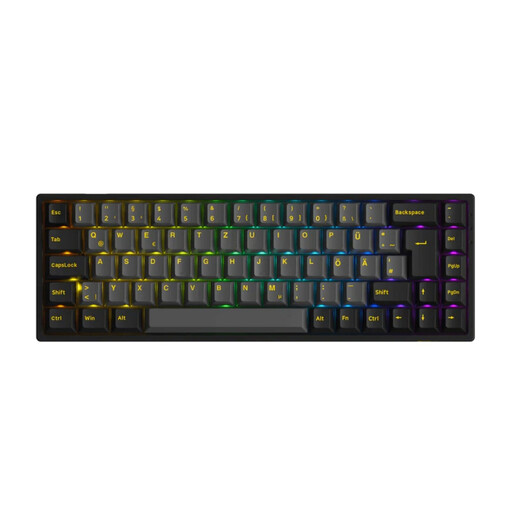
Why this product suits the profile: The 65% keyboard with ISO-DE layout suits users who switch between a PC, laptop and mobile devices and need multiple connection options.
Bluetooth, 2.4 GHz and USB-C are listed separately. Support for 3-pin and 5-pin hot-swap switches, as well as the polling rates for each connection type, is also specified.
ISO-DE layout, RGB, hot-swap, 1,800 mAh battery and support for Windows, macOS, iOS and Android.
We have put together a complete, regularly updated list of products that fully meet these strict selection criteria and the safety regulations applicable in the EU.
Before placing your order, check the following:
A 75% or 65% model with a QWERTZ layout offers a good range of functions in a compact footprint. For frequent typing, linear or tactile switches may be suitable depending on your personal typing preference. A volume control can make media management easier.
Service life depends on the switch type, usage, dust and liquid damage. Manufacturers often specify a certain number of keystrokes, but this figure is not a guarantee of the service life of the entire keyboard. With a hot-swappable keyboard, individual compatible switches can be replaced when needed.
Rapid Trigger and magnetic switches are primarily of interest to users who want to adjust actuation and reset points precisely. For casual gamers, office users and people who type extensively, layout, typing feel, noise levels and ergonomic positioning are generally more important than an especially high polling rate.