
Lieferung heute & morgen

Qualitätsgarantie

Willkommens-Angebote freischalten: KOSTENLOSE Lieferung | Bis zu 80 % RABATT | Kostenlose 30-Tage-JoyPlus-Testphase
App herunterladen
A mechanical gaming keyboard can offer plenty of benefits for gaming, writing and work. At the same time, product terms such as “8K”, “Rapid Trigger” or “pro” don’t automatically point you towards the right purchase. What matters is whether the switches, layout, connectivity and form factor suit the way you’ll use it.
An 8000 Hz polling rate sounds impressive. It describes how often the keyboard reports its status to the computer. The theoretical interval between two reports is 0.125 milliseconds. In practice, however, perceived response time also depends on the switches, firmware, USB connection, game engine and PC you’re using. A high figure is therefore a technical feature, not a general guarantee of quality.
A 60% keyboard saves space, but usually does away with separate arrow, function and navigation key groups. That can make sense for FPS players, but may mean using extra key combinations for spreadsheets, office software or programming.
A 75% keyboard generally keeps the arrow keys and a compact function row. If you work with numbers frequently, on the other hand, choose a keyboard with a number pad or a 100% layout. Also check whether you need a US QWERTY layout or a German QWERTZ layout.
Not every gaming keyboard with a mechanical look and feel has genuine mechanical switches. Some models use membrane or scissor-switch technology, with a corresponding feel when you press the keys. That isn’t necessarily a bad thing, but it’s worth distinguishing these keyboards from a mechanical keyboard with replaceable or selectable switches.
Mechanical switches differ in several ways, including actuation force, sound and travel. Linear switches move without a tactile bump and are often preferred by players who want consistent inputs. Tactile switches provide noticeable feedback when actuated. Clicky switches also produce a distinct clicking sound.
On a Hall Effect keyboard, magnetic switches detect the key’s position without contact. With compatible software, you can adjust the actuation point. Rapid Trigger can register the reset as soon as the key moves up slightly. This is particularly useful for quick direction changes in FPS games, but requires a compatible keyboard and software.
On compact models, check the position of Delete, Home, End and the function keys. Replacement keycap compatibility can also depend on the layout.
A wired keyboard doesn’t need charging and provides a consistent connection. A wireless mechanical keyboard, on the other hand, gives you more freedom to move it around. A tri-mode keyboard typically combines USB, Bluetooth and 2.4 GHz wireless connectivity. Check whether a receiver is included and whether it supports your preferred platform, such as Windows, macOS, a tablet or a console.
A hot-swappable keyboard lets you replace compatible 3- or 5-pin switches without soldering. This makes it easier to customise later. RGB lighting is mainly useful for visibility and appearance; it doesn’t replace practical features. For wireless models, factor in battery capacity, the charging port and how long the keyboard lasts with the lighting on.
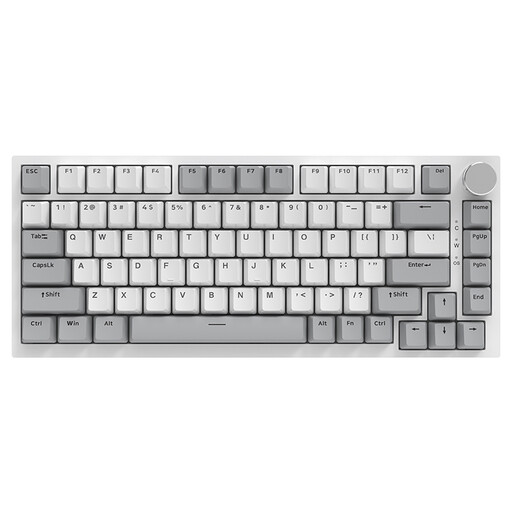
Why it suits this user: This wired 75% keyboard combines a compact design with arrow keys, 82 keys and a US QWERTY layout. It’s a good fit if you don’t need wireless connectivity and want to make efficient use of your desk space.
The connection is clearly specified as wired USB. Hot-swap support for 3- and 5-pin switches lets you make changes later without having to buy a new keyboard.
Features include a gasket mount, PBT keycaps, a volume control and RGB lighting.
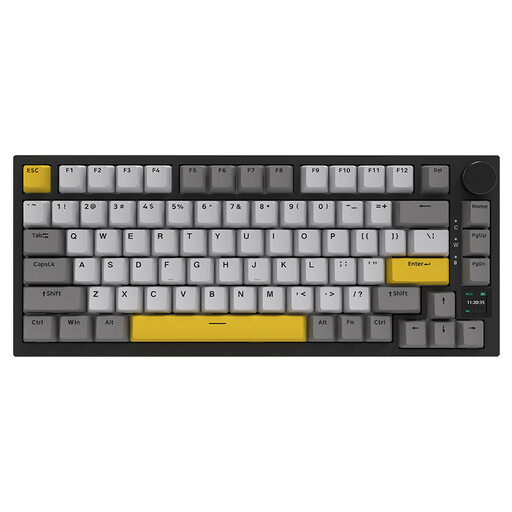
Why it suits this user: This model combines a 75% layout, hot-swap switches, RGB lighting, a TFT display and three connection options. It’s a good choice if you want to switch between gaming, office work and customisation.
The specifications list Bluetooth, 2.4 GHz and USB-C. A hot-swap socket and compatible PBT keycaps give you more scope to customise it than a keyboard with a fixed configuration.
According to the product specifications, it includes a 4000 mAh battery, a TFT colour screen, a volume control and sound-dampening layers.

Why it suits this user: The 68-key design is aimed at FPS players and anyone short on space for wide mouse movements. Hall Effect switches and Rapid Trigger are designed for fast inputs.
The specifications give both an adjustable actuation range of 0.2 to 4.0 mm and Rapid Trigger. This makes it easier to assess the advertised features.
It’s listed with an 8000 Hz polling rate, a detachable USB-C cable, RGB lighting and compatibility with Windows and macOS.

Why it suits this user: This tri-mode keyboard supports USB, Bluetooth 5.0 and 2.4 GHz. With 81 keys, a rotary knob and macro support, it’s designed for gaming, office work and use with multiple devices.
Multiple connection options mean you’re less reliant on a single device. According to the product description, the hot-swap socket supports 3- and 5-pin switches.
Listed features include a 4000 mAh battery, 16.8 million RGB colours, N-key rollover and a programmable rotary knob.
We’ve put together a complete, regularly updated list of products that meet these strict selection criteria and fully comply with the safety regulations in force in the EU.
For FPS games, compact 60%, 65% or 75% models that leave enough room for your mouse are a good choice. Hall Effect switches, an adjustable actuation point and Rapid Trigger can help you make quick inputs. Also check whether a US QWERTY layout suits the way you use your keyboard.
Lifespan depends on the switches, keycaps, stabilisers, cable, battery and how you use the keyboard. Figures such as “several million keystrokes” are manufacturer claims, not a guarantee for every component. Dust, spills, heavy knocks and incorrectly fitted switches can all shorten its lifespan.
A wireless mechanical keyboard can be suitable for gaming if it comes with a dedicated 2.4 GHz receiver and a wired fallback mode. Bluetooth is handy for an office, tablet or mobile phone, but latency can vary depending on the device and surroundings. For a stable connection, position the receiver as close to the computer as possible, with a clear path between them.