
Lieferung heute & morgen

Qualitätsgarantie

Willkommens-Angebote freischalten: KOSTENLOSE Lieferung | Bis zu 80 % RABATT | Kostenlose 30-Tage-JoyPlus-Testphase
App herunterladen
A mechanical gaming keyboard should enable precise inputs when gaming while also remaining comfortable for typing, programming or working. In practice, however, three common purchasing misconceptions often lead to the wrong decision: a striking gaming keyboard with RGB lighting is automatically considered high quality, a compact format is bought without checking the layout, and technical terms such as Hot-Swap or Gasket Mount are confused with features they do not necessarily guarantee.
This buying guide explains which details really matter before purchasing a mechanical keyboard for PC and Mac.
RGB lighting primarily affects the appearance and visibility of the keys. It says nothing about the switches, the stability of the keycaps or the quality of the case construction. You should therefore check separately whether the brightness, effects and, where applicable, software controls are documented. The same principles apply to a keyboard with white backlighting.
A 60% keyboard saves space, but usually omits the function-key row, separate arrow keys and navigation keys. A 75% keyboard often retains these areas and mainly reduces the gap between the different key blocks. A TKL keyboard generally does without the number pad, while a full-size gaming keyboard with 104 or 108 keys is suitable for spreadsheets, entering numbers and certain workflows.
Some models use a membrane construction and merely advertise a mechanical typing feel. If you are specifically looking for a mechanical gaming keyboard, you should check the exact switch specification. Terms such as “Red Switch”, “Sea Salt Switch” or “Hall Effect” describe different technologies and should not be treated as interchangeable.
For users in Germany, a mechanical QWERTZ keyboard is usually the more straightforward choice. It provides the familiar arrangement for German text, including the positions of Z, Y and special characters. US-layout keyboards, on the other hand, use QWERTY. Although the change can be partially compensated for in software, the keycap labels and some special characters will still differ.
You should also check that the operating system is configured correctly. With a keyboard for PC and Mac, the layout of the Windows, Alt, Command and Option keys may differ. Compatibility with Windows and macOS does not automatically mean that every function will work identically without configuration.
Linear switches move without a noticeable click or tactile bump and are often chosen for fast inputs. Tactile switches provide noticeable resistance when activated. Clicky switches also produce a clear acoustic signal. However, the volume also depends on the keycaps, case, dampening and the surface on which the keyboard is used.
A hot-swap keyboard allows compatible switches to be replaced without soldering. Check whether it supports 3-pin, 5-pin or exclusively magnetic switches. A Hall Effect keyboard works with magnetic sensors. Features such as an adjustable actuation point or Rapid Trigger are only technically relevant if the keyboard and its software actually support these options. Standard mechanical 3-pin or 5-pin switches are not automatically compatible with Hall Effect models.
A mechanical keyboard with USB-C offers a detachable or permanently integrated cable connection. Wired models do not need to be charged and avoid pairing issues. A wireless mechanical keyboard is more flexible, but may need regular charging depending on the connection used. With gaming models, specifications for Bluetooth, 2.4 GHz and wired operation should be considered separately.
A volume control or rotary knob can be useful while gaming, during video conferences and when playing media. The exact function – such as pressing the knob to mute – should be stated in the product description.
The term Gasket Mount keyboard describes a construction in which the positioning plate is mounted using damping elements. This can alter the typing feel and sound profile, but it is not a uniform quality standard. Even multiple layers of dampening will not eliminate every sound, particularly with hard keystrokes.
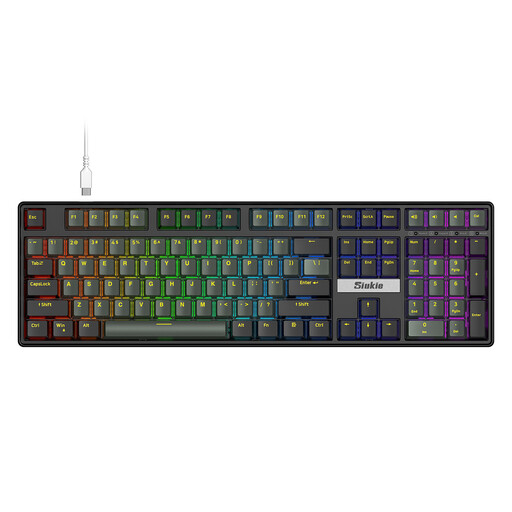
Why this product suits this profile: This full-size model offers 108 keys, RGB backlighting and wired use with PC and Mac. The number pad is available for office work and entering numbers.
The product specifications explicitly state the number of keys and the hot-swap function. This makes it easier to distinguish the format from compact layouts before buying.
108 keys, detachable mechanical switches and wired connectivity.

Why this product suits this profile: The compact 82-key layout combines function keys, arrow keys and a volume control with RGB lighting, USB-C and hot-swap support.
The German QWERTZ layout is explicitly specified. The supported 3-pin switches and wired USB-C connection are also stated.
82 keys, Gasket Mount construction, rotary knob and detachable USB-C cable.
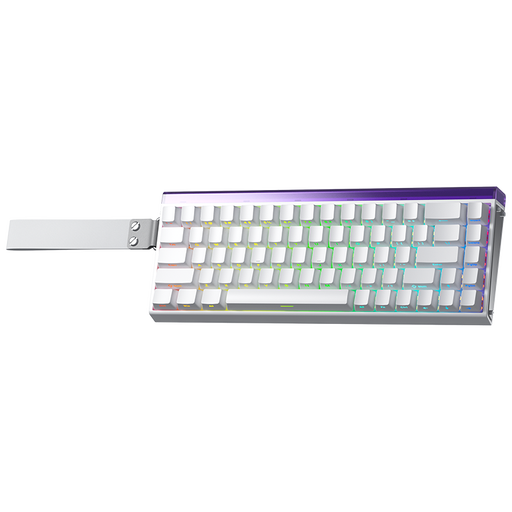
Why this product suits this profile: This model is aimed at users looking for a compact keyboard with magnetic switches, an adjustable actuation point and Rapid Trigger functionality.
The product specifications explicitly point to magnetic switches. This avoids confusing it with a conventional hot-swap keyboard.
60% format, RGB lighting and stated support for adjustable actuation and Rapid Trigger.
We have put together a complete, regularly updated list of products that fully meet these strict selection criteria and the safety regulations applicable in the EU.
Connect a wired keyboard directly to a suitable USB port and use a dry, soft cloth or compressed air for cleaning. Liquids can damage the circuit board, USB port and switches; even a stated resistance to splashes does not make the device completely waterproof.
The lifespan depends on the switch type, usage, dust, moisture and keystroke force. Manufacturer specifications such as “50 million keystrokes” are technical ratings, not a guarantee of a specific service life. With hot-swap models, individual compatible switches can be replaced. This can make maintenance easier, but requires careful handling and suitable replacement parts.
Yes, provided that the volume, switch characteristics and layout suit your workspace. Linear switches and additional dampening may be more suitable for shared spaces than noticeably clicky switches. A German QWERTZ layout makes typing German text easier.
A 75% keyboard provides arrow and function keys while taking up less space. A TKL keyboard makes sense if you do not need a number pad. For spreadsheets, accounting or frequent number entry, a full-size gaming keyboard with a separate number pad remains the more practical choice.
A wireless mechanical keyboard requires energy for the wireless connection and, where applicable, RGB lighting. Battery life depends on battery capacity, lighting brightness, wireless standard and usage. In wired mode, charging is not required, while Bluetooth or 2.4 GHz provides greater freedom of movement.