
Lieferung heute & morgen

Qualitätsgarantie

Willkommens-Angebote freischalten: KOSTENLOSE Lieferung | Bis zu 80 % RABATT | Kostenlose 30-Tage-JoyPlus-Testphase
App herunterladen
A mechanical gaming keyboard can be a worthwhile choice for gaming, writing and work for many years. The key is choosing a layout, form factor and switch technology that suit your everyday needs. Product pages often promote RGB lighting, high polling rates or an especially wide range of features. However, these specifications are not automatically important for every user.
Three common buying pitfalls occur particularly often:
The keyboard layout should match the language you use and the programmes you work with. On a German QWERTZ keyboard, the “Z” and “Y” keys are positioned differently from those on QWERTY models. Special characters such as “ä”, “ö”, “ü” and “ß” are also directly accessible.
The following guidelines apply to form factors:
Also check whether “ISO-DE” is actually stated in the product name or technical specifications. A German keycap set alone does not necessarily turn a QWERTY keyboard into a complete German ISO keyboard.
A keyboard with linear switches offers a smooth keypress without a noticeable tactile bump. This can appeal to users who want fast inputs and consistent actuation. Tactile or clicky switches, on the other hand, provide clearer feedback when actuated and can be more noticeable acoustically.
A hot-swappable keyboard allows compatible switches to be replaced without soldering. Before buying, check the following:
A Hall Effect keyboard detects key actuation magnetically. Some models offer an adjustable actuation point and a Rapid Trigger function. This technology should not be equated with conventional mechanical switches. With the AULA WIN60HE, the product information explicitly states that only compatible magnetic Hall Effect switches may be used.
A USB-C keyboard with a cable does not need a battery and provides a consistent connection. A wireless mechanical keyboard offers greater flexibility on your desk and, depending on the model, can connect via Bluetooth or a 2.4 GHz keyboard connection. For low-latency gaming, 2.4 GHz is often the more practical wireless option; Bluetooth is particularly suitable for multiple devices such as a laptop, tablet or smartphone.
The polling rate indicates how often the keyboard reports data to the computer. Values such as 1,000 Hz or 8,000 Hz are technical specifications, but on their own they do not guarantee a better gaming experience. Firmware, the game, the computer and the actual signal processing are also important.
A gaming keyboard with RGB offers various lighting effects. When deciding what to buy, you should also look for PBT keycaps, a detachable USB-C cable, N-key rollover and a volume dial. A gasket-mount keyboard uses elastic mounts for the positioning plate. Combined with sound-dampening material, this can affect the typing feel and the case resonance, but it does not replace checking the rest of the specification.
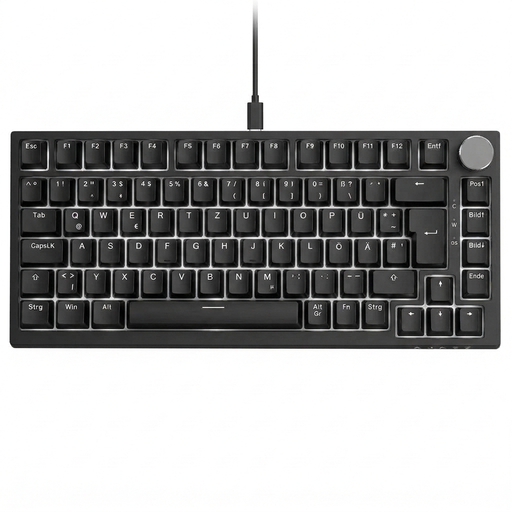
Why this product suits the profile: The compact 82-key layout combines a German QWERTZ arrangement, arrow keys, function keys and a volume dial with a wired USB-C connection.
The explicitly stated QWERTZ layout reduces the risk of ending up with an unsuitable US layout. Hot-swap support for compatible 3-pin switches allows later customisation without soldering.
Linear red switches, a gasket-mount design, white lighting and a volume control dial.
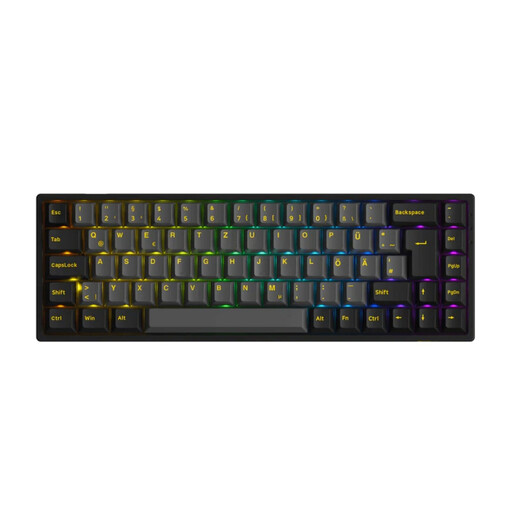
Why this product suits the profile: This 65% model is designed for users looking for a compact keyboard with multiple connection options and a German ISO-DE layout.
The technical specifications list Bluetooth 5.0, 2.4 GHz and USB-C, as well as hot-swap support for 3-pin and 5-pin switches. This makes its possible uses clearer.
PBT keycaps, RGB lighting, a 1,000 Hz polling rate in wired and 2.4 GHz modes, plus an 1,800 mAh battery.

Why this product suits the profile: For gamers looking for a very compact form factor, magnetic switches and customisable actuation settings, this model offers a clearly specialised feature set.
The product information lists Rapid Trigger, adjustable actuation and hot-swap support for magnetic switches. Important: conventional 3-pin or 5-pin switches are not compatible.
60% format, RGB lighting, USB connectivity and a stated polling rate of 8,000 Hz.
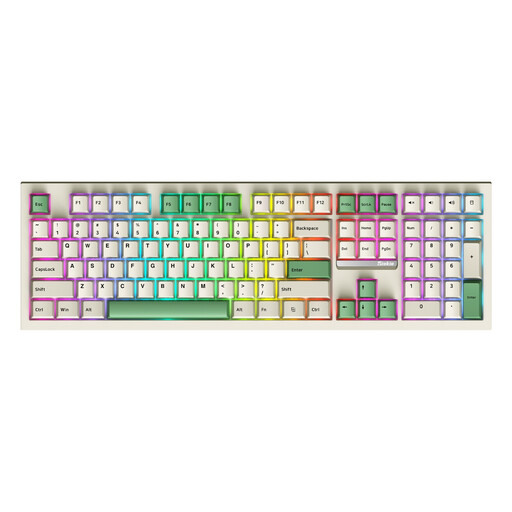
Why this product suits the profile: The full-size layout with number pad is aimed at frequent typists, office users and anyone who does not want to give up dedicated number keys while working.
The three connection options — Bluetooth, 2.4 GHz and USB-C — avoid locking you into just one type of connection. Check the available layout before ordering.
108 keys, number pad, hot-swap support, RGB lighting and tri-mode connectivity for PC and Mac.
We have put together a complete, regularly updated list of products that fully meet these strict selection criteria and the safety regulations applicable in the EU.
For German-language applications, a QWERTZ keyboard with an ISO-DE layout is usually the simplest option. Before buying, check the key arrangement, number pad and compatibility with Windows or macOS. Although you can change the language settings on QWERTY models, the labels and positions of individual keys remain different.
Its lifespan depends on the switches, keycaps, case, usage and maintenance. Many manufacturers state a specific number of actuations for their switches. These figures are technical manufacturer specifications and do not guarantee an identical service life in everyday use. Hot-swap functionality makes it easier to replace individual switches if they fail later.
Power consumption depends on the wireless standard, lighting brightness, battery capacity and power-saving features. RGB lighting increases consumption. During longer gaming sessions, a 2.4 GHz keyboard can be switched to USB-C when the battery is nearly empty, provided the model supports all three operating modes. Always compare stated battery life with the manufacturer’s specifications and the selected lighting setting.