
Lieferung heute & morgen

Qualitätsgarantie

Willkommens-Angebote freischalten: KOSTENLOSE Lieferung | Bis zu 80 % RABATT | Kostenlose 30-Tage-JoyPlus-Testphase
App herunterladen
A mechanical gaming keyboard can perform reliably for many years, whether you use it for gaming or typing. However, the choice can be overwhelming: RGB lighting, 8,000 Hz polling, magnetic switches and compact layouts may sound appealing, but they reveal little about how practical a keyboard is for everyday use. For users in Germany, the keyboard layout, connectivity and actual specification are the most important factors.
Many compact models are sold as QWERTY keyboards with a US layout. The positions of Y and Z, special characters, and the arrangement of the Enter and Shift keys differ from those of a German QWERTZ keyboard. Changing the software layout does not turn a US keyboard into a physical German keyboard.
If you regularly write German text, look specifically for “DE”, “German Layout” or “QWERTZ”. A US layout may be sufficient for a gaming-only setup, but switching between office work and gaming often leads to typing errors.
An RGB keyboard changes the appearance and can make individual keys easier to see. However, it says nothing about switch quality, key stability or input delay. Check the following separately:
A rapid-trigger keyboard or Hall-effect keyboard can offer very precise configuration of key actuation and reset points. This is particularly interesting for fast-paced FPS games. For office work, studying or occasional gaming, these features are not essential. A high polling rate also requires suitable software support and does not automatically provide a noticeable advantage in every application.
The keyboard format affects both the space required and how easily you can reach the keys:
Also check the actual number of keys. Labels such as “75%” describe the form factor and do not mean that every manufacturer uses exactly the same key arrangement.
Mechanical switches are often divided into linear, tactile and clicky varieties. Linear switches have a smooth, consistent travel; tactile switches have a noticeable bump; while clicky switches can produce a distinct audible click. The overall volume also depends on the keycaps, case, dampening and desk.
A hot-swap keyboard has replaceable switch sockets. This allows compatible 3-pin or 5-pin switches to be changed without soldering. Before buying, check which sockets are supported and whether replacement switches are available. Hot-swap is a maintenance and customisation feature, not a blanket indication of the durability of the entire keyboard.
A USB keyboard needs neither a battery nor wireless pairing and is ready to use straight away. A detachable USB-C cable makes transport and replacement easier. A wireless gaming keyboard may use Bluetooth or 2.4 GHz wireless connectivity. Bluetooth is convenient for multiple devices, while a 2.4 GHz receiver is designed for low transmission latency, depending on the model.
Check which systems are actually supported: Windows, macOS, Android, PlayStation and Xbox may offer different functions. A keyboard with a QWERTY layout remains physically a US keyboard, even if it is compatible with Mac and Windows.

Why this product suits the profile: This full-size model is aimed at beginners who need a number pad and a complete key arrangement, as well as a wired solution for PC or Mac.
The product information specifies 108 keys, a detachable connection and hot-swap switches. Before buying, check that the stated US layout meets your requirements.
Full-size design, RGB lighting and replaceable switches without soldering.
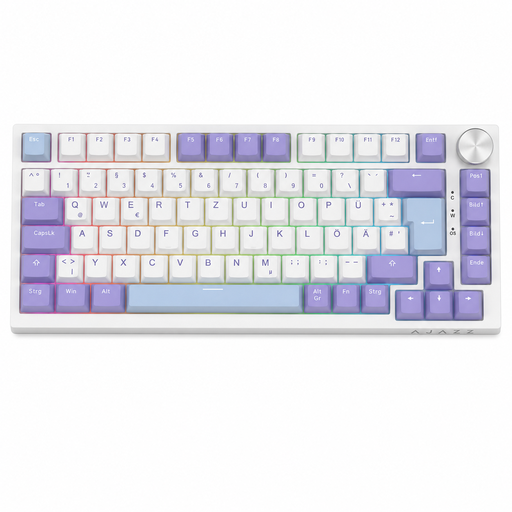
Why this product suits the profile: The German key legends, compact 75% layout and volume control make it appealing to users who combine gaming, typing and office work.
The product details specify QWERTZ, USB-C, hot-swap support for 3-pin and 5-pin switches, plus a compact layout with arrow and function keys.
Gasket-mount design, five layers of dampening, PBT keycaps according to the product information, and a rotary volume dial.
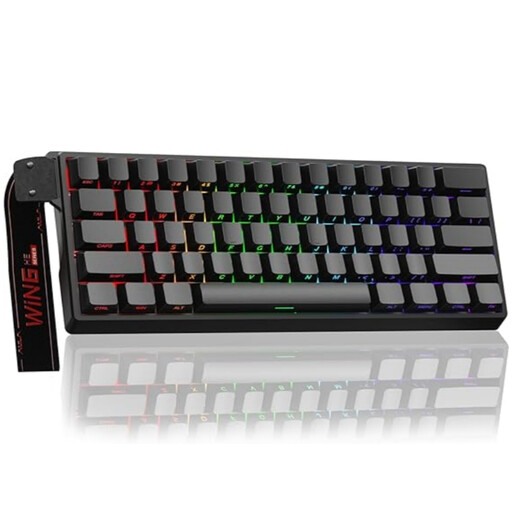
Why this product suits the profile: FPS players with limited desk space who are interested in configurable actuation get an especially compact model with magnetic switches.
The rapid-trigger function and adjustable actuation are clearly identified as specialist features. Before buying, check whether the 60% layout lacks the arrow and function keys you need.
Magnetic hot-swap switches, a stated polling rate of 8,000 Hz and RGB lighting.
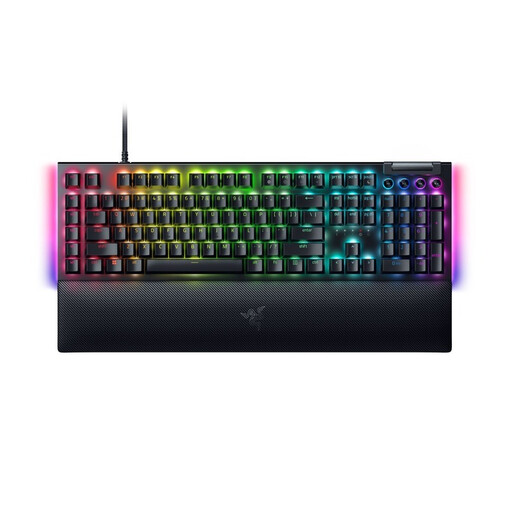
Why this product suits the profile: This full-size model with German key legends is designed for users who need plenty of easily accessible keys for gaming, typing and media control.
The layout, switch type and connection are clearly specified: QWERTZ, linear Razer Yellow switches and a detachable USB-C cable. Consider the large format in advance if you have a small desk.
Dedicated media keys, a multifunction control dial, ten RGB zones and a detachable wrist rest according to the product details.
We have put together a complete, regularly updated list of products that fully meet these strict selection criteria and the safety regulations applicable in the EU.
The lifespan depends on the switches, connections, keycaps, cleaning and use. Mechanical switches are often advertised with a specific number of actuations. This manufacturer specification is a technical guideline, not a guarantee of the lifespan of the entire device. Hot-swap can make maintenance easier if individual switches can be replaced.
Yes, provided the volume and layout are suitable. Linear or dampened switches are generally less conspicuous than clicky varieties. The keyboard should also have a German QWERTZ layout if you regularly type German text. RGB lighting can be disabled or reduced on many models.
A USB keyboard is powered by the computer and does not need a battery. A wireless model, on the other hand, needs to be recharged regularly or powered by batteries. Battery life depends on the wireless standard, lighting, battery capacity and usage. If you prefer maximum simplicity, choose USB; if you use several devices or want a tidy desk, Bluetooth or 2.4 GHz may be a better choice.