
Lieferung heute & morgen

Qualitätsgarantie

Willkommens-Angebote freischalten: KOSTENLOSE Lieferung | Bis zu 80 % RABATT | Kostenlose 30-Tage-JoyPlus-Testphase
App herunterladen
A mechanical gaming keyboard should enable fast input, feel comfortable to use and fit the space available. At the same time, models can differ considerably in terms of switch technology, layout, connectivity and build quality. If you focus only on RGB lighting or high polling rates, it is easy to overlook important details.
For PC and console gamers, FPS players, students, home-office users and prolific typists, three common purchasing misconceptions are particularly relevant:
With a traditional mechanical keyboard, each key press is registered by its own switch. Depending on the design, the actuation feel, volume and travel distance vary. Linear switches are often suitable for users who prefer a consistent key press. Tactile variants provide noticeable feedback when pressed.
A hot-swappable keyboard allows compatible switches to be replaced without soldering. You should check whether the sockets are designed for 3-pin or 5-pin switches.
Hall Effect switches, also known as magnetic switches, use sensors instead of conventional metal contacts. On certain models, the actuation point and reset behaviour can be adjusted in software. The Rapid Trigger function can register the key again as soon as it moves upwards slightly. This may be useful for rapid changes of direction in FPS games, but it is no substitute for practice or a stable input configuration.
Important: a keyboard with a mechanical typing feel is not necessarily mechanically built. According to its product description, the MageGee TS91 uses membrane technology with a mechanical feel.
The layout has a greater impact on everyday use than many visual features.
For Germany, a QWERTZ layout is particularly relevant. On US models, the position and labelling of some keys differ; umlauts may be entered using key combinations or require adjustments to the operating system’s keyboard settings.
A wired keyboard needs no battery and provides a direct USB connection. A detachable USB-C cable makes transport and replacement easier. A wireless keyboard offers greater flexibility, but requires battery or rechargeable-battery management. Bluetooth and 2.4 GHz are practical when using several devices, while wired models offer a straightforward solution for stationary gaming PCs.
An RGB keyboard can make the keys easier to see in low ambient light and allows you to personalise your setup. However, the number of lighting effects says little about switch quality or durability. A keyboard with a volume dial is useful when you want to control media during a game or while working from home without using key combinations.
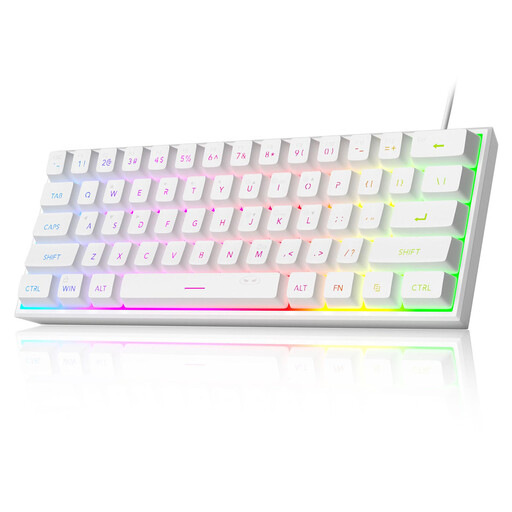
Why this product suits this profile: The compact 60% design takes up little space and is listed as compatible with PC, Mac, PS4 and Xbox One. The wired connection does not require a battery.
The product details explicitly state that it uses membrane technology with a mechanical feel. This makes it clear that it does not offer genuine mechanical switches.
61-key layout, RGB lighting and, according to the product description, IPX4 protection for the PCB. The USB interface is not covered by this protection.
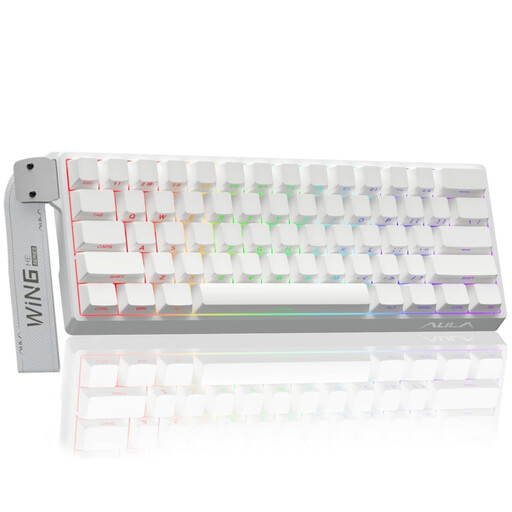
Why this product suits this profile: This model is aimed at users looking for a compact design with magnetic switches, adjustable actuation and Rapid Trigger.
The specifications clearly state compatibility with Hall Effect switches. According to the safety notice, conventional 3-pin or 5-pin switches are not suitable.
According to the product details: adjustable actuation, Rapid Trigger mode, hot-swapping for magnetic switches and an 8000-Hz polling rate.

Why this product suits this profile: The 75% layout with a German QWERTZ layout combines compact dimensions with arrow keys, function keys and a volume dial.
The German layout reduces the adjustment required when typing. Hot-swap sockets allow compatible mechanical switches to be replaced without soldering.
82 keys, USB-C cable, RGB lighting, volume dial and, according to the product description, five layers for noise insulation.
We have put together a complete, regularly updated list of products that fully meet these strict selection criteria and the safety regulations applicable in the EU.
That depends on how you use it. A 60% keyboard may be sufficient for gaming and space-saving setups. If you regularly use arrow keys, F keys, navigation keys or numbers, a 75% or TKL keyboard is usually more practical.
Rapid Trigger is primarily aimed at users who need extremely fast inputs and changes of direction. The function is typically tied to magnetic switches and compatible software. For office work, studying and everyday typing, layout, noise levels and ergonomics are often more important.
Its lifespan depends on the switches, keycaps, cable, dust and usage. Manufacturers often specify a particular number of actuations, but this figure does not automatically describe the lifespan of the entire device. A hot-swappable keyboard may be easier to maintain, provided compatible replacement switches are available. Liquids, heat and aggressive cleaning products should always be avoided.