
Lieferung heute & morgen

Qualitätsgarantie

Willkommens-Angebote freischalten: KOSTENLOSE Lieferung | Bis zu 80 % RABATT | Kostenlose 30-Tage-JoyPlus-Testphase
App herunterladen
A mechanical gaming keyboard can provide a clearly defined actuation point and responsive input when gaming, programming and writing. However, the choice can be overwhelming: compact designs, RGB lighting, magnetic switches and high polling rates are often prominently advertised, while important details remain hidden in the small print.
Three common purchasing pitfalls are particularly important:
For users in Germany, a mechanical QWERTZ keyboard is usually the simplest choice. It offers the familiar arrangement of “Y” and “Z”, along with German special characters. With a US layout, the key legends and the characters actually entered may differ.
The keyboard format affects everyday use:
Before buying, check whether the product page explicitly states German QWERTZ. The description “compact gaming keyboard” alone says nothing about the key layout.
Traditional mechanical switches use a physical switching mechanism. Linear switches move without a noticeable click and are often used for fast inputs and extended typing sessions. Tactile or clicky variants provide stronger feedback during a key press.
A hot-swappable keyboard allows compatible switches to be changed without soldering. Buyers must check the stated compatibility: some PCBs support 3-pin and 5-pin switches, while Hall Effect models work exclusively with suitable magnetic switches.
With a Hall Effect keyboard, magnetic sensors measure the position of the switch. This allows a Rapid Trigger keyboard to configure a key’s reset point based on its movement. This can be relevant to FPS players, but it is not automatically an advantage in every game. You should also check:
A wired gaming keyboard transmits inputs without a battery or wireless pairing. A detachable cable with a USB-C keyboard makes transport and replacement easier. For everyday use, a volume control is practical because the audio output can be adjusted directly on the device.
The polling rate describes how often the keyboard reports its inputs to the computer. Manufacturer specifications such as 1,000 or 8,000 Hz should be considered in the context of the entire system. Stable software, correctly recognised keys and a connection that suits your PC are also important when making your decision.
RGB lighting is primarily a feature for equipment and visibility. Look out for the difference between single-colour lighting, several preset effects and individually configurable per-key RGB.
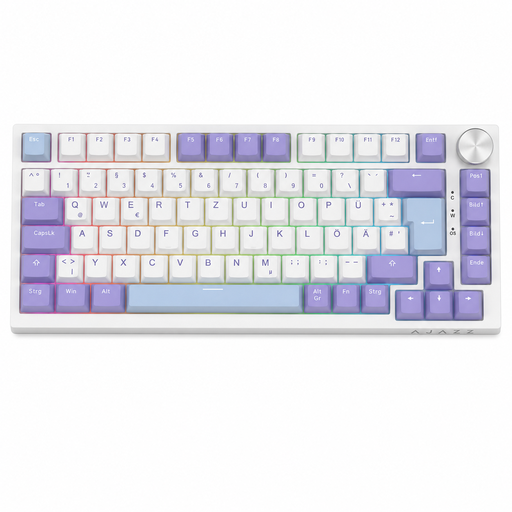
Why this product suits the profile: The 82-key layout combines compact dimensions with function keys, arrow keys and navigation keys. This makes the keyboard suitable for gaming, office work and everyday typing.
The product details explicitly state a German QWERTZ layout and mechanical switch technology. Hot-swapping for compatible 3-pin switches makes later customisation easier.
USB-C cable, volume control, RGB lighting, gasket construction and five layers for noise reduction.
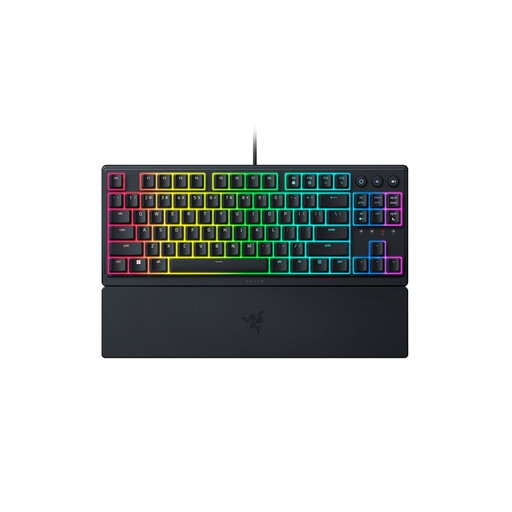
Why this product suits the profile: The TKL format saves space, while dedicated media keys, a wrist rest and a German QWERTZ layout support everyday use.
The product description identifies the technology as Mecha-Membrane. This makes the terminology transparent rather than presenting it as equivalent to traditional mechanical switches.
Low-profile design, 8-zone RGB, UV-coated keycaps, USB connection and separate media controls.
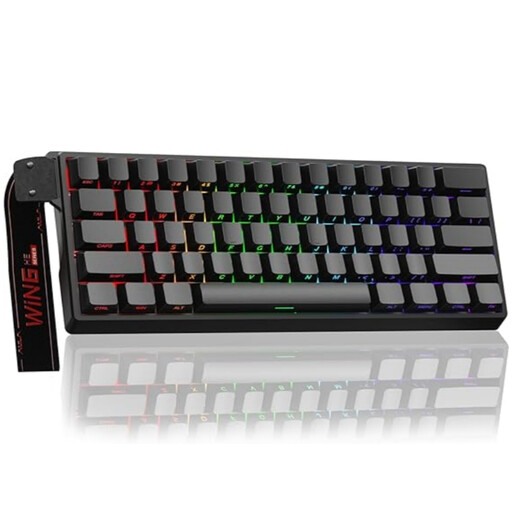
Why this product suits the profile: The 60% format is aimed at FPS players who need plenty of mouse movement and value configurable actuation distances and Rapid Trigger.
The information explicitly states that it is compatible only with Hall Effect switches. Standard 3-pin or 5-pin switches must not be used here.
Adjustable actuation point, Rapid Trigger mode, hot-swapping for magnetic switches, RGB and wired connection.
We have put together a complete, regularly updated list of products that fully meet these strict selection criteria and the safety regulations applicable in the EU.
That depends on your workflow. A 60% keyboard may be sufficient for gaming and typing. If you frequently need function keys, arrow keys or navigation keys, a 75% keyboard or TKL keyboard is usually more convenient. For extensive number entry, a full-size model remains more practical.
Lifespan depends on the switch type, usage, dust, liquids and build quality. Some product specifications state up to 50 million keystrokes for certain switches, for example. This manufacturer specification is a technical guideline, not a guarantee of the actual service life of the entire device. Regular cleaning with a dry, soft cloth and careful handling of the USB-C cable can help reduce wear.
A wired RGB keyboard normally draws its power via USB. Additional power consumption depends on the brightness, lighting zones and effect. With a wireless keyboard, keeping RGB permanently switched on can reduce battery life. If you prefer a consistent connection without charging breaks, choose a wired gaming keyboard and turn the lighting down when needed.