
Lieferung heute & morgen

Qualitätsgarantie

Willkommens-Angebote freischalten: KOSTENLOSE Lieferung | Bis zu 80 % RABATT | Kostenlose 30-Tage-JoyPlus-Testphase
App herunterladen
A mechanical gaming keyboard can be used for gaming, writing and work for many years. However, the wide range of products can quickly lead to the wrong purchase: compact models leave out keys, wireless versions need regular charging, and some keyboards advertise a mechanical feel even though they do not contain mechanical switches.
Joybuy Product Recommendation Officer therefore filters the most important information according to objectively verifiable criteria. What matters is not eye-catching marketing language, but layout, switch technology, connection type, build quality and expandability.
A keyboard with membrane or scissor technology may feel mechanical, but it works differently from a keyboard with individual mechanical switches. When choosing, you should therefore look for the specific switch type.
A 60% keyboard normally has no separate arrow-key row, function keys or number pad. These keys are often accessed using the Fn key. A 65% keyboard usually adds arrow keys, while a 75% keyboard also provides a compact row of function keys.
For guidance:
Also check the labelling. A QWERTZ keyboard matches the German key layout. A US QWERTY keyboard has, among other differences, a different position for Z and Y, as well as a different arrangement of special characters.
An RGB gaming keyboard can customise the key lighting, but this says nothing about switch quality or latency. With a wireless mechanical keyboard, you should distinguish between three connection types:
With a wireless model, also check the battery capacity, charging port, receiver and whether the keyboard can be used as a wired device while charging.
For fast-paced games, short actuation travel and consistent key presses can be important. A Rapid Trigger keyboard resets a key according to the movement of the switch. On Hall Effect models, the actuation point and reset behaviour can often be configured using software.
However, this does not mean that everyone benefits from this feature. For office work, word processing and occasional gaming, classic linear or tactile switches may be sufficient. Also check that the stated actuation travel, operating force and lifespan are actually listed in the specifications.
A hot-swap keyboard allows compatible switches to be replaced without soldering. Before buying, you should check:
PBT keycaps are common on many mechanical keyboards and have a different surface texture from ABS keycaps. Whether the lettering remains durable also depends on the manufacturing method, such as double-shot or dye-sublimation.
Before buying, measure the available depth and width of your desk. With a compact gaming keyboard, there should also be enough room for your mouse. If you regularly enter numbers, you should not do without a number pad without careful consideration.
For German users, the combination of a QWERTZ layout, suitable keycaps and correctly configured software is important. A US layout can work perfectly well technically, but it requires some adjustment and does not display special characters in their familiar positions.
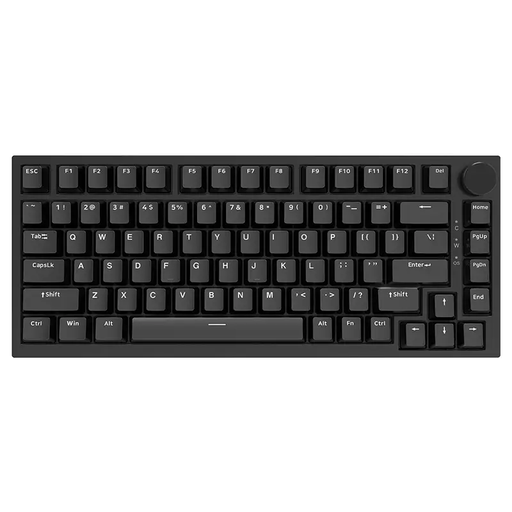
Why this product suits this profile: The 75% layout combines compact dimensions with arrow and function keys. The wired USB-C connection does not require a battery.
The product specifications state that it has mechanical linear switches, hot-swap support, PBT keycaps and USB-C, rather than merely claiming a general ‘mechanical feel’.
83 keys, CNC volume control, RGB lighting and compatibility with both 3- and 5-pin switches according to the product description.
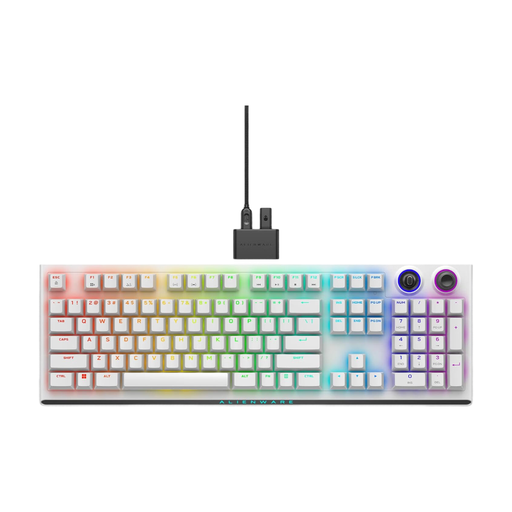
Why this product suits this profile: This model combines CHERRY MX Red switches with 2.4 GHz wireless, Bluetooth 5.1 and USB-C for gaming and multi-device use.
The three connection types reduce reliance on a single wireless standard. Before buying, you should check that the QWERTY International layout suits your typing habits.
Double-shot PBT keycaps, programmable rotary control, N-key rollover and up to three Bluetooth connections according to the manufacturer’s specifications.
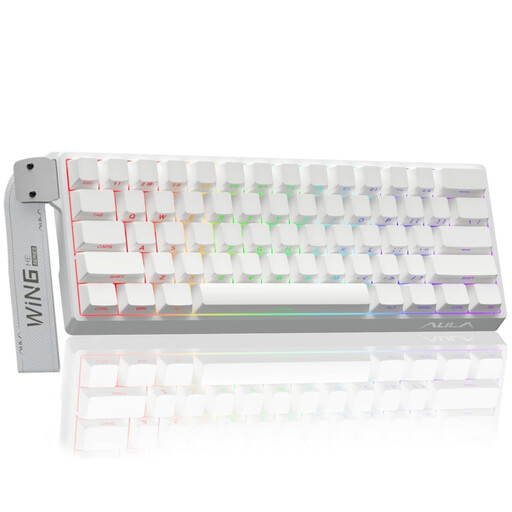
Why this product suits this profile: FPS players and users who want to adjust the actuation point and Rapid Trigger function get a 60% model with Hall Effect technology.
The product warning explicitly states that only Hall Effect magnetic switches may be used. Conventional 3- or 5-pin switches are not compatible.
Adjustable actuation, Rapid Trigger mode, 8,000 Hz polling rate and RGB lighting according to the product specifications.
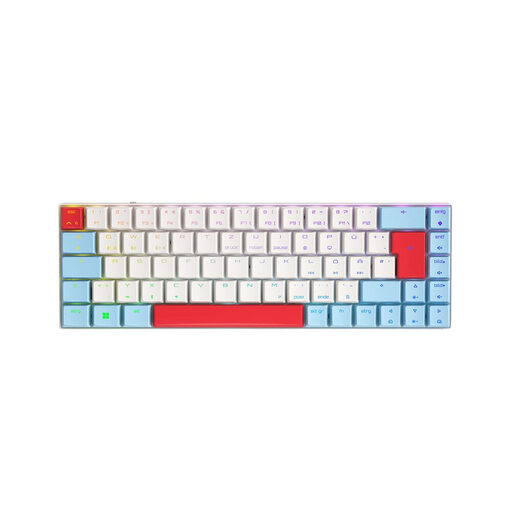
Why this product suits this profile: The compact 65% layout features a German QWERTZ layout, low-profile switches and three connection types for gaming and work.
The German QWERTZ version avoids the typical adjustment required with a US layout. 2.4 GHz, Bluetooth and USB-C are available for different usage scenarios.
CHERRY MX Low Profile Speed switches, per-key RGB, anti-ghosting and support for up to three Bluetooth devices according to the product description.
We have put together a complete, regularly updated list of products that fully meet these strict selection criteria and the safety regulations applicable in the EU.
A 60% or 65% keyboard creates extra room for wide mouse movements. If you regularly use arrow keys, a 65% keyboard is usually more practical. For macros, function keys or text work, a 75% or 80% keyboard may be a better choice.
Lifespan depends on the switches, keycaps, PCB, usage and care. Depending on the model, manufacturers quote anything from several million to more than 100 million keystrokes. These figures are not a guarantee of the lifespan of the entire device. Clean the keyboard without using liquid, protect it from spills and handle hot-swap sockets carefully.
A 2.4 GHz wireless keyboard can be suitable for gaming, provided that the receiver, battery and connection mode meet your requirements. Bluetooth is convenient for using multiple devices, but depending on the system and power-saving function, it may offer a different response behaviour. For maximum reliability, a USB-C connection remains a direct option.