
Lieferung heute & morgen

Qualitätsgarantie

Willkommens-Angebote freischalten: KOSTENLOSE Lieferung | Bis zu 80 % RABATT | Kostenlose 30-Tage-JoyPlus-Testphase
App herunterladen
A mechanical gaming keyboard should make it easy to type quickly, feel comfortable for everyday typing and fit your existing desk. In practice, though, technical differences aren’t the only thing that can lead to a disappointing purchase. Keyboard formats, layouts and switch technologies are often confused. If you focus only on RGB lighting or a high polling rate, you could overlook details that matter for everyday use in Germany.
Some models use a rubber dome or membrane design and advertise a mechanical typing feel. This may appeal to first-time buyers, but it isn’t technically the same as a mechanical keyboard with individual switches. If you want to swap switches or try different actuation characteristics, you’ll need a genuine hot-swappable keyboard with compatible mechanical switches.
A 60% keyboard saves space, but usually has no dedicated function-key row or number pad, and often has no dedicated arrow keys either. These functions are accessed using key combinations. A 75% keyboard or TKL model, on the other hand, retains more controls, making it a better choice for office work, programming and frequent typing.
A QWERTZ keyboard is generally more straightforward for German users when it comes to special characters and the positions of Z and Y. A QWERTY US keyboard may not have keys for characters such as “Ä”, “Ö” and “Ü”, and some punctuation marks are in different places too. You can change the operating system settings, but the labels on the keycaps won’t change. So check the physical layout before you buy.
As well as checking the number of keys, look at the dimensions. A compact gaming keyboard leaves more room for your mouse, while a wider model keeps extra functions within easy reach.
Linear switches have a smooth key travel with no noticeable bump. Tactile switches provide physical feedback when they actuate. Clicky switches also make a distinct clicking sound, so they may not be ideal in shared spaces.
If you’re considering a hot-swappable keyboard, check whether it supports 3-pin or 5-pin switches. A keyboard with magnetic switches or Hall effect sensors isn’t automatically compatible with conventional mechanical switches. According to the product information, the AULA WIN60HE can only be used with magnetic Hall effect switches.
A wired gaming keyboard doesn’t need a battery and provides a consistent connection. A detachable USB-C cable makes it easier to carry and replace. When it comes to lighting, check whether the keyboard has a single-colour backlight, rainbow backlighting or individually customisable RGB lighting.
Adjustable actuation points and rapid trigger functions may be useful for competitive gaming. However, these features are only worthwhile if the software is compatible and the game supports them. An 8,000 Hz polling rate is a technical specification, but it isn’t proof on its own of better gaming performance.
Also look out for:
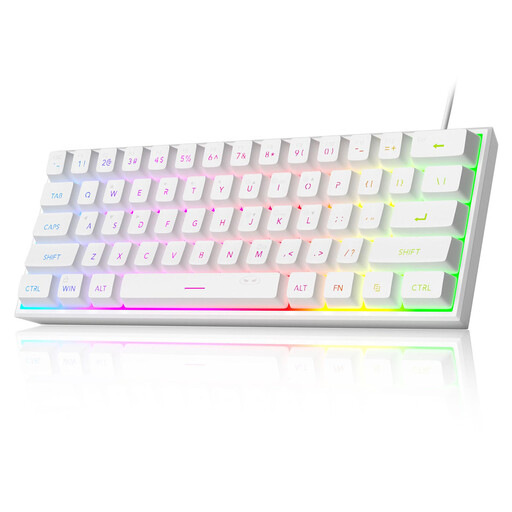
Why this product suits this profile: Its 61-key format takes up little space and offers RGB lighting, as well as a wired connection for PC, Mac and selected consoles.
The product description clearly states that it has a membrane design with a mechanical feel. This helps buyers understand that it doesn’t have replaceable mechanical switches.
61 keys, RGB modes and a circuit board component listed as IPX4-rated. The USB interface itself is not waterproof, according to the warning.

Why this product suits this profile: The German QWERTZ layout, function keys and volume control make it well suited to gaming, office work and everyday typing.
Its 82 keys mean fewer functions are lost compared with a 60% model. Hot-swap sockets for compatible 3-pin switches let you make changes later without soldering.
Gasket mount, five sound-dampening layers, RGB backlighting, a detachable USB-C cable and a metal control knob with a mute function.
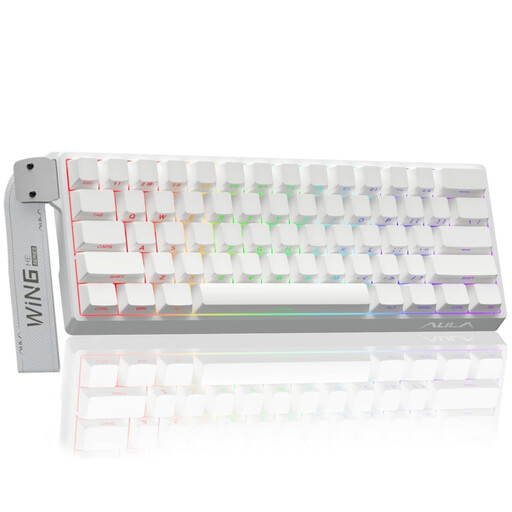
Why this product suits this profile: If you’re interested in adjustable actuation and rapid trigger functions, this specialist 60% format is designed for wired gaming.
The product information specifically identifies magnetic switches and rules out conventional 3- or 5-pin switches. This helps avoid any misunderstanding about upgrade options.
Adjustable actuation point, rapid trigger mode, hot-swap support for compatible magnetic switches and a stated polling rate of 8,000 Hz.
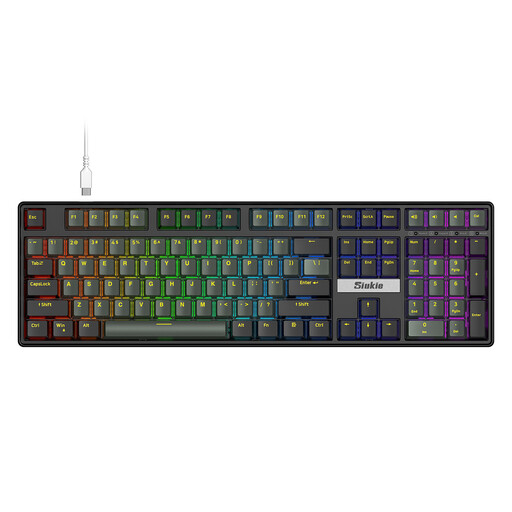
Why this product suits this profile: The full-size layout is designed for frequent typists, spreadsheet users and gamers who need a number pad close at hand.
Its full-size layout means you won’t be missing a number pad or navigation keys. Before buying, check that the US layout suits the way you type.
108 keys, a wired connection, RGB lighting and hot-swap sockets for removable switches, according to the product information.
We’ve put together a complete, regularly updated list of products that meet these strict selection criteria and fully comply with the safety regulations in force in the EU.
Lifespan depends on the switch type, how often you use it, dust and general care. Some manufacturers state that certain switches can withstand several million keystrokes. This is a technical estimate, not a guarantee of the lifespan of the entire keyboard. Cables, stabilisers, keycaps and hot-swap sockets can all wear out independently.
Yes, as long as the noise level, layout and feel of the keys suit your workspace. Linear switches are often described as smooth, while clicky switches make audible clicking sounds. For an office in Germany, a QWERTZ keyboard is usually more practical if you regularly use German special characters.
A wired gaming keyboard is powered via USB. The power used by RGB lighting depends on its brightness, type and electronics. If you want to reduce power consumption, you can turn down the brightness or switch the lighting off. A wired keyboard also means you don’t have to charge a battery regularly.