
Lieferung heute & morgen

Qualitätsgarantie

Willkommens-Angebote freischalten: KOSTENLOSE Lieferung | Bis zu 80 % RABATT | Kostenlose 30-Tage-JoyPlus-Testphase
App herunterladen
A mechanical gaming keyboard should deliver precise input while gaming and remain reliable for everyday use. In practice, however, purchases often fail not because of the appearance, but because of details such as the wrong layout, unsuitable switches or an overemphasis on polling rate.
It is therefore worth taking an objective look at the technical specifications before buying. Three common pitfalls are particularly important:
If you work in Germany or regularly write German text, you should specifically look for a QWERTZ gaming keyboard or a German QWERTZ keyboard. On a US layout, Z and Y are in different positions, while special characters and the position of the Enter key also differ.
The form factor determines which keys are available:
A compact 75% keyboard can be a sensible choice for FPS players and smaller desks, while frequent typists or users who regularly enter numbers are likely to benefit more from a full-size model.
Mechanical switches differ mainly in actuation feel, noise level and operating force. Linear switches move without a noticeable tactile bump, while tactile switches provide perceptible feedback when actuated. Clicky variants also produce a clearly audible sound.
A hot-swappable keyboard offers replaceable switches without the need for soldering. Compatibility must still be checked: some models support both 3-pin and 5-pin switches, while Hall Effect keyboards may be designed exclusively for magnetic switches.
With a Hall Effect keyboard, the key position is detected magnetically. According to the product descriptions of certain models, this technology enables features such as Rapid Trigger and an adjustable actuation point. This can be useful for making fast direction changes in competitive games. For normal typing, however, it is not an essential buying criterion.
A wired keyboard does not require a battery and provides a straightforward USB-C connection. A wireless mechanical keyboard, on the other hand, can be used via Bluetooth, 2.4 GHz wireless or cable. A tri-mode model is practical when using several devices, although battery level and the wireless receiver become additional considerations.
A mechanical keyboard with RGB makes it easier to find your way around in dim surroundings and allows you to create personalised lighting effects. It does not replace clearly labelled keys, however, and says nothing about switch quality.
An integrated dial is particularly useful for gaming, video conferences and music. A keyboard with a volume control lets you adjust the volume or mute your audio without leaving the active window. If you are looking for a keyboard for PC and Mac, you should also check whether operating system compatibility and key mapping are actually specified.
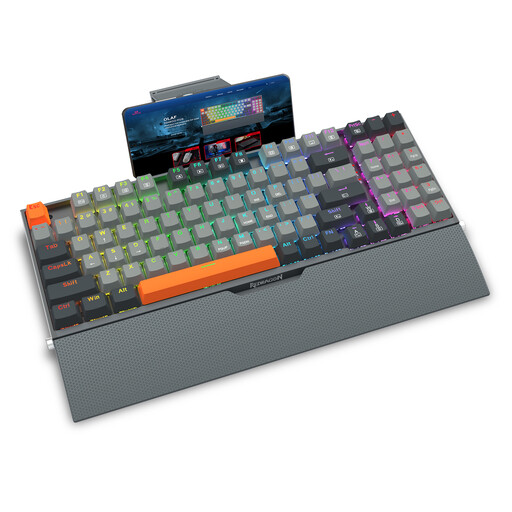
Why this product suits this profile: The wired design requires no battery maintenance. With 94 keys, RGB lighting and a detachable wrist rest, it covers both gaming and everyday use.
The product description specifies a mechanical design, hot-swap sockets and anti-ghosting. The exact layout should nevertheless be checked before buying.
Wired operation, hot-swap functionality, PBT double-shot keycaps and a detachable wrist rest.
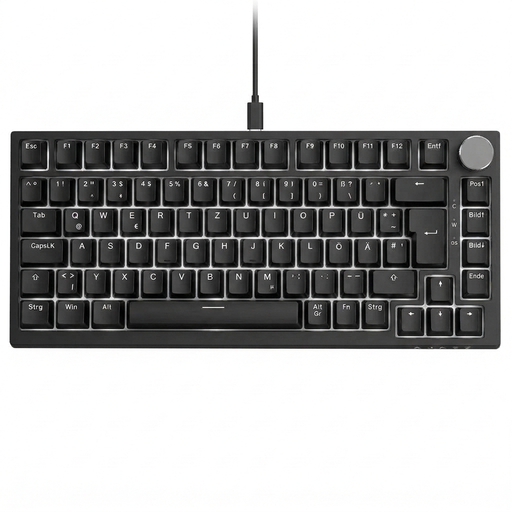
Why this product suits this profile: The 82-key layout combines arrow keys and function keys with compact dimensions. This makes it suitable for German workstations, gaming and everyday typing.
The German QWERTZ layout reduces the adjustment period. Hot-swap support allows compatible 3-pin switches to be replaced later without soldering.
QWERTZ layout, volume control, USB-C cable, RGB lighting and gasket-mount construction according to the product specifications.

Why this product suits this profile: The 60% design is aimed at FPS players with limited space and a strong need for unrestricted mouse movement.
The product specifications state adjustable actuation, Rapid Trigger and an 8000 Hz polling rate. This model uses Hall Effect switches; according to the safety information, conventional mechanical switches are not compatible.
Compact 60% format, RGB lighting, magnetic switches and a wired USB-C connection.

Why this product suits this profile: The tri-mode model combines QWERTZ, a 75% format and several connection options for PCs, laptops and compatible mobile devices.
The German layout avoids the common confusion with a US keyboard. Bluetooth, 2.4 GHz wireless and USB-C allow you to use it according to the device and situation.
75% layout, hot-swap support, volume control, RGB lighting and a stated battery capacity of 8000 mAh.
We have put together a complete, regularly updated list of products that fully meet these strict selection criteria and the safety regulations applicable in the EU.
Yes, provided the noise level and switch type are suitable for your surroundings. Linear switches are often described as smooth, while clicky switches can produce clearly audible sounds. A keyboard with sound-dampening material or a gasket mount can affect its acoustic profile, but cannot eliminate noise completely.
Its lifespan depends on the switches, keycaps, USB connection and care. Some product descriptions state that certain switches can withstand up to 50 million keystrokes. This is a manufacturer’s specification, not a guarantee for the lifespan of the entire device. Liquids, dust and damaged cables can significantly shorten its service life regardless of the switches.
An 8000 Hz polling rate can reduce polling intervals and is mainly promoted for compatible PC games that involve fast inputs. For many users, however, layout, switch feel, ergonomics and a stable connection are more important. Before buying, check whether the keyboard, software and game can make effective use of the feature.